
By Siddharth Borderwala
Published
10 min read
What is a brand system? The parts, two real examples and why agents need one
A brand system is everything a team maintains so others can make on-brand assets: identity, rules, files, templates, owners, changes and checks. How its scope differs from brand guidelines and a design system, one brand traced from source to a missing rule, and one change carried across tasks.
TL;DR
A brand system is everything a team needs to produce on-brand assets without asking the brand team each time: the identity decisions, the rules and examples, the files and templates, an owner for each decision, a record of what changed and a check on new assets. Its scope is wider than brand guidelines, which record the rules, and than a design system, which covers the product interface. A good one is current and written so people and agents can both apply it.
What a brand system is
“Brand system” is a description, not a product category. It is defined by scope: everything a brand team maintains so that other people can make on-brand assets without asking. That covers the decisions about how the brand looks, sounds and behaves, the rules that let others apply them and the files they need. It also covers the parts that keep those current: who owns each decision, how a change is approved and recorded, and how new assets are checked.
Vendor pages define it narrowly. Frontify's brand system guide describes a framework of guidelines, asset management, templates, workflows and API access. Brandkit's branding system page describes “an overarching conceptual and visual framework or foundation for your brand”. Both are fair, and both describe it from the software outward.
The people hiring for it describe it from the job outward, and lately they mean something more specific. These are from job ads and product announcements live in November 2026:
- Checkr's next creative director will “Build brand into an operating system”, made of “standards, briefs, review cycles, and clear decision rights” (job posting).
- Instacart's ad for a product designer says, “Our design system is the most important context our agents have. If it's unclear, so is everything they make.” (job posting)
- Webflow's Source product asks designers to “bring your brand system (components, styles, voice, and tone) into Source, so anything a marketer or agent ships stays on brand” (Webflow, September 2, 2026).
Read together, they describe the same shift. A brand system used to be something people read. Now it also has to be something agents can apply, and something someone can check their output against.
The parts of a brand system
| Part | What it holds | More detail |
|---|---|---|
| Identity decisions | Positioning, name, how the brand looks, sounds and behaves | Brand identity |
| Elements and rules | Logo, colour, type, voice, imagery and the rules for each, with examples | Brand elements |
| Visual system | How the visual parts combine across formats: hierarchy, layout, motion | Visual identity system |
| Assets | The files: logo versions, font files, approved photos, audio | Brand assets |
| Templates | Decks, social formats, documents, and the product's design components | The design system, for product interfaces |
| Claims and limits | What the brand can say about itself, with sources, and what it must never say | Brand messaging framework |
| Decisions and changes | Who decides what, and a record of what changed, when and why | Brand management |
| Checks | How new assets are reviewed against all of the above | Brand compliance |
Most of these exist somewhere in most companies. What makes them a system is that they agree with each other, that one version is current, and that whoever makes the next asset can reach the parts they need.
Brand system, brand guidelines or design system?
The three are often used as if they were the same thing. The clearest way to tell them apart is by what each one covers.
- Brand guidelines record the rules for people to read, in a PDF or on a site. A good guide can be complete about the rules, and even say where they stop. The files, templates, owners, change process and checks sit outside it.
- A design system covers the product interface: components, tokens and code, and often the writing inside the interface too. IBM's Carbon has content guidelines that it says are based on IBM's standards for language, tone and writing. Campaigns, advertising, packaging and events sit outside a design system's scope.
- A visual identity system covers the visual part of the brand across every format: the rules that make logo, colour, type and imagery work together.
Instacart's line explains why the boundary matters now. If agents build product screens from the design system, that design system has become brand context. The same is true of every other part of the brand system an agent touches.
A brand system as files: Kaorium
What does the rules-and-files part look like when it is written for agents? Kaorium makes guided fragrance consultations: in shops, customers respond to scents and words, and an advisor helps them find a fragrance. Rainbrand, which keeps a brand's identity, guidance and files as shared context for agents, stores each brand as a Brand Skill: a versioned set of guidance files and file references. Here is Kaorium's, from the published Kaorium example:
SKILL.md
references/
  voice-and-messaging.md
  color.md
  typography.md
  website-ui.md
  product-experience.md
  imagery-identity.md
  imagery-backdrops.md
  imagery-website.md
  imagery-news.md
+ font files
+ 79 images: logo SVG, butterfly art, photos
SKILL.md says what Kaorium is and which file to read for which job; product-experience.md covers the in-store consultation and how to describe it. The top file routes each kind of task to the files it needs. An excerpt of its routing table:
| Component needed | Required | Consider |
|---|---|---|
| Color | color.md | website-ui.md |
| Typography | typography.md | website-ui.md |
| Website imagery | imagery-website.md | imagery-news.md |
A person reads a guide from the front. An agent needs to know which part to load for the task in front of it, and the routing table tells it. A file tree like this shows how the rules and files are organised. It doesn't show who owns them, how they change or whether anything made from them gets checked.
Codex, connected to Rainbrand, used these files to make two concept pieces: a single-screen website where visitors pick up to three scent words, and a printed A5 card for the advisor's conversation. It asked for a Brief, the guidance and files a task needs, which gave it the exact SVG mark, the display serif and the monospaced face with their roles, the colour roles, “no shadows”, and the copy limits: the card must not suggest a live recommendation or replace the advisor.
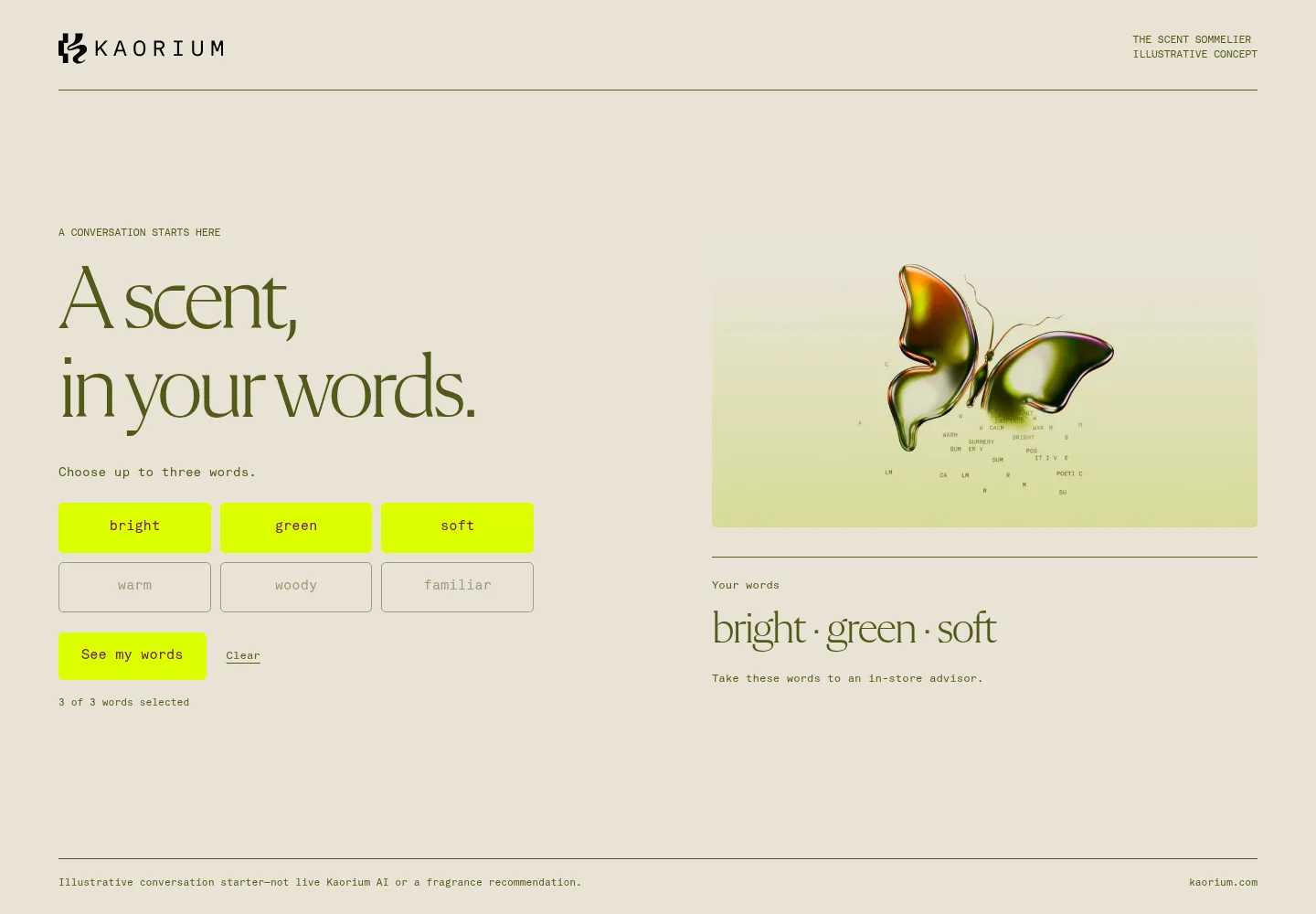
The website concept
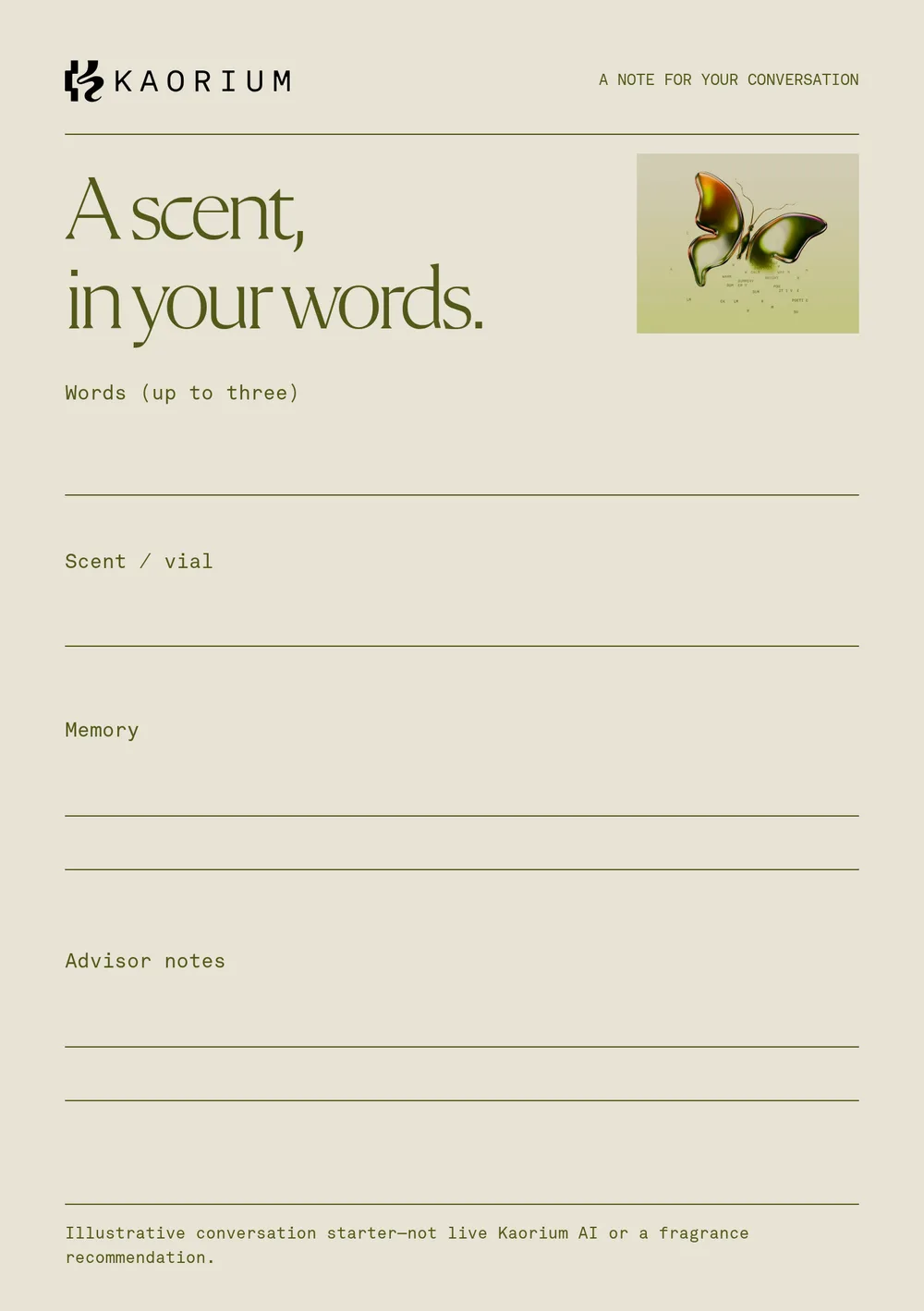
The printed conversation card
The Brief also said where the system stopped. Kaorium's colour roles are documented for its website, and nothing in the brand covers print:
The palette roles are documented primarily for web; no separate Kaorium print-color or print-production specification is supplied, so keep the card’s use restrained and legible rather than claiming a formal print system.
Here is the whole run against the parts of a brand system, with what was recorded and what wasn't:
| Step | Recorded? | What the record shows |
|---|---|---|
| Source | Yes | The brand was added from kaorium.com during the run, on October 23, 2026 |
| Selected guidance | Yes | One Brief for both pieces, with the files above and the copy limits |
| Assets | Yes | The website and the card, built from Kaorium's own logo, fonts and butterfly image |
| Checks | Yes | Two Review rounds on five captures. The card passed all four checks; the website's colour checks stayed uncertain because Review couldn't measure a fine button label |
| A missing rule | Yes | The Brief's note that no print colour or print production rules exist |
| Fixing the gap | No | Nobody added a print section, and in a concept run nobody owns that decision |
The last row is the part a file tree can't supply. If Kaorium starts printing cards, someone has to decide the print rules and add them, and until then every printed piece repeats the same restrained guess.
One change, carried across tasks
The other half of a system is change. To see one change travel, we used the IBM brand in our account, added from ibm.com for our IBM brand guidelines page. It said to set headings and body text in IBM Plex Sans Light (300), with #0062FE as the accent blue. IBM's published Carbon Design System says otherwise: its type sets set body text in Regular (400), and its primary button is Blue 60, #0F62FE.
On November 16, 2026 we corrected the brand to Carbon and requested Briefs on either side of the change, for two concept tasks: an empty-state screen for a web product, and a release-notes email.
| Step | Record | What it said |
|---|---|---|
| Brief for the empty-state screen | 2b024683 | Light (300) for headings and body; #0062FE as the accent |
| Brand edit, applied | a9eff3cb | Blue changed to Blue 60, #0F62FE; headings and body changed to Regular (400); Semi-Bold (600) added for the smallest heading style, heading-01 |
| Brief for the release-notes email | 30dd40d1 | Regular (400) for heading and body; Blue 60 for the button |
| Fresh Brief for the same empty-state screen | 5b0c3af5 | Regular (400) for heading and body; Blue 60 for the primary button |
| Second brand edit, applied | 6384c75c | All seven Carbon heading styles: Semi-Bold for heading-01 and heading-02, Regular for 03 to 05, Light for 06 and 07 |
| Fresh Brief for the empty-state screen again | 4b12bb46 | Regular (400) by default, with the seven heading styles listed as options |
| The first Brief, fetched again | 2b024683 | Still Light (300) and #0062FE |
Three things in that record are worth copying. Each change was prepared from a written instruction that cited the source, and we read the proposed change before applying it. The first edit was slightly wrong: on a closer reading of Carbon's type sets, heading-02 is Semi-Bold too, so a second edit corrected it, and the record shows both. And the first Brief never changed. A Brief is a snapshot of the brand when it was made, and so is an exported Brand Skill. A screen built from the first Brief, or guidance copied out of it into another tool, keeps the old weights until someone replaces it.
Keeping a brand system running
A brand system decays the day it stops being updated. Products get renamed, claims expire, a new campaign colour turns up in three decks. Running one means a few habits:
- One current version, with older ones kept for reference. Rainbrand saves each version of a brand, and a change is prepared as a brand edit you inspect, then apply or discard.
- Context fetched per task, not copied into each tool. Agents request a fresh Brief after a change, as in the IBM run; guidance pasted into a chat last month doesn't update.
- Every asset checked against the system before release. A Review compares an image of the asset with the brand and returns findings to revise from; it doesn't change the asset itself.
- A named owner for each kind of decision, so changes have somewhere to go. Brand governance for AI agents covers who approves what.
Questions to test your brand system
Ask these of your own brand. A “no” shows you where the system is still a set of documents.
| Question | If the answer is no |
|---|---|
| Could a new agency make a social post from it without a call? | The rules rely on knowledge in people's heads |
| Does every rule have an example, and every logo a file? | People and agents will guess, and redraw |
| Is there one current version, and does everyone use it? | Old copies are making new assets |
| Can an agent get just the parts a task needs? | It will skim a long guide and miss the rule that mattered |
| Is there a record of what changed and why? | The next change will repeat an old argument |
| Are new assets checked against it before they ship? | Drift is found by customers, not by you |
FAQ
What is a brand operating system?
It is another name for a brand system, used in some job ads and by some vendors. Checkr's version is “standards, briefs, review cycles, and clear decision rights”. The word “operating” stresses that the system runs day to day, rather than sitting in a document.
Who owns a brand system?
Usually the head of brand or design owns it overall, with named owners for parts such as voice, product claims and the design system. What matters most is that every kind of decision has someone who can approve a change.
What is the difference between a brand system and a brand kit?
A brand kit is a package of files, usually logos, colour values, fonts and a short guide, handed to someone for a job. A brand system is everything those files come from: the decisions, rules, templates, change record and checks, kept current. A kit is a snapshot of the system; it goes stale when the system changes.
How do you build a brand system?
Start from what exists: the guidelines, the logo and font files, the templates and the decisions people keep making in chat threads. Put them in one maintained place, write each decision as a rule with an example, name an owner for each part, and decide how a change is approved and recorded. Then test it on one recurring asset made by someone outside the brand team, or by an agent, and fix what they had to guess.
More in Brand guidelines
All 18 Brand guidelines articles18 min read
Brand guidelines examples: 12 real brand books and what to copy from each
Twelve brand guidelines you can open today, from Mastercard’s logo rules to NASA’s 1976 standards manual, with the exact rule worth copying from each, which ones an AI agent can read, and what it took to correct an agent’s version of Starbucks.
10 min read
Branding kit checklist: what to include, file formats and real examples
What a branding kit should contain, from logo files and colour values to fonts, templates and rights; what to agree with your designer; what real companies’ kits hold; and a bounded web sample kit, with its index, a template and an asset made from it.
11 min read
Logo usage guidelines: what to include and how to write them
Logo usage guidelines say which logo goes where, how much space it needs, how small it can go, which colours and backgrounds it allows and what never to do. See how Amazon and Strava write each rule, how AI tools get logos wrong, and a template to download.