
By Siddharth Borderwala
Published
14 min read
Brand messaging framework: a template, a completed example and how to test it
How to build a brand messaging framework from customer research. Download a free template, see it completed for GitLab from public sources, read the ad, email and page copy an AI agent wrote from it, and learn how to test the messages with your audience.
TL;DR
Brand messaging is what a brand says about itself: who it’s for, what it promises, why anyone should believe it and what it never claims. A messaging framework writes those decisions down once: positioning, the value proposition at a few lengths, pillars with proof, messages per audience, approved descriptions and claim boundaries. The decisions come from customer research, and the messages need testing with the people they’re for.
A template makes a messaging framework look finished before the hard parts are decided: which audience comes first, what it would use instead of you, and which difference it cares about. Those come from research, and whether the result works comes from testing. The template is the place to write both down.
Messaging is the what; how it sounds is the voice guide’s job. A useful test for any framework is whether a new writer, or an AI agent, could produce a consistent ad from it without asking anyone.
The template
Download the template as a Word file or as Markdown, and the completed GitLab example (Word) described below. They’re free, with no sign-up.
| Section | What it holds |
|---|---|
| 1. Positioning | Who it’s for, what it is, why choose it over the alternative, who it isn’t for and the research behind it |
| 2. Value proposition | The same promise in under 10 words, one sentence and about 50 words |
| 3. Audiences | What each audience is trying to do, uses today and needs to hear first |
| 4. Message pillars | Two to four themes, each with one message and its proof |
| 5. Proof library | Every claim the copy may use, with its source and the date checked |
| 6. Claim boundaries | What the brand never says, says only with proof, or can’t say yet |
| 7. Words to use and avoid | Names and terms, each with the reason |
| 8. Approved descriptions | Tagline, boilerplate, short bio and email introduction, used as written |
| 9. Adapting it | What may change by channel or audience, and what must not |
| 10. Ownership | Who owns it, what triggers a review, and a change log |
| 11. Testing | What was tested, with whom, what they understood and what changed |
Start with research
Every line in the framework should trace back to something customers said or did, or to a fact you can show. Most of it comes from five places:
- Recent buyers and lost deals. Ask what they were trying to do, what they used before, what nearly stopped them and how they’d describe you to a colleague. Write down their exact words; they make better copy than yours. Keep going until new conversations stop surprising you.
- Sales calls and support tickets. The objections sales hears and the questions support answers show where your current messages fail.
- Public reviews and community threads. What users praise and complain about when nobody asked them.
- Competitors’ pages. List the claims every competitor makes. A claim they can all make won’t set you apart: GitLab’s handbook advises against “integrated” for this reason, because a competitor whose suite is made of separate apps can say it too.
- Your proof. Every number, customer story, certification and analyst mention you could use, with its source and its date. This becomes section 5.
Make three decisions
Research tells you what’s true; it doesn’t choose for you. April Dunford’s positioning method in Obviously Awesome starts from the alternative rather than the product, and that order keeps the framework honest:
- The alternative. What would this audience use if you didn’t exist? Often it isn’t a competitor but a spreadsheet, an internal tool or several tools joined together. GitLab’s Lockheed Martin story names one: ClearCase, Jenkins, Dimensions, Redmine and Bitbucket, with a different toolchain for each program.
- The difference that matters. Of the things you do that the alternative doesn’t, which does this audience care about, and can you prove it? A difference with no proof goes in the claim boundaries as “not yet”.
- The audience that cares most. Not everyone who could buy, but the group for whom that difference matters most and where you already win. Write down who it isn’t for as well.
If the research doesn’t settle a choice, that’s a question for the next round of conversations. A broader sentence that avoids choosing will read as vague to everyone.
A completed example: GitLab
GitLab, which makes a software development platform, publishes more of its messaging than most companies: a messaging page and message houses for several use cases in its public handbook, brand voice guidelines, and the boilerplate at the end of every press release. On November 16, 2026, we filled in the template from those sources and GitLab’s website. Quoted lines are GitLab’s words, the rest is our summary, and anything GitLab doesn’t publish is marked as not published; its internal framework may say more.
| Section | GitLab, from its public sources |
|---|---|
| Positioning | For engineering organizations scaling AI agents that won’t trade speed for control. Unlike a separate tool for each stage, planning, source control, CI/CD and security share one data model, and the same policies and approvals apply to people and agents. |
| Under 10 words | “Speed you can trust, all the way to production.” (homepage) |
| One sentence | “GitLab is the intelligent orchestration platform for teams that won’t compromise on speed or control as they scale agentic software engineering.” (homepage) |
| Audiences | Engineering executives, security and compliance leads, and development team leads, using the personas from GitLab’s message house |
| Pillars | AI orchestration; one platform, one source of context; security built in |
| Proof, for example | Lockheed Martin: “80x faster CI pipeline builds”, named with the number. “approximately 50% of the Fortune 100”, only with its footnote. |
| Never | “first” or “only”: “extremely difficult to prove with evidence” |
| Instead of “integrated” | “single application”, “built from the ground up”, “built in” |
What filling it in turned up
GitLab publishes a lot, across a handbook, a website and press releases written by different teams at different times. Putting every claim in one table with a source and a date showed four things that are common when many teams publish over several years, and a framework can help manage each one:
- Category names change over time. The handbook’s messaging page gives the value proposition as “GitLab is The DevOps platform”, and its standard email introduction uses the same name. The website, company page and press releases use “intelligent orchestration platform”. The promise underneath carried over: the company page still talks about delivering software faster, more efficiently, while strengthening security and compliance. In a framework, a rename goes in the change log, with the approved texts that need the new name.
- Figures are dated. The company page, with figures dated June 2026, gives over 50 million estimated registered users; the boilerplate on the October 29, 2026 press release gives more than 70 million. Both are correct for their dates. A proof library records which one copy should use now.
- Word rules have exceptions. The handbook advises against “integrated” to describe the platform, and the Why GitLab page has the heading “Integrated AI and multi-agent workflows across the SDLC”. A framework can say where a word rule applies and where it doesn’t, so writers don’t have to guess.
- Some decisions stay internal. Who GitLab isn’t for, what triggers a review of the messaging and how messages were tested aren’t published, which is normal. In your own framework, these are the fields to fill first.
From the framework to an ad, an email and a page
Rainbrand, the brand layer for agents, keeps a brand’s guidance and files for connected agents. We added GitLab to it from about.gitlab.com, the completed framework as Markdown, the GitLab Sans and GitLab Mono font files from GitLab’s own font package and the two logo files from its press kit. Then we requested a Brief, the guidance and files for one task: a LinkedIn ad, a follow-up email and a landing page hero for engineering executives whose teams use a separate tool for each stage and are starting to use AI coding agents. The task asked for claims from the proof library only, and for any out-of-date or conflicting entries to be flagged.
The Brief came back with the decisions the copy needed. It said to position GitLab as “the intelligent orchestration platform for DevSecOps”, not as The DevOps platform, and that the two short value-proposition lines “are not an established official tagline; no official tagline is published.” It recommended the Lockheed Martin results, “appropriate for engineering executives”, as long as Lockheed Martin is named with each number and the story is linked; it noted that the Fortune 100 footnote “is likely cumbersome in a small image”; and it said not to reuse the email introduction the framework marks as out of date. It also said what the pillars can’t carry: their wording is positioning, “not independently substantiated as a metric in the proof library”, so concrete proof has to come from section 5.
Claude wrote the copy from the Brief:
LinkedIn ad. Introductory text: “Adding AI agents? GitLab keeps planning, source control, CI/CD and security in one platform, under the same gates for people and agents.” Headline under the image: “Speed you can trust, all the way to production.”
Follow-up email. Subject: “Your teams, their AI agents and one set of gates”. Preview: “Planning, source control, CI/CD and security in one platform.”
When planning, source control, CI and security each live in their own tool, every handoff depends on an integration someone has to maintain.
GitLab puts planning, source control and CI/CD in one platform. Scanning, policies and approvals run inside the pipeline, the same gates apply to changes from people and from AI agents, and every agent action shows up in the audit trail.
Lockheed Martin’s customer story reports 80x faster CI pipeline builds and thousands of Jenkins servers retired.
If that’s the problem your teams have, request a demo and we’ll show you how it works.
Landing page hero. Headline: “Ship faster with AI agents. Stay in control.” Subhead: “GitLab is the intelligent orchestration platform for DevSecOps. Planning, source control, CI/CD and security share one platform, so your teams and their agents work from the same data, under the same policies and approvals.” Calls to action: “Get free trial” and “Talk to sales”, with the Lockheed Martin result and a link to its story below.
Every claim traces to a line of the framework:
| In the copy | From the framework |
|---|---|
| “Ship faster. Stay in control.” and “Speed you can trust…” | 2. Value proposition, as written |
| “Ship faster with AI agents. Stay in control.” | 9. Adapting: headlines may change “as long as they are truthful and authentic” |
| Planning, source control and CI/CD in one platform, same data | 4. Pillar: one platform, one source of context |
| Gates inside the pipeline for people and agents; audit trail | 4. Pillar: security built in |
| A separate tool for each stage, joined by integrations | 3. Audiences: what they use today |
| 80x faster CI builds; Jenkins servers retired | 5. Proof library, with Lockheed Martin named |
Left out on purpose: the user count, because the two dated figures differ; the Fortune 100 figure, because its footnote doesn’t fit an ad; and the email introduction, because it still uses the earlier category name.
The table also caught a gap in our own framework. Its proof library says copy may use only the claims listed there, but the two pillar rows trace to section 4, not section 5. The Brief had treated pillar wording as positioning language. The lines are GitLab’s own product descriptions from its homepage, so we added them to the proof library with their source and noted the change in the framework’s change log; the download includes them.

Concept LinkedIn ad, round one: the copy check failed because the Lockheed Martin result had no source.
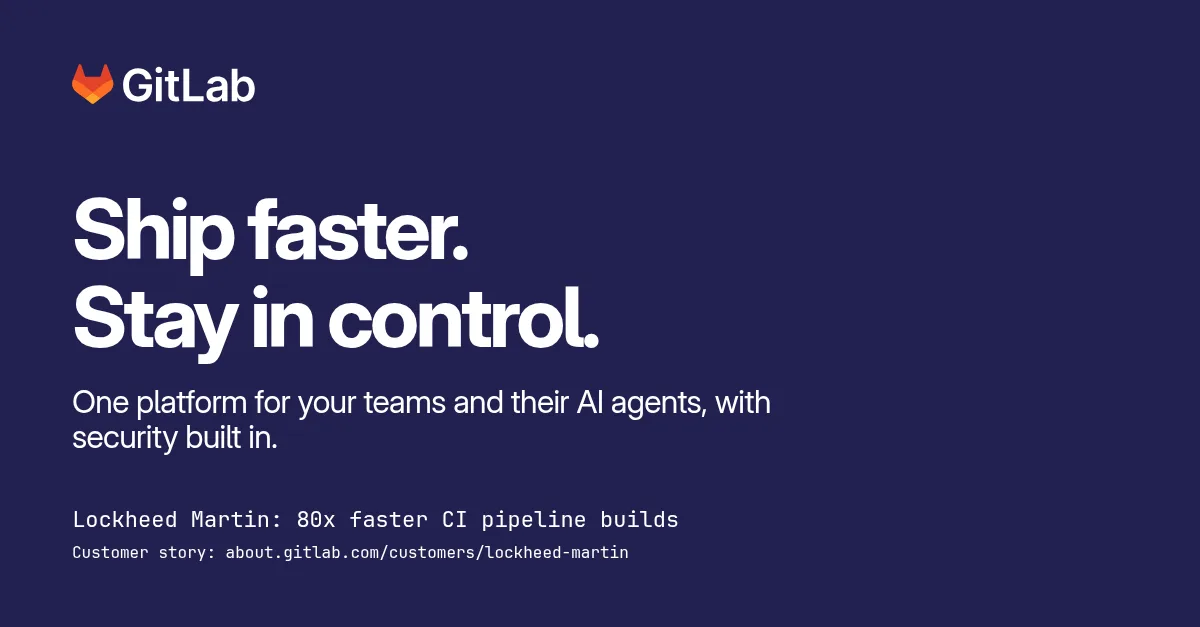
Concept LinkedIn ad, round three: the source line added and the background a solid brand colour.
We built the ad image in HTML with GitLab’s logo file and fonts and checked each version with a Rainbrand Review, which compares an image with the brand and returns a verdict and a reason for each check. It doesn’t edit the image.
The finding that matters for messaging came in the first round: the copy check failed because the Lockheed Martin number had no source on the image. The proof library ties that number to its customer story, the Brief turned that into an instruction to link the story, and the Review caught the version that left it out. Adding the story’s address under the result fixed it, and copy passed in both later rounds.
The visual checks say more about our setup than about the message. Typography and logo failed in round one, although the image used GitLab’s own font and logo files, and passed once we attached a bold specimen of the font. Colour stayed uncertain in all three rounds: the brand as we added it had no gradient rules, so we replaced our glow with GitLab’s dark-mode base colour, Purple 04s, and the Review still couldn’t sample the small text precisely.
Two questions a framework can’t answer alone
The trace table answers the first question: is every claim true and allowed? The proof library makes that checkable, but it doesn’t make it automatic. An agent can still misquote a figure, combine two claims into a third or drop a condition, so someone checks the copy against the library, line by line. When a claim in the copy traces to nothing, decide which it is: a gap in the framework, if it’s true and you can source it, or an error to delete.
The second question is whether the audience understands the message and cares about it. Nothing in the framework, the Brief or a Review answers that. We didn’t test the GitLab copy with anyone from GitLab’s audience. Here’s how you would test your own.
Test the messages with your audience
Test with people from the audiences in section 3, not with colleagues, who already know what you mean.
- Ask them to say it back. In short calls with five to ten people from the audience, show the one-sentence value proposition and ask them to explain, in their own words, what the company does, who it’s for and what it replaces. If their answers don’t match your positioning, the sentence isn’t working, however accurate it is.
- Show the page for five seconds. A five-second test shows a design briefly and then asks what people remember. Lyssna’s guide suggests questions such as what the page was about, what was offered and who it was designed for, and says five to ten participants are typically enough to see the main patterns. It can’t measure whether people complete a task.
- Compare versions with separate groups. Give two or three versions of the value proposition to different groups from the same audience, so one version doesn’t affect how people read the next, and compare how accurately each group describes the product.
- Test headlines in the market. Run two ad headlines to the same audience on the same budget, and judge them by what happens after the click, such as demo requests or trials, not by clicks alone. An ad tells you what gets attention; it doesn’t tell you what people understood.
- Listen to sales calls. A few weeks after launch, check whether prospects describe you in the framework’s terms.
Then change the part of the framework the results point to:
| What you hear | What to change |
|---|---|
| They can’t say what it is or who it’s for | Positioning, or the category name |
| They understand it but don’t care | The pillar: choose a difference this audience values more |
| They don’t believe it | The proof: a more specific, better-sourced result |
| They describe the problem in other words | The copy: use their words |
Record each test in section 11, with the date, who took part, what they understood and what you changed.
Keep it current
Give the framework an owner and write down what triggers a review: a launch, a new audience, new proof, a price change or a claim that stops being true. A category rename is a good example of a trigger: the new name has to reach every approved text, including older ones such as an email introduction.
In Rainbrand, update the framework and then edit the brand with it: describe the change, review what Rainbrand proposes and apply it. Briefs requested after that carry the new messaging. Briefs saved earlier and exported Skills are snapshots, so request or export them again.
To find gaps before a launch, give an agent only the framework and a task, and read what it invents:
Using only our messaging framework, attached, write a 50-word product description, a LinkedIn post announcing our next feature and the first two lines of a sales email to [audience]. Use the approved descriptions as written where they fit. After each piece, list every claim you made and the line of the framework it came from. Mark any claim you couldn't trace to the framework, and anything you had to guess.Sort what it marks the same way as before: a true claim you can source goes into the proof library, with its date, and the rest gets deleted.
FAQ
What is a message house?
A one-page version of a messaging framework, drawn as a house: the core message is the roof, three or four pillars hold it up, and the proof sits in the foundation. GitLab’s handbook has message houses for several use cases; the DevOps Platform one gives the value proposition for leaders and for engineers, three key values, the promise, customer pains, product proof and customer examples. A framework in a document has room for what a house leaves out: the proof library’s sources and dates, claim boundaries, approved descriptions and the change log.
Should each product or audience have its own framework?
Keep one framework for the brand, with its positioning, proof library, boundaries and approved descriptions. Add a message house per product or use case, as GitLab does, and handle audiences as rows in section 3 rather than separate documents. Separate frameworks drift apart, and there should be only one proof library.
How long should a messaging framework be?
Long enough to hold the proof library and the boundaries, which usually means a few pages; the positioning and value proposition should fit on the first page. The completed GitLab example runs to about 2,000 words, and the proof library is the longest section.
More in Brand voice
All 5 Brand voice articles11 min read
Brand voice vs tone: what's the difference?
Brand voice is the personality that stays the same; tone is how it adjusts to the situation. See the difference in real brands' copy, build a tone map for the situations you write for, and write tone rules an AI agent can follow.
5 min read
How to keep AI writing in your brand voice across tools
ChatGPT, Claude, Gemini, Jasper and your own agents each bring their own defaults, settings and copy of your guide, so one voice comes out several ways. Write the voice in the parts that carry across models, keep one version every tool reads, and check the same tasks in each tool.
11 min read
Brand voice examples, and how to write rules AI can follow
Brand voice examples from Slack, Innocent, Apple, Visa, Oatly, Nike and eight published voice guides, with the real copy behind each and rules your AI tools can follow.