
By Siddharth Borderwala
Published
14 min read
How to make brand guidelines AI-ready
AI-ready brand guidelines give an agent rules it can apply without guessing, the real logo and font files, and the current version. Rewrite each rule without inventing policy, keep the guide's own decisions apart from your suggestions and the questions only the brand owner can answer, then test the rewrite on a real task.
TL;DR
Brand guidelines are AI-ready when an agent can find the rules for its task, apply each one without guessing, use the real logo, font and image files, and get the current version. Rewrite judgement calls as instructions, but keep the guide’s own decisions apart from your suggestions and from the questions only the brand owner can answer. Then test each rewritten rule on a real task.
What “AI-ready” means
In November 2026, Mercury was hiring a Staff Brand Designer to “build AI-ready brand guidelines the team can design against”. Robinhood’s ad for a Staff Visual Designer, Product Creative asked for someone to “Evolve our internal design system to be AI-ready”. Webflow’s ad for a Creative Director, Brand Studio gave the reason: “More of Webflow’s brand will soon be made by marketers and AI agents, not only by designers. That makes the brand system the product.”
Brand guidelines were written for people who read them once and then use judgement. A designer who has absorbed the guide fills its gaps from experience. An agent reads the guide again at the start of every task, often as fragments that a tool has retrieved, and fills each gap with whatever seems most likely.
So AI-ready isn’t a file format. Guidelines are AI-ready when an agent can do four things with them without asking anyone:
| The agent can | What happens when it can’t |
|---|---|
| Apply each rule without interpreting it | It settles open questions itself, and nobody can see that it did |
| Use the real files | It redraws the logo from a picture and substitutes the font |
| Find the rules for its task | It reads the whole guide, or one retrieved fragment, and misses the rule that mattered |
| Tell that it has the current version | Last year’s claim or a retired colour comes back |
Most of the work is the first row, and it’s where a well-meant rewrite goes wrong. Turning a judgement call into an instruction tempts you to decide things the guide never decided. The four public guides below show the usual problems, and the first shows the trap.
Rewrite rules without inventing new ones
Webflow: restate the decision, don’t extend it
Webflow’s design guidelines set colour in terms anyone can follow: “Lead with blue, black, and white for big brand moments,” and “Each asset should include black, white, and one color. … But only choose one.” An agent can apply that, and a reviewer can count it.
Rainbrand, which builds and maintains brand context for AI agents, publishes a brand guidelines library of well-known brands, each with a Brand Skill: a folder of guidance, colour values and images that an agent reads, built from the brand’s public sources. It’s Rainbrand’s reading of the brand, not the brand’s own guide. The Webflow Skill, built from Webflow’s website, states the same colour rule in one line: “Use the secondary colors as accents, one per asset.”
Webflow’s voice and tone page is written for a person. Under “Bold” it says “Be choosy about when to be bold” and warns against overdoing it: “our boldness is a bubble over, not a constant boil.” A writer who knows Webflow’s work can judge that. An agent drafting a release note can’t tell whether this is one of the moments.
The page answers part of the question in two other places. Its “Show it off” line says when: “When showing off a particularly cool product capability or turning heads in a brand campaign.” Its dos say how: “Back up bold claims with showing, not just telling.” A version an agent can apply keeps Webflow’s decisions apart from anything added to them:
| Label | Rule |
|---|---|
| Webflow’s decision, restated | Be bold when showing off a particularly cool product capability or in a brand campaign meant to turn heads. Back up bold claims with showing, not just telling. Otherwise, default to straightforward language. |
| Our suggestion, not Webflow’s | Put the proof next to the claim: a demo, a screenshot or the feature named precisely. |
| Open, for the brand owner | Does a routine enhancement count as a particularly cool capability? |
The first row adds nothing Webflow didn’t write; “Default to straightforward language” is one of its own dos, under “Down-to-earth”. Our first rewrite joined the same lines into “use them only in brand campaign headlines and when announcing a specific product capability”. That reads well and sounds faithful, but “only”, “headlines” and “announcing” are inventions, and an agent would have enforced them as Webflow policy.
Test the rewritten rule
We tested what the labels change on November 16, 2026. Two fresh Claude sessions got the same task: write the headline and opening of Webflow’s update post for its new modal and popover elements, using only the facts on Webflow’s updates page. One got the voice lines as the page words them. The other got the labelled rule above.
| Given | Headline it wrote | What it said about the choice |
|---|---|---|
| The page’s lines, as written | Native modals and popovers are here | It kept the boldness to the headline “because this is a product capability worth showing off” |
| The labelled rule | New modal and popover elements | It “wasn’t sure” whether the release counts, so it “kept the language straightforward” and said so |
Webflow published the update as “New modal and popover elements” and filed it as an enhancement, not a feature. One run each isn’t a benchmark, and neither headline breaks a rule. The difference is who made the call. Given the page’s lines, the agent settled the open question itself and nobody would have noticed. Given the labelled rule, it fell back to Webflow’s default and reported the question it couldn’t answer, which is the question to take to the brand owner.
Spotify: precise rules that seem to disagree
Spotify’s design guidelines for developers are exact about size and spacing. The full logo “should never be smaller than 70px in digital or 20mm in print,” and the exclusion zone “is equal to half the height of the icon.” That measurement is written out as well as drawn in a diagram, so an agent reading the page as text still gets it.
On colour, two sentences sit one heading apart. Under “Using the logo”, the green logo “should only be used with black, white, and non-duotoned photography.” Under “Which color logo to use”, it “should only be used on a black or white background, for any other background you should use a monochrome logo.” A designer can read the first as the palette the logo appears alongside. An agent placing the logo on a photograph finds one sentence that seems to allow it and one that doesn’t.
The Spotify Skill resolves it in two sentences: “The green logo is the primary colorway and belongs on black or white. On any other background, use the black logo on light colors and the white logo on dark colors.” That’s a sensible reading, but it’s a reading. Until Spotify’s brand owner confirms it, it belongs in the “open” row, with the more cautious reading as the default. The Skill also includes the three logo files, named so an agent can tell them apart: spotify-lockup.svg in green, spotify-lockup-black.svg and spotify-lockup-white.svg.
Airbnb: adjectives and directions in one brief
Airbnb’s brief for photographers shooting its Experiences says how the pictures should feel: “The images should be authentic and candid, magical and immersive, clear, direct, and centered.” Those words describe a result. They don’t tell a photographer, or an image model, what to do.
The same brief then gives directions anyone can follow:
- “Since the product displays images as a square crop by default, always center your subject with plenty of space around them”
- “Prioritize photographing near window light.”
- “Direct the guest to avoid eye contact with the camera.”
- “Avoid capturing action from behind.”
That list is the part to restate for agents, word for word. The first line also carries its reason, the square crop, which lets an agent handle a case the brief didn’t foresee, such as a different crop. Image and video models follow what they see more than what they read, so pair the directions with a few approved photos, each labelled with what it shows: the light, the framing, the moment.
Oura: a rule hiding in the small print
Oura’s home page carries a note on its Health Radar features: they “are intended for general wellness purposes only. They are not intended to diagnose, treat, cure, mitigate, monitor, or prevent any disease, illness, or medical condition, and they do not provide medical advice.” For a regulatory reviewer, that’s a disclosure. An agent writing an Instagram caption about Health Radar is unlikely to look there, so the guide has to state it as a rule for writers.
The Oura Skill gives it a reference file of its own, on health claims. It turns the disclosure into instructions a writer can follow: “Present alerts as signals that may be worth attention, not as a diagnosis or substitute for care,” and for Health Radar, explain “that features surface patterns or changes that may be worth discussing with a qualified healthcare professional.” Product names, claims and the qualifications they need are where an agent’s guess costs most, so move them out of footers and legal notes and into the guide, each with the wording to use instead.
Label every rewritten rule
When you rewrite a guide for agents, keep three things apart: what the guide already decides, what you’re suggesting, and what only the brand owner can decide. Put suggestions and open questions in front of the owner before they become rules. Each rule an agent can apply also names:
- the subject, such as “the green logo”, not “it” or “the logo above”, because tools often hand an agent one section of a guide;
- the condition: which asset, format, channel or background it covers;
- the action or value: the hex code, size, file, wording or count;
- what to do when the condition doesn’t match, or who decides;
- the reason, when it helps with a case the rule didn’t foresee.
If your guide is a PDF, how to turn a brand PDF into instructions AI can use covers getting the rules out of it. For voice, how to write brand voice guidelines AI tools can follow builds rules from real edits, and brand voice vs tone shows how to write tone rules for each situation. An agent can do the first pass on your current guide:
Read our brand guidelines and list the rules that [social posts, sales decks, ads] depend on. Quote each rule with its page or section. Where an agent couldn’t apply a rule without judgement, propose a rewrite in three labelled parts: restated from the guide, using only decisions the guide makes; suggested by you; and open questions for our brand owner. Don’t add words such as only, always or never unless the guide uses them, and don’t invent values or policies.Give each part the form its output needs
Agents use each part of a brand differently. Code, slides and documents take exact values and files: a hex code goes into CSS, a font file into a deck. Image and video models work best from what they’re shown, such as reference photos, the logo and a font specimen. Copy carries the brand in words alone.
| Part of the brand | What an agent does with it | What to give it |
|---|---|---|
| Logo | Places it in pages, decks and layouts | Original SVG and PNG files for each lockup and colourway, named for when to use each |
| Colour | Sets values in code and slides; shows them to image models | Hex values, each with a role and any limit, such as one accent per asset |
| Type | Embeds fonts in pages, decks and documents | Font files or their licensed source, weights by role and a fallback |
| Voice | Writes and edits copy | Rules with conditions, plus approved and rejected examples |
| Names and claims | Writes ads, emails and product copy | Exact spellings, approved claims with their qualifications, banned claims with the reason |
| Imagery | Prompts image and video models; chooses photos | Reference images with a line on what each shows, plus directions for subject, light and framing |
| Layouts | Fills a structure instead of inventing one | Templates or reference layouts for each format |
Give agents direct links to the original logo and font files; do not rely on their extracting usable assets from a page preview. Which brand guideline formats AI tools can use compares Markdown, Agent Skills, DESIGN.md and design tokens, and how to share approved brand assets across AI agents covers getting the files to each agent.
Organise the guide by task
An agent writing a LinkedIn post needs the voice, the product claims and perhaps one image. It doesn’t need the clear-space rules. When the guide is one long document, the agent spends its attention on all of it, and a tool that retrieves pieces may hand it the wrong ones. So AI-ready guidelines start with a short entry file that sends each task to what it needs.
Every Brand Skill in Rainbrand’s library starts with a SKILL.md file that does this, followed by reference files for each part of the brand and a manifest that describes its images. The Webflow Skill’s entry file tells the agent to “Match the request across every applicable table. Read the union of its Required files.” Two rows of the Skill’s routing table by task:
| Task | Required | Consider |
|---|---|---|
| Marketing copy | Product positioning, Voice and messaging | Dos and donts |
| Brand design | Colors, Dos and donts, Typography | Brand imagery identity, Logo |
Two more tables in the same shape route by component (colour, imagery, logo, typography, voice) and by medium (a campaign, a product interface, a website). A request for a campaign landing page matches rows in all three, and the agent reads the files those rows name instead of the whole guide.
A finished example: TANNIN
The TANNIN Brand Skill shows a guide worked all the way through. It’s built from designer Anna Kuziuk’s identity concept for an urban tea room, with nine reference pages, editable SVG marks and templates, two open-licence fonts and the original case-study boards. Every image comes with a line in the manifest telling the agent what it’s for. For this board, it’s “Close packaging study across flavors, including color families, data rails, and grainy illustrations.”
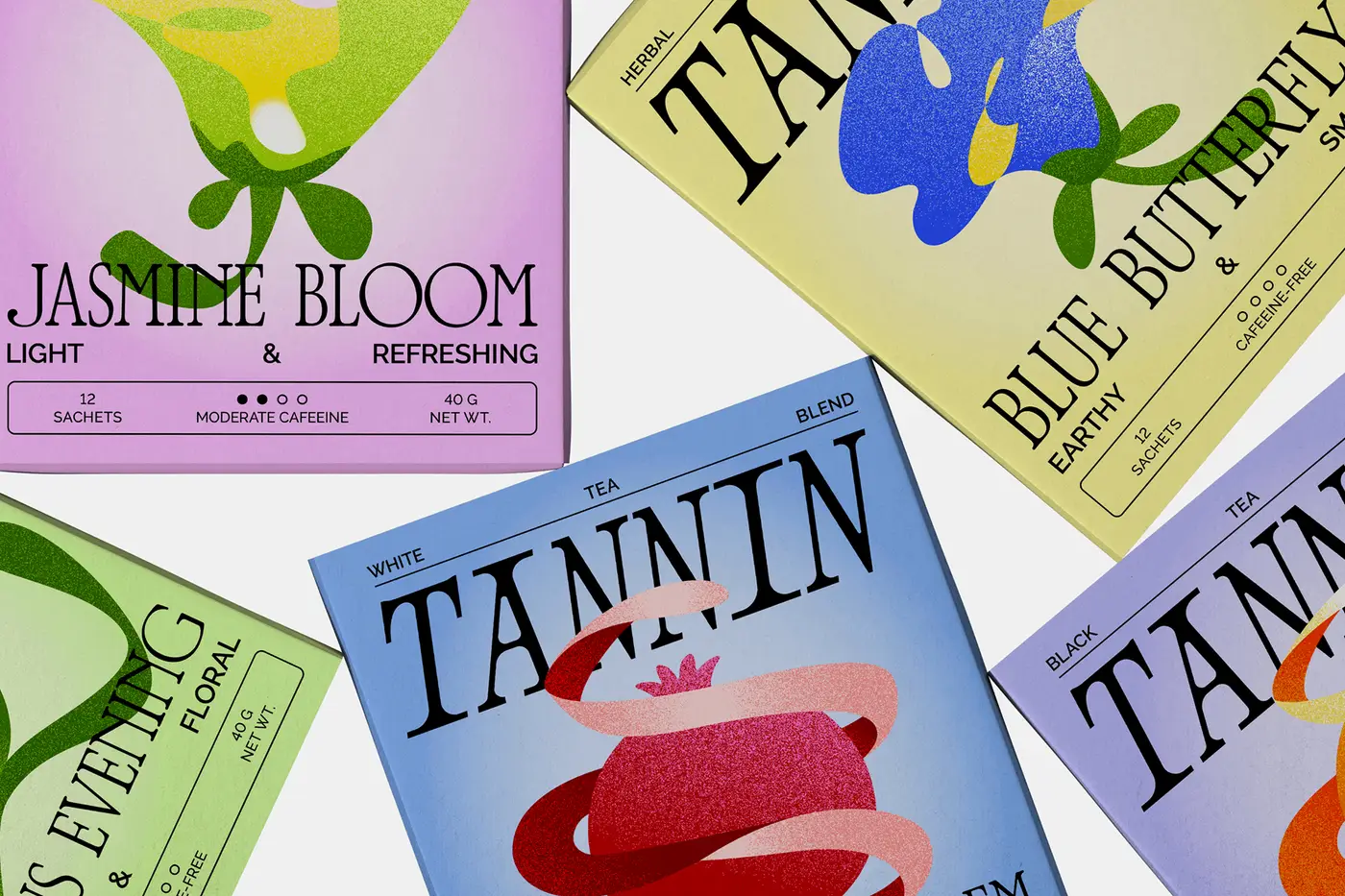
A reference board from the TANNIN Brand Skill. Original identity by Anna Kuziuk.
Its guidance on generating images is written for how image models behave: “Generate artwork and compose the branded layout as separate steps. This gives the image model room to make convincing shapes while keeping typography, facts, and spacing under direct control.” It adds: “A generated image containing approximate lettering is not a finished branded layout.” The Skill’s preview sheet shows both halves: a poster and a carton with exact type set in SVG, and a generated botanical image with no lettering in it.
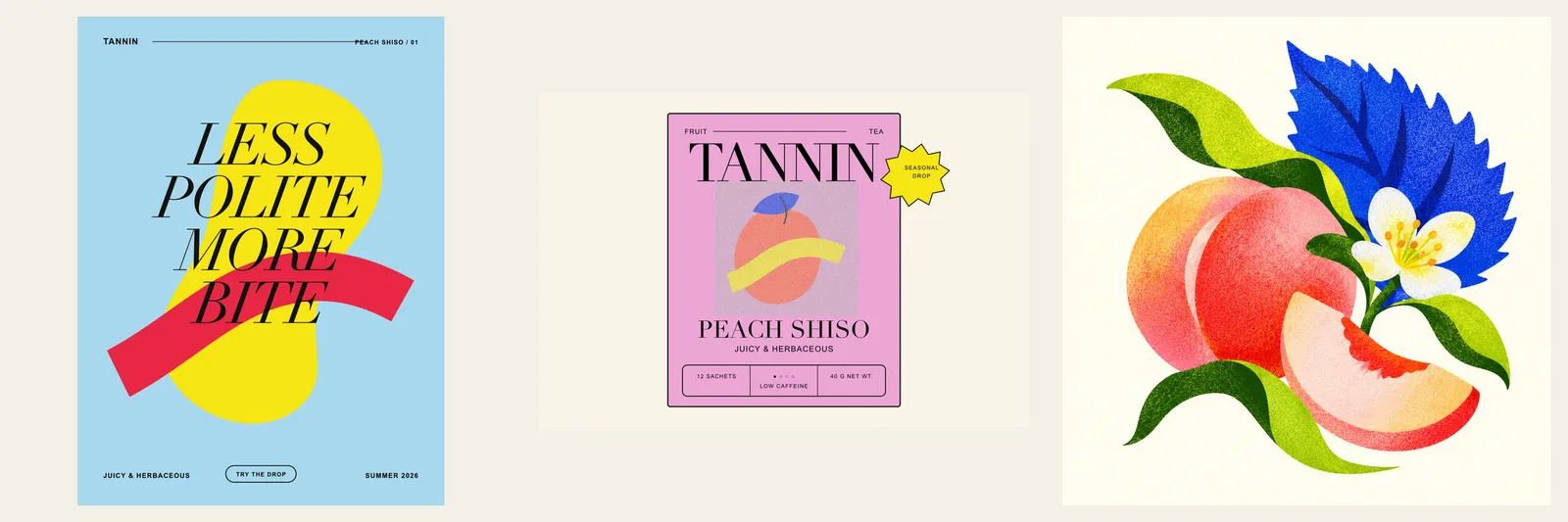
From the TANNIN Brand Skill’s preview: type set in layouts, and generated artwork made without text.
Download the TANNIN Brand Skill to read a complete example, or give the folder to an agent and ask it to read SKILL.md before a task.
Keep it current, and test every change
Every copy of a guide freezes when it’s made: the PDF in a chat project, the Markdown in a repository, the skill uploaded to one app. Anthropic’s documentation says plainly that custom skills “do not sync across surfaces”. Keep one maintained version and have agents fetch it at the start of each task.
In Rainbrand, a change to the brand is an edit: you describe it, inspect what Rainbrand prepares and apply it. Only a Brief, the guidance and files for one task, requested after that uses the change. A Brief saved earlier and a Brand Skill folder exported earlier stay as they were, so replace any exported folder after an edit.
Test each rewritten rule the way the Webflow rule was tested: run a recent real task with the old wording and the new, and read what changes. A rule that changes nothing may not be needed; a rule that makes the agent decide something the guide didn’t decide needs another label. How to test whether an AI agent follows your brand guidelines covers building a fuller test set, and how to update brand guidelines across all your AI tools covers moving a change through the copies you already have.
FAQ
Do AI-ready guidelines replace the brand book?
No. The brand book explains the brand to people: its story, its reasoning and its best work. The AI-ready version turns the same decisions into rules, values and files for agents. When a decision changes, change both.
Who should own AI-ready brand guidelines?
The brand team, because the hard part is deciding what the rules are, not formatting them. Matchstic, a branding agency, answers the same question with “The brand team.” Someone with authority over the brand has to settle the open questions a rewrite turns up.
How long does it take to make brand guidelines AI-ready?
It depends on how many decisions are missing. Matchstic estimates “About 1-2 weeks in most cases” when a brand already has solid guidelines, and longer when the strategy behind them has gaps. Start with the two or three assets your team makes most, so agents can use the first rules before the whole guide is done.
Is an AI-ready design system the same thing?
They overlap. A design system tells coding agents how to build an interface: tokens, components and their states. Brand guidelines cover what a design system usually leaves out, such as voice, product claims, imagery and logo rules for marketing. An agent building a landing page needs both; giving Claude Code and Cursor your brand shows how they fit together.
More in Brand guidelines
All 18 Brand guidelines articles18 min read
Brand guidelines examples: 12 real brand books and what to copy from each
Twelve brand guidelines you can open today, from Mastercard’s logo rules to NASA’s 1976 standards manual, with the exact rule worth copying from each, which ones an AI agent can read, and what it took to correct an agent’s version of Starbucks.
10 min read
Branding kit checklist: what to include, file formats and real examples
What a branding kit should contain, from logo files and colour values to fonts, templates and rights; what to agree with your designer; what real companies’ kits hold; and a bounded web sample kit, with its index, a template and an asset made from it.
11 min read
Logo usage guidelines: what to include and how to write them
Logo usage guidelines say which logo goes where, how much space it needs, how small it can go, which colours and backgrounds it allows and what never to do. See how Amazon and Strava write each rule, how AI tools get logos wrong, and a template to download.