By Siddharth Borderwala
Published
11 min read
How can non-designers make on-brand assets without a designer?
Marketers, founders and salespeople can make everyday assets on-brand if a template holds the design and they change only the words and photo. A complete example, from a failed AI-made post to an editable template and two exported versions, with what the brand settled, what the template settled and what the checks found.
TL;DR
Non-designers can make everyday assets on-brand when a template holds the design and they change only the words and the photo. The brand supplies the logo file, fonts, colours and approved photos; the template fixes the layout, sizes and positions the brand leaves open. Use AI for drafts and backgrounds, never to redraw a logo or a product, and check the exported file before it goes out.
Change what it says, not how it looks
A marketer, founder or salesperson can make a brand’s everyday assets safely if they stay on one side of a line. Change the words, the photo, the date and the numbers. Leave the layout, type, colours and logo to a template, or to files and rules that came from the brand.
Brand teams are hiring for exactly that. In November 2026, Snorkel AI’s ad for a Principal Brand Designer asked for guidelines, Figma libraries and templates so that marketing, sales, research and recruiting can make on-brand assets without a designer involved. Conveo wants its Brand Design, Creative Lead to build templates “so the on-brand version is the easy version for every team.” Checkr’s Creative Director is to pair clear standards, briefs and reviews with self-serve AI tools, so other teams can make good assets without the creative team touching each one. In each ad, the designer builds the templates and tools, and other teams make the assets.
| Asset | Make it yourself when | Bring in a designer when |
|---|---|---|
| Social posts and stories | A template or a recent approved post sets the layout | It opens a campaign or a new series |
| Event and webinar graphics | You’re changing the title, date, speakers and photo | It’s a flagship event that needs its own look |
| Sales one-pagers and decks | You’re filling an approved template with a deal’s details | The template itself needs new slides or layouts |
| Email headers and newsletters | The email template exists and you’re changing the image and copy | You need a new template |
| Ad variants | You’re adapting an approved ad’s copy, size or offer | It’s a new concept, or a lot of money is behind it |
| Product images | You’re placing approved product photos or real screenshots | The product would have to be generated |
| Logos, packaging, print runs | Never on your own | Always |
The middle column depends on what the brand team has already built. Each new template moves an asset from the right column to the left.
A post that went wrong
Graza sells olive oil in two squeeze bottles: Sizzle for cooking and Drizzle for finishing. In Rainbrand’s Higgsfield setup run, Claude made Graza an Instagram post in Higgsfield, an image-generation platform, with the headline “Drizzle to finish. Sizzle to cook.” and Graza’s wordmark. Rainbrand gives AI agents a brand’s guidance and files, and its Review checks a captured image against the brand. The Review passed the headline’s wording and typeface. It failed the logo twice, “horizontally squashed” and then “horizontally compressed and distorted”, and failed the headline’s colour twice. The model had also drawn the bottles itself and filled their labels with words that don’t exist.
None of that is fixable by prompting harder. An image model redraws whatever it’s given, so the wordmark, the exact olive of the headline and the label text all come out approximately. The run stopped at the diagnosis: place the real logo and set the headline over the image instead of asking the model to draw them. Here is that fix, done the way a marketer could repeat it every week.
The rescue, step by step
1. Ask the brand what it settles
On November 16, 2026 we asked Rainbrand for a Brief, the guidance and files for one task, for a 1080 × 1350 Instagram template a marketer would fill in Google Slides or PowerPoint. It returned a real photo of both bottles from Graza’s own files, “not a generated bottle image”, and the primary black wordmark as an SVG, with the instruction “do not recreate it in a font or recolor it.” It gave the colours by role: warm cream #F6E6D9 for the background and deep olive #3C422E for the headline. And it named the headline font, ITC Garamond Condensed, with the file.
It was just as clear about what it couldn’t settle. On the font for Google Slides, it said Graza’s sources “do not designate a Slides-available fallback”, so “any substitute would be a production choice, not a Graza rule.” On layout, it said Graza’s material doesn’t prescribe “a post layout, safe-area/margins, headline size, other type sizes, or the wordmark’s size or position.”
2. Let the template settle the rest
Those open decisions are where non-designers go wrong, and they’re exactly what a template is for. A designer makes them once; everyone else inherits them. Here’s where each decision in the finished post came from:
| Decision | Value | Settled by |
|---|---|---|
| Product photo | Graza’s photo of both bottles, unedited | The Brief |
| Logo | Primary black wordmark, from the SVG | The Brief |
| Background and headline colour | #F6E6D9 and #3C422E | The Brief |
| Headline font | ITC Garamond Condensed | The Brief |
| Stand-in font in this template | EB Garamond, a stand-in nobody has approved | The template |
| Canvas | 1080 × 1350 | The task |
| Margins | 72 px on every side | The template |
| Headline | Two lines at the top, 80 pt | The template |
| Photo frame | 936 × 880, cropped to keep both caps in view | The template |
| Logo size and position | 52 px tall, bottom left | The template |
| Logo file in the template | A large PNG made from the SVG | The template |
The last row is a practical one. Not every slide tool accepts SVG files, so the template carries a large PNG made from the official SVG, never a screenshot of the website. We built the template as a PowerPoint file and tested it in LibreOffice Impress. Google Slides, PowerPoint and Keynote can open PowerPoint files, but we haven’t checked how this one looks or exports in them: fonts, line breaks and image placement can change on import. Each element is named for what you may do with it: “Headline (edit the words only)”, “Product photo (right-click, Replace image)” and “Graza wordmark (don’t edit)”. The speaker notes repeat the rules, the colours and the font situation.
Download the template to see how it’s put together. It’s a concept template made for this article.
3. Fill it in and export
The marketer’s job is now three steps: edit the headline’s words, replace the photo with another real one from the brand’s files if needed, and export a PNG. We exported two versions in LibreOffice Impress: one using the unapproved EB Garamond stand-in and one using the brand font. This shows the template works; it isn’t a usability test, because no non-designer has used it yet.
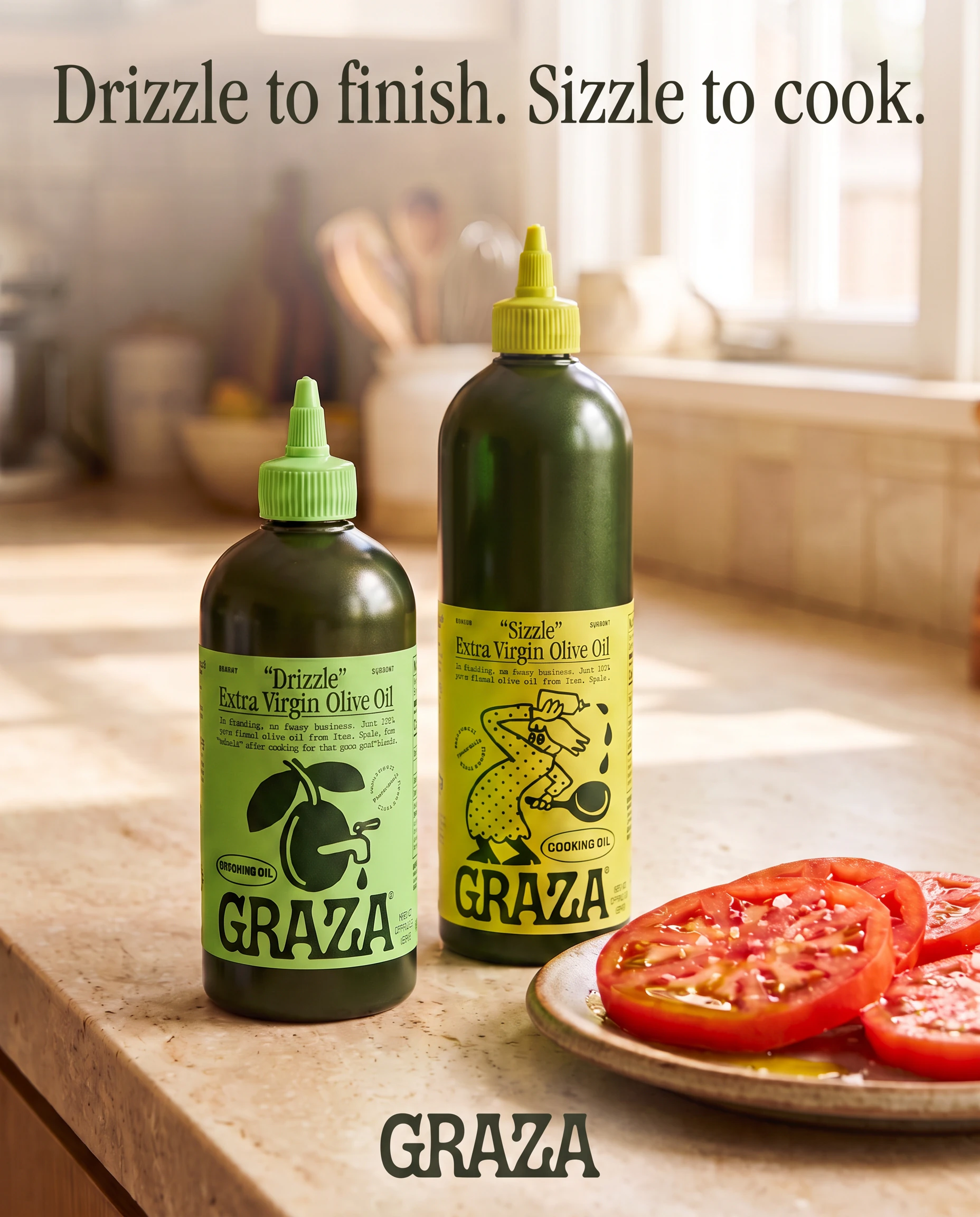
Before: generated by an image model. Logo and headline colour fail.
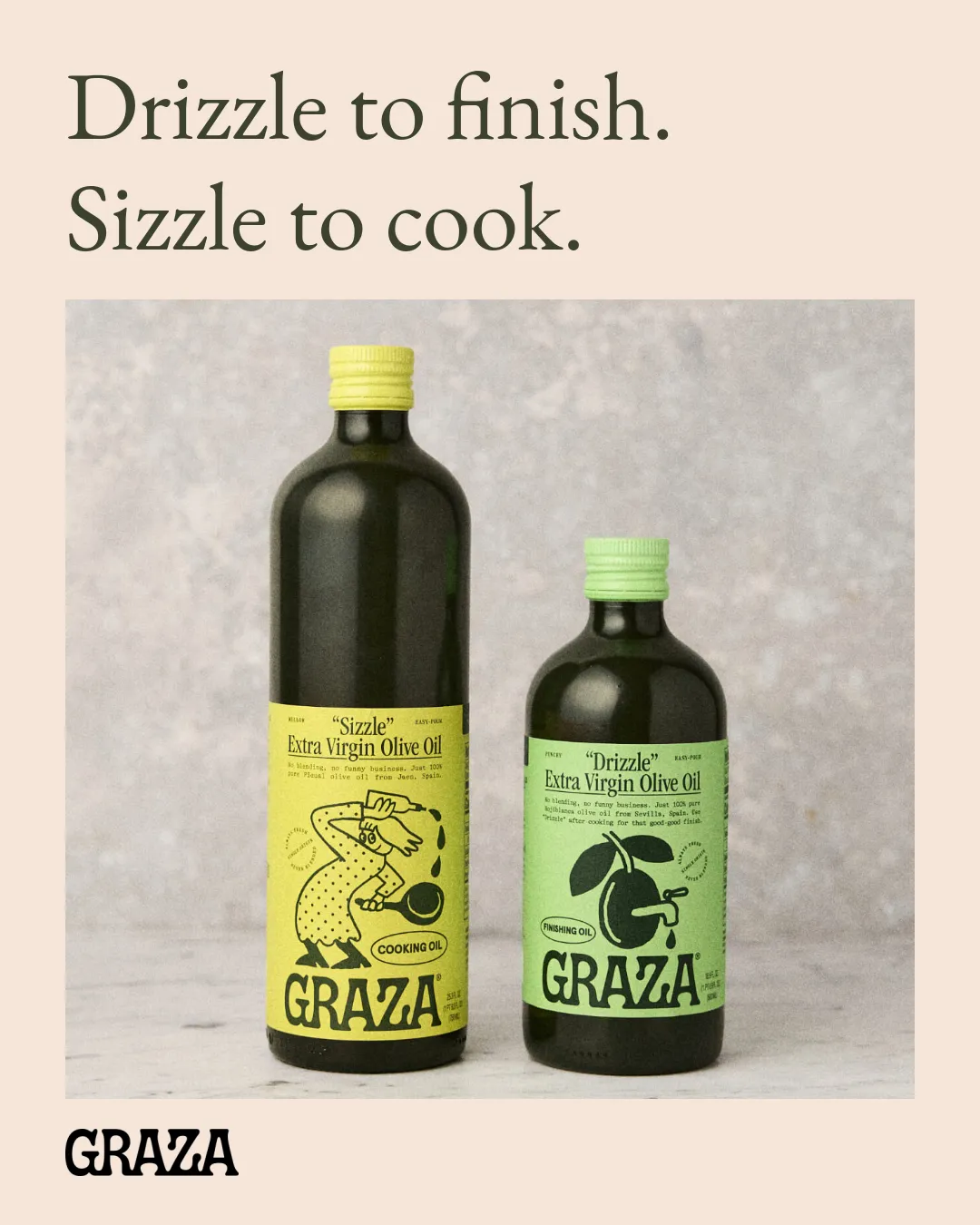
From the template, with the stand-in font. Typography fails.
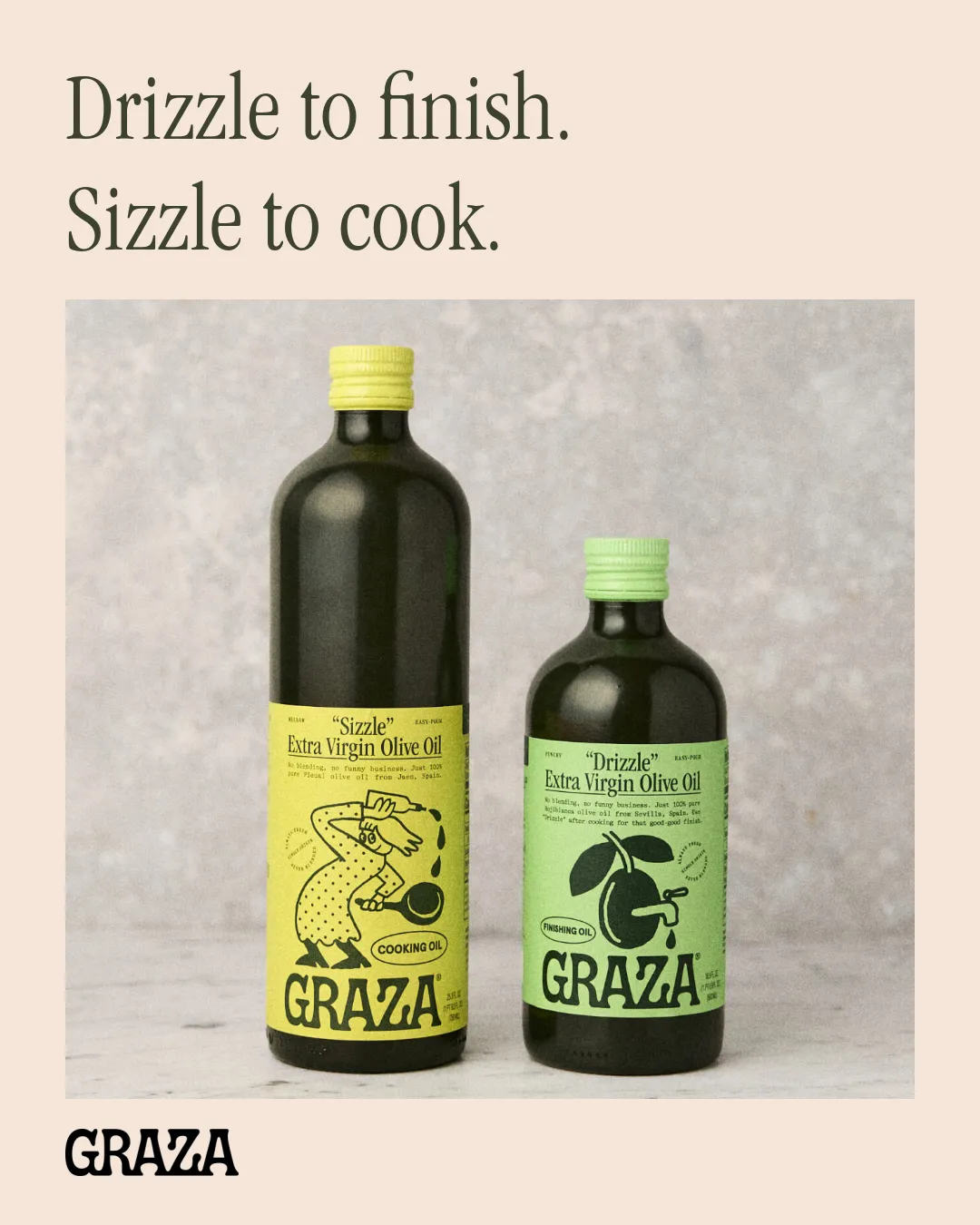
From the template, with the brand font. Colour and copy pass; typography and logo uncertain.
4. Check the export, then read the verdicts
We sent both exports to Review for colour, typography, logo and copy:
| Check | Stand-in font | Brand font |
|---|---|---|
| Colour | Pass | Pass |
| Typography | Fail | Uncertain |
| Logo | Uncertain | Uncertain |
| Copy | Pass | Pass |
The stand-in failed for the reason you’d expect: “Requested EB Garamond replaces required ITC Garamond Condensed.” That doesn’t make the template wrong. It means the brand owner has a decision to make: approve a stand-in for tools that can’t load the brand font, or ask for these posts to be exported from a tool that has it.
The uncertain verdicts needed someone to check the source, not a fix. On the brand-font version, the Review said the “headline font could not be confirmed” from the pixels; we know it’s ITC Garamond Condensed because we set it from the brand’s file. On the logo, both Reviews said the separate wordmark matched and was clear, and called the result uncertain only because the wordmarks printed on the bottles “curve around the photographed packaging.” Those are Graza’s own labels in Graza’s own photo, so we accepted them. Compare that with the generated version, where the same check failed the logo outright.
What to get from the brand first
The Brief above worked because Graza’s files were already in order. If you’re starting from scratch, collect these parts of the brand’s branding kit before you open a design tool, so nobody screenshots a logo or picks a green by eye:
- logo files for every background you’ll use, as SVG or a large PNG;
- the font files and their licence, plus an approved stand-in for tools that can’t load them;
- the hex values for background, text and accent colours;
- approved product photos, real screenshots and photos of people you have the rights to use;
- a few voice rules, product names spelled correctly and the claims you’re allowed to make;
- the template, the channel’s sizes and any legal line that has to appear.
A public brand page can cover some of this. Attio’s brand page offers a logo pack “as SVG and PNG files in both light and dark variants” and two rules anyone can follow: use the wordmark “by default wherever the layout allows,” and “do not typeset the name in place of the wordmark.” It has no colour guidance, so for colours you’d go back to the brand owner.
Use AI tools for the content, not the logo
ChatGPT, Claude and Gemini are good at drafting the words and at making backgrounds, textures and illustrations where the brand allows them. Given the brand’s files and rules for the task, they get much closer than when told to “use our brand colours”. You can attach those files to each request, or connect the tool to Rainbrand so it can request a Brief before it starts.
Keep three things away from the image model: the logo, any lettering, and the product itself. Generate the picture without them, then place the real files in the template. If your tool is connected to Rainbrand, you can ask it for a Brief like the one above and a Review of the export:
Request a Rainbrand Brief for [brand] for a [size] [channel] post I’ll make from our [template name] template in [tool]. Show me the logo file, photo, fonts and colours it chooses, and list what it says the brand doesn’t settle. If I need a background image, generate it with no text, logo or product in it. After I export the post, Review the export for colour, typography, logo and copy, and tell me which verdicts need a person to look.Check it before it goes out
Run through this before you post, send or print anything you made yourself. Agencies and larger teams can use the fuller creative QA checklist.
Logo
- It’s the brand’s file, not retyped or redrawn, and the right version for the background.
- It isn’t stretched, recoloured, cropped or crowded.
Words
- Product and brand names are spelled exactly as the brand writes them.
- Every claim, price and date is approved and current.
- No invented text anywhere in an image, including labels and screens.
Type and colour
- The brand font, or the approved stand-in, is what actually rendered in the export.
- Colours come from the palette, and text is easy to read on its background.
Images
- The product is real and shown as it is, not generated.
- You have the rights to every photo and the people in it.
Format
- The size and shape match the channel, and nothing important sits where the platform crops.
- You’ve looked at it on a phone.
When to bring in a designer
Ask a designer when the asset would change how the brand looks, or when a mistake would be expensive:
- There’s no template for an asset you’ll make again. Ask for the template, not just this one.
- It’s a launch, a campaign or a flagship event, which needs a look of its own.
- It touches the brand itself: the logo, a new colour, a new illustration style.
- It’s packaging, signage or a print run, where errors can’t be fixed after the fact.
- A check keeps failing for the same reason and you can’t see why.
- A lot rides on it: a fundraising deck or a pitch for your biggest deal.
When you do, send the version you made, what failed and where it’s going. A designer can fix a draft faster than a blank page, and the template they make from it means you won’t need them for the next one.
FAQ
What tools can non-designers use to make on-brand graphics?
Canva, Adobe Express, Google Slides and Figma all work well with templates the brand team has set up, and ChatGPT, Claude and Gemini can draft copy and images. The tool matters less than whether it starts from the brand’s real files. Best AI design tools that support your brand kit compares how each one uses a kit.
How do I make sure the brand font survives export?
Export the finished asset as an image, or as a PDF whose font list, in the PDF reader’s document properties, shows the brand font as embedded, so it can’t be swapped on someone else’s computer. If the font’s licence doesn’t allow embedding, export an image or use the approved stand-in.
How do we stop people using old logos?
Keep one current set of files, delete the old ones from shared drives, and name files by what they’re for, such as logo-dark-background.svg. Put the current logo in the templates themselves, so nobody has to find it.
Can we use AI-generated images in brand assets?
For backgrounds, textures and illustration, often yes, if your brand allows them. Don’t generate the product itself or real people, check the rights of anything you use as a reference, and follow your company’s policy and each platform’s rules on labelling AI images.
More in Images and design
All 10 Images and design articles10 min read
Creative brief template: free download with design and campaign brief versions
A free creative brief template in Word and Markdown, with design and campaign brief versions, a completed example from a real concept with its unknowns marked, what to write in each section, and the gaps real briefs leave open.
11 min read
How to keep AI ads on-brand across markets
We made one ad for two markets, the US and Japan, and recorded every decision. Keep the photo, logo and layout identical, take each market's words and prices from its own page, choose a font for each script, and check every version before someone in the market approves it.
11 min read
What are brand assets? Types, examples and what AI agents need
Brand assets are the files and recognisable cues a brand uses and protects, from logo files and fonts to a signature colour. The main types, which ones agents need and in what form, distinctive brand assets, a winery's label faces as a worked example, and an inventory sheet.