
By Siddharth Borderwala
Published
12 min read
Creative QA checklist for AI-generated assets
A pre-delivery checklist for agencies and in-house teams shipping AI-made copy, images, video, ads and decks. It covers brand, visual integrity, product truth, text and claims, rights, AI disclosure, accessibility, specs and delivery, with who checks what and a record filled in for a real film. Download it as Markdown or CSV.
TL;DR
Before an AI-made asset goes to a client or goes live, check it in ten groups: the brief and sources, brand, visual integrity, product truth, text and claims, rights and likeness, AI disclosure, accessibility, specs and delivery, and sign-off. Give each group an owner, run an automated brand check first, and record a result, evidence and fix for every check, version by version.
Why AI assets need their own QA pass
Agencies already run QA, and some measure it. Power Digital’s ad for an Account Manager, CRO sets a target of “a QA rework rate of 5% of deliverables”. What AI changes is the kind of mistake. A human designer rarely redraws a client’s logo or invents a product feature; an image model does both, and the result looks finished. The errors are plausible, they arrive at volume, and the person checking is often looking at the twentieth variant of the day.
So agencies are building QA into the production line rather than bolting it on. Code and Theory is hiring a Senior Director, AI & Creative Transformation to “Design human-in-the-loop patterns where creative judgment, brand compliance, and legal review stay in the workflow”, and an Associate Director to build “quality gates that hold up under production volume”.
The checklists that rank for this question cover images only. Overs’ AI image QA checklist is thorough on product accuracy, people and physics in a single image, and those checks stay in the list below as their own group. An agency also ships copy, video, decks and ad sets, for several clients, and has to prove what it checked, so the list adds those formats and a record to fill in.
Who checks what
Split the checklist by what each person can actually judge, and run the automated part first:
| Who | Checks |
|---|---|
| An automated brand check | Logo, colour, typography and copy against the client’s brand |
| Designer or art director | Brand and visual integrity on every asset, plus every fail and uncertain verdict from the check |
| Copy editor | Exact copy, spelling, claims and their sources, links |
| Account lead or strategist | Brief, product truth, client facts, AI disclosure, sign-off |
| Producer or operations | Rights and licences, specs, file delivery |
| Client legal or compliance | Regulated claims, likeness, market rules |
One person can hold several roles on a small team. What matters is that each group has a named owner and that nobody signs off a group they can’t judge, such as a designer approving a financial claim.
The designer looks at every asset, not only the ones the check flagged, because an automated check can be wrong with confidence. Calibrate it before you rely on it: run it on assets your team has already accepted and rejected, and see whether its verdicts match. In the example further down, one colour verdict changes between rounds although the colour never did.
The checklist
Copy it into your project tool, or download it as Markdown for a doc or as CSV for a spreadsheet. For each check, record:
- the asset and the version you checked;
- the result: pass, fail, uncertain or not applicable;
- the evidence: the frame, crop, Review or source line you looked at;
- the corrective action, and the version that has it;
- who checked it, and when.
Uncertain means a person still has to look; it isn’t a pass. Not applicable is worth writing down too, so the next person knows the check was considered rather than skipped.
1. Brief and sources · producer or account lead
- The asset matches the approved brief: format, audience, channel and message.
- It was made from the right client’s brand, the right sub-brand and the current version of its guidance.
- Every input was approved: product photos, screenshots, copy deck, data and references.
2. Brand · designer, plus an automated brand check
- The logo is the supplied file, the right version for the background, not redrawn, stretched, recoloured or crowded.
- The logo is legible at the size it will be seen.
- Colours come from the palette, in the roles the guide gives them.
- The brand fonts, or the approved fallbacks, are what actually rendered in the export.
- Imagery matches the brand’s references, and nothing from another client or brand slipped in.
- The voice matches the guide, including the client’s spelling, such as British or American English.
3. Visual integrity · designer or art director
- People: hands, fingers, teeth, eyes, ears and limbs are complete and natural, and a face stays the same person across a set.
- Objects rest on surfaces and touch what they should. Nothing floats, melts into something else or passes through it.
- Perspective and scale agree: horizon and vanishing lines, and the product’s size against hands, furniture and rooms.
- Shadows fall away from the light, with one consistent direction and softness.
- Reflections, glass and liquids behave: reflections match their objects, liquid surfaces are level, and glass shows what’s behind it.
- At 100% zoom, backgrounds, patterns and plain surfaces have no smears, seams or garbled detail.
- Video: people, products and logos keep their shape, colour and position from frame to frame; nothing morphs, pops in or vanishes; motion is physically plausible; cuts and loops don’t jump.
4. Product truth · account lead, with the client’s facts
- The product looks as it really does: shape, colour, labels, packaging and interface.
- No invented features, variants, ingredients, results or settings.
- Product names, model numbers, prices, dates and offers match the source.
5. Text and claims · copy editor, plus client legal
- Copy matches the approved copy deck exactly, including case and punctuation.
- No invented or garbled text anywhere: labels, screens, signs and small print in images and video frames.
- Every claim has a source and keeps its qualification.
- Comparative, health, financial and other regulated claims are approved by the client.
- Links, QR codes, phone numbers and URLs work and go to the right place.
6. Rights and likeness · producer, plus legal
- Licences cover every photo, font, piece of music and clip used, for this use, market and period.
- No real person’s face, voice or likeness without a release, and no resemblance to a famous person.
- No other brand’s logo, product or trademark unless approved.
- Reference images used for generation were licensed for that use.
7. AI disclosure · account lead, plus legal
- The client’s policy on AI use was followed, and the client knows what was AI-made.
- Platform labels are applied where required, such as for realistic synthetic content.
- Rules in each market the asset runs in are checked, such as the EU AI Act’s rules on deepfakes.
8. Accessibility · designer and copy editor
- Text contrast meets WCAG 2.2 AA: at least 4.5:1 for normal text and 3:1 for large text.
- Images have alt text, and video with speech has captions.
- No information is carried by colour alone.
- Text in images is readable at the size it will be seen, on a phone.
9. Specs and delivery · producer or operations
- Dimensions, aspect ratio, duration, file type and file size match each placement.
- Nothing important sits in a platform’s crop or interface overlay.
- Video: every frame with text, the end card, captions and audio levels are checked.
- Decks and documents: the exported file’s font list shows the brand fonts as embedded, or the approved fallback where a font’s licence doesn’t allow embedding, and chart numbers match the source.
- Files are named to the client’s convention, with editable sources and licences. Font files are included only where their licence allows; otherwise, the font names and where to get them.
- The asset was previewed in its real placement and on the device people will use.
10. Sign-off · account lead
- Each group above was checked by its owner, with the date.
- The brand check result is attached, and every uncertain finding was resolved by a person, with what they found.
- Every fail has a corrective action and a later version that passed, or a recorded decision to accept it.
- The client approved this version, and the approval is recorded.
The contrast figures come from WCAG 2.2. For disclosure, YouTube, for example, requires creators to “disclose AI-generated or altered content that seems realistic”, and the EU AI Act’s Article 50 requires deepfakes to be disclosed. Ask the client’s legal team which rules apply to their category and markets.
What changes by format
Most of the checklist applies to every asset. Each format adds its own failure points:
| Format | What to add |
|---|---|
| Copy: emails, posts, pages | Subject lines and preview text, merge fields filled, links, unsubscribe and legal footers |
| Static images and ads | Text inside the image, logo placement in every size of the set, product details at 100% zoom |
| Video | Every frame with text, the end card, captions, music licence, sound levels, the first and last second |
| Decks and documents | Master slides used, fonts embedded where licensed (or the approved fallback), every chart number against its source |
| Web pages and emails in code | Phone and desktop widths, dark mode, alt text, page titles and link previews |
Video needs the most care, because problems hide in frames nobody pauses on. Check each frame that carries text or the logo, not just the poster frame.
One asset, filled in
Extropic, which makes thermodynamic computing hardware, is one of Rainbrand’s published examples. Claude made a 20-second film for it, and a Rainbrand Review, which checks a captured image against the brand, checked frames from it. Review checks images, so for video you capture the frames that matter, such as the end card, and review each one. On November 16, 2026 we filled in the checklist for that film, using the saved Reviews and our own checks. Ours were done by an AI agent, Claude, and the record says so on every row it checked; no person has signed off any row.
On the end card, the first Review passed the copy and typography and failed the logo: “the central stippled mark is visibly narrowed and horizontally compressed.” The mark had been drawn at 150 pixels wide from a file made for 256, and its outer stipple was lost. Claude redrew it at the file’s native size, centred the group, and the next Review passed the logo.
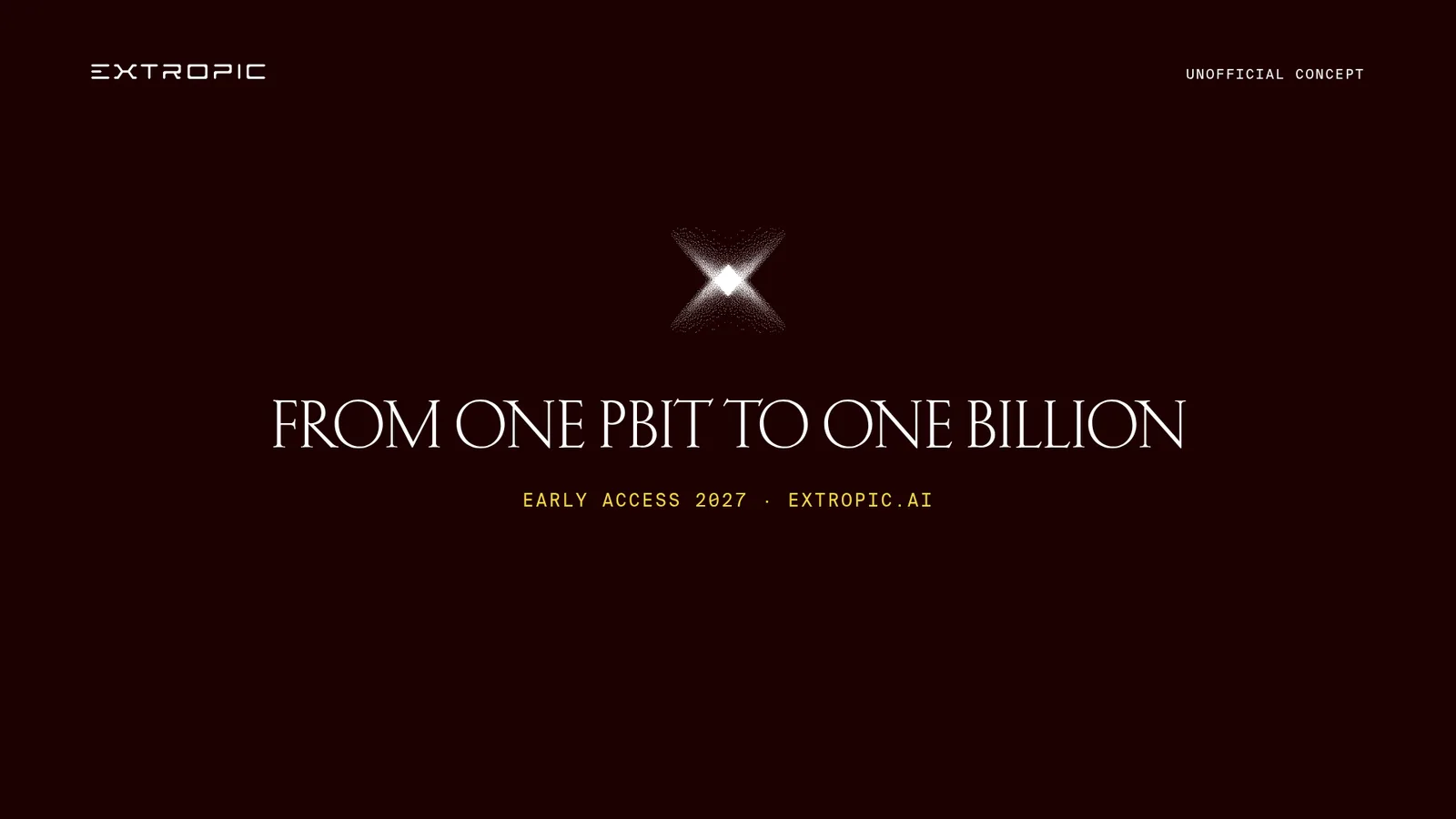
Before: logo fail, the mark “narrowed and horizontally compressed”.
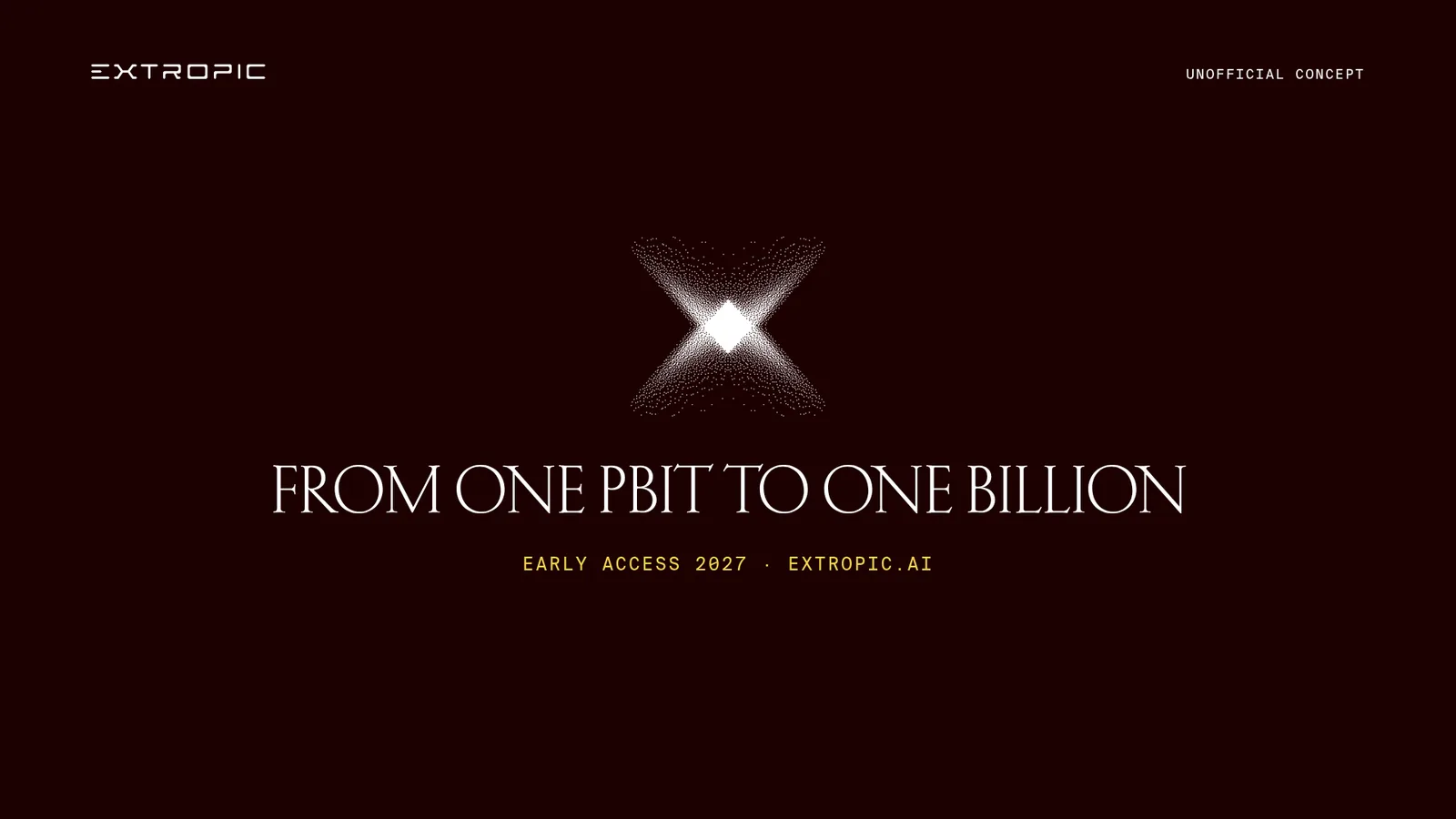
After: the mark at its native size. Logo pass.
The colour check shows why a person still matters. The small gold line, “EARLY ACCESS 2027 · EXTROPIC.AI”, came back uncertain in the first Review, failed in the second, and was uncertain again in the third after it was enlarged: thin gold text is hard to measure against a dark ground. Its source colour was the same in every round. We sampled the final film’s end card: the brightest pixels of that line average #F6D147, against the brand gold #F5D54C, and we accepted the colour on that inspection. That doesn’t explain the second Review’s fail, which checked a separate capture, so the record leaves it unexplained. A correct value in the source file isn’t proof that the checked image was right, which is why a designer looks at every asset rather than only the flagged ones.
Continuity needed more than the end card. We stepped through the whole film, one frame every 0.04 seconds, and viewed every scene change frame by frame. The scenes fade through the dark ground, the wordmark and labels stay fixed, and the product photographs drift slowly without jumping. That pass also found a scene, the one-billion-pbit cluster, that a handful of sampled frames had skipped.
Here is part of the filled record. The full record has 25 rows, including the checks that didn’t apply.
| Version | Check | Result | Evidence | Action |
|---|---|---|---|---|
| Round 1 | Logo is the supplied file | Fail | Review: mark “narrowed and horizontally compressed” | Drawn at native 256 × 237 px in round 2 |
| Round 2 | Colours from the palette | Fail | Review: gold “materially deviates” from the brand gold | Line enlarged from 24 to 30 px |
| Round 3 | Colours from the palette | Uncertain | Review: gold text can’t be judged “due to edge blending” | Agent sampled #F6D147 in the final film; accepted |
| Final | Video continuity | Pass (agent) | Whole film stepped through; scenes fade, nothing jumps | A designer to watch it before delivery |
| Final | People | Not applicable | No people in the film | None |
| Final | Objects and compositing | Pass (agent) | Product photos blend into the ground with no seams or halos | None |
| Final | Input approval | Uncertain | Extropic’s photos, used without a client approval step | Client approval before delivery |
| Final | Product figures | Uncertain | Match the task’s figures; not rechecked against Extropic’s update | Account lead to check before delivery |
| Final | Licences | Uncertain | Brand fonts and site photos, not cleared for client delivery | Clear before delivery |
| Final | Contrast | Pass | Gold 13.8:1 and white 19.9:1 on #1C0101 | None |
| Final | Client approval | Not applicable | A concept example, never delivered to a client | None |
Three rows stay open: approval of the input photos, the product figures and the licences. A real delivery would need people to settle all three, and no automated check does any of them. The agent’s passes aren’t a sign-off either; they tell the designer where to look first.
Keep the record with the files
A QA pass that isn’t written down can’t be shown to a client, and can’t teach you anything next month. For each delivered asset, keep the filled record, the brand check results, the client’s approval and the version they approved, in the same folder as the files.
Then read the records every month or so. If one client’s assets keep failing the same check, fix the cause: their brand guidance, the template, or the prompt that made the assets. How agencies get client approval on AI-made brand work covers what to send the client with the files, and how to manage many client brands with AI covers keeping each client’s brand separate in the first place.
FAQ
Can AI check AI-generated creative?
For the brand groups, an automated check is a good first pass, and it gives a verdict and reason for each check. It can also be inconsistent, as the gold line above shows, so calibrate it on assets you’ve already judged. Claims, likeness, rights, disclosure and most of visual integrity need people. How to check AI images against your brand guidelines covers what software can and can’t judge.
Should we QA every variant in an ad set?
Every variant that will run, yes, because image models change details between variants even from the same prompt. Run the automated brand check on all of them and have a person look at the full set side by side, which catches differences a one-at-a-time review misses.
How is creative QA different from brand compliance?
Brand compliance asks whether an asset follows the brand. Creative QA asks that and more: whether it’s true, cleared, accessible and ready to deliver. What is brand compliance covers the brand part in depth, and brand compliance monitoring covers the checks after an asset is live.
Do we have to tell clients we used AI?
Agree it in the contract or statement of work before the first draft, and follow it. Many clients have their own AI policies, and some platforms and markets require labels on the published asset as well.
More in Agencies
All 5 Agencies articles5 min read
How agencies keep client brands separate across AI tools
Client brands get mixed in two ways: an agent applies the wrong client’s guidance, or one client’s material turns up in chats and projects where it doesn’t belong. Here’s how agencies guard against both in the AI tools they already use.
5 min read
How agencies get client approval for AI-made brand assets
Agree the ground rules before the first draft, check each asset against the client’s brand before they see it, tell them how it was made and what they’re deciding, and put each correction into their brand once.
6 min read
How agencies manage many client brands with AI agents
Give each client job an explicit brand, current guidance and a handoff the next person can use. Keep brand changes separate from campaign feedback without replacing your delivery tools.