How agencies manage many client brands with AI agents
Give each client job an explicit brand, current guidance and a handoff the next person can use. Keep brand changes separate from campaign feedback without replacing your delivery tools.
TL;DR
Keep a small roster that connects each client to its current brand guidance, files and open questions. Name the brand in every job, retrieve the relevant context, and hand over the draft with its sources and remaining decisions. Separate lasting brand changes from campaign instructions. Keep delivery and any agreed client approval in your existing project workflow.
Keep a roster that routes the work
“Use the same look as last time” works only while the person who remembers last time is doing the job. When another writer, designer or agent takes over, it becomes a search through old conversations for a decision nobody recorded.
Give that person a short client record in the project tool or spreadsheet your agency already uses:
| Record | What it helps the next person do |
|---|---|
| Client and brand name | Select the identity for this job |
| Brand reference and account or team | Retrieve the intended brand from the connected system |
| Current source links | Check a disputed rule without searching old attachments |
| Contact for brand questions | Resolve missing or conflicting guidance |
| Last applied brand change | Identify files or jobs that may need updating |
| Open questions | See what remains unknown |
| Delivery links | Find campaigns, drafts, final files and any agreed approvals |
Link to maintained guidance rather than copying the guide into this record. Otherwise a colour change creates another copy to update. The roster should tell people where to work and where to ask, while the brand context carries the instructions and files.
This guide starts after the brand exists. For a new account, the client onboarding checklist covers collecting sources and checking the first task.
Start each job with the intended brand
Name the client, deliverable, audience and campaign request before an agent starts. Preserve the connected system's actual brand reference alongside its readable name. Two records can have similar names; an agent should resolve that ambiguity before drafting.
Access needs its own check. A roster entry does not grant a freelancer permission to see the client's material. Confirm which account is connected and whether the person or workflow may access the selected brand, especially when people join or leave the account.
Rainbrand maintains shared brand guidance and assets that agents can retrieve for recurring client work. With a connected agent, select the client's brand and request a Brief. A Brief contains the guidance and assets relevant to that task. The agent uses it with the tools your agency already uses to make the deliverable.
The connection matters at setup too. Rainbrand adds a new brand to the personal account by default; name the intended team when creating it. The MCP quickstart explains account confirmation and team selection, and the tool reference covers listing accessible brands and teams.
Here is a reusable request for a fictional client, Acme, whose Atlas Pro product is a design app:
Confirm the connected Rainbrand account. Find Acme's ready brand in the team named in this job and confirm its name and Brand ID before continuing. If more than one brand matches, ask which to use. Request a Brief for an Atlas Pro launch email to existing design-team customers, using the campaign request attached to this job. Show the guidance and selected assets, then draft the email. Flag missing product facts. Return the draft without sending it.Keep the client reference and task requirements in your repeatable workflow. Fetch the guidance rather than embedding the whole guide in every reusable prompt. Agencies can use this internally or embed the same brand capabilities in a repeatable service they offer clients.
Decide what feedback changes
Client feedback can refer to one sentence, one campaign or all future work. Record which before updating the brand.
| Feedback | Where the resulting instruction belongs |
|---|---|
| “Use this product name from now on.” | Maintained brand guidance, with the source for the change |
| “This launch uses a warmer visual direction.” | This campaign's request, including its scope |
| “Crop this image more tightly.” | The revision notes for this output |
If “make it warmer” leaves the scope unclear, ask about the work in front of you. Approval of an image does not establish a new rule for every later image.
Use the client's existing decision arrangements. A small account may have one contact; another may have different people for product facts, brand direction and publication. Record those arrangements where they help the next person act.
For a lasting change in Rainbrand, prepare a Brand Edit. It proposes changes to the brand without immediately making them active. Inspect the proposal, answer any requested input, then refine, apply or discard it through the workflow authorised for that account. Request a new Brief after applying it.
Put a short change note in the roster: what changed, which source or decision established it, and which active jobs are affected. An updated brand will help the next task; it will not rewrite a scheduled email or a freelancer's downloaded files.
Keep the files usable by the next creator
A font name is less useful than the exact font file a layout needs. The same goes for a logo preview when the next person needs the original vector artwork. Check that handoffs point to usable files, with the rights needed for the client's work.
Rainbrand's Brand Library is the collection of assets agents should reuse for the brand. Add reusable product photos, approved illustrations or footage deliberately. Generation experiments and temporary uploads remain outside the Library unless added. Written guidance, colours and typography are maintained through brand edits.
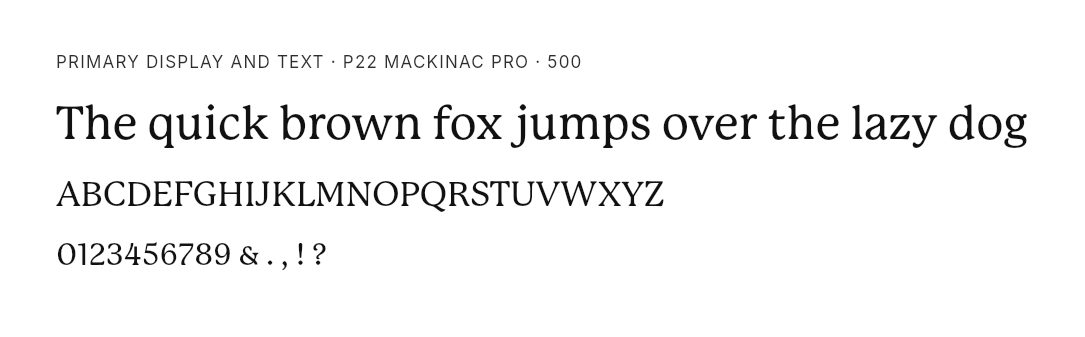
The saved Brief in our Eager demonstration shows what a useful file handoff can contain. Eager is a juice brand; we asked Claude to develop a campaign for a blackcurrant-flavour concept using its brand context. The Brief linked actual font files, including P22 Mackinac Pro 500 in WOFF2 format, alongside matching specimens. Those links supplied both the file and a way to inspect its appearance.
For your clients, give reusable assets clear names and explain their purpose. When a file is superseded, update the references used by active jobs as well as the brand collection. A complete set of current files is easier to hand over than a folder containing several unexplained alternatives.
Hand over the job's current state
The next person needs to know how to continue. A conversation transcript may contain all the facts, but it can also contain rejected directions and outdated drafts.
Include the checks already performed. Rainbrand Review checks work against the brand and returns findings. For a campaign image, submit the finished composition with the expected copy and relevant constraints. For a page or slide, prepare a visual capture of the layout being checked. The agent uses its creation or editing tools to make corrections.
Put the current state of the work in a small record:
Client and authorised brand reference:
Deliverable, audience and campaign request:
Brief or brand-version reference used:
Files used, with usable links:
Latest draft:
Feedback still to apply:
Review findings still open:
Questions and who can answer them:
Any agreed client approval, with its record:
Brand changes since this job started:
Next action and responsible person:
Final file and delivery location:
This is a blank working template. Leave a field empty or mark it inapplicable when the job does not need it. Keep the details that help another person continue.
For a new deliverable, retrieve current brand context. For a revision, check whether a brand change should affect the piece already underway. A correction to a product name may need to reach every active job, while a campaign retaining its previously agreed direction may need its earlier context. Resolve the particular change and record the choice.
A brand check also does not record whether a client accepted an offer, date or product claim. Where your client agreement requires approval, keep that decision in the established delivery workflow and link it from the job.
Maintain the roster when work exposes a problem
Start with exceptions that affect current work: a changed product, repeated corrections, conflicting files, inaccessible assets or a contact who has left. They give you a reason to inspect the context without rereading every client guide on the same schedule.
When a failure recurs, trace it. If several writers use the wrong product name, check whether the guidance and retrieved Brief make the current name clear. If one draft ignores a clear instruction, revise that draft and its creation process. Changing the brand just to make the draft pass would preserve the mistake.
When an account ends or access changes, close its scheduled work and update who can retrieve its brand and files. Keep any retained work according to the client's agreement. Agencies building their own multi-customer software also need the server-side controls in managing customer brands in an AI product.
Try the roster and handoff record on one active job. Have a colleague continue from the record: select the brand, retrieve the guidance, find the latest output and identify the next action. Anything they have to recover from your memory belongs in the record or the maintained guidance before you use the process across the rest of the roster.
More in Agencies
9 min read
How to onboard a client brand into AI: an agency checklist
Collect the client's current sources, resolve conflicting guidance, create reusable brand context and check the first task. Keep the files, findings and unanswered questions in a handoff your team can use.