
By Siddharth Borderwala
Published
17 min read
How to run creative and content operations with AI
What creative operations and content operations cover, a content production workflow stage by stage with where AI agents fit, a stage ledger from one real request with its capacity and scope decisions, what creative automation tools do, and how to keep assets on-brand as volume grows.
TL;DR
Creative operations runs how design, video and brand assets are requested, made, checked and delivered. Content operations does the same for content across its whole life. When AI agents do much of the making, the operation is the record around them: who owns each stage, what goes in and comes out, where a failure goes back to, and what was decided when capacity or scope changed.
On November 14, 2026, we read 70 live job ads for brand, content, marketing operations and agency roles that involve making assets with AI. By our count, eleven asked for content at scale or high-volume content, and twenty-four for review processes, QA or a quality bar. Content operations appeared in five and creative operations in four. R/GA’s ad sets the bar at “never looks like hastily generated slop”; Viral Nation’s asks for content at scale “without sacrificing quality or brand voice”.
Both ads want more assets without lower quality. Agents can make the assets. Whether the volume holds its quality depends on decisions around them: what each agent was asked for, what it knew about the brand, who checked what came back, and what happened when a check failed. This guide maps those decisions, then shows them in a ledger from one real request.
Creative operations and content operations
Creative operations is the system around making creative assets: how requests arrive, who makes what, how drafts get reviewed and approved, and how finished files are delivered and stored. Superside describes it as the system that governs how creative assets are requested, produced, approved and delivered at scale. Atlassian describes disciplines that “align people, workflows, and tools so creative teams can move quickly while maintaining consistency and brand integrity”.
Content operations covers the same ground for content, and follows it for longer: from planning through publishing, updating and taking it down, under the rules its content governance sets. Colleen Jones of Content Science defines it as “the behind-the-scenes work of managing content activities as effectively and efficiently as possible”, across people, process and technology.
Every source draws the line between them a little differently. This is how it usually falls in practice:
| Creative operations | Content operations | |
|---|---|---|
| What it runs | Design, video and brand assets, and studio capacity | Writing, publishing and each piece’s life on a channel |
| Typical outputs | Ads, social graphics, video, decks, packaging | Articles, emails, product and help pages, newsletters |
| Usual owner | A creative operations lead in-house, or an agency | A content, editorial or marketing operations lead |
| Systems it lives in | Project management, proofing, digital asset management | Content management system, editorial calendar |
| The question it answers | Can we take this request, and is the result on-brand? | What do we publish, where, and when does it come down? |
Agencies and Adobe call the whole chain, from planning to delivery and measurement, a content supply chain. It’s a useful name when one team owns the lot.
With agents doing the making, the split matters less than it did. The same agent drafts a launch email and makes its header image, so running one intake and one review for both removes a handoff where things get lost. Keep separate owners if your organisation needs them, but give them one workflow.
What changes with AI
Agents speed up drafting, building and generating, so more of an operation’s attention goes to the stages around production: the brief, the checks, and what to do when a check fails. In the run below, the Brief took under two minutes and each check under a minute and a half; the decisions between them were the part that needed a person.
Three other things change with it.
- Agents start each task knowing nothing about your brand beyond their training and what the task gives them. Every tool that holds its own copy of the brand, in a prompt, a project’s instructions or a template, keeps that copy until someone updates it by hand. Copies drift apart.
- Generated variants differ in more ways than templated ones. Regenerating a background can also change the product, the lettering and the logo, so each variant is a new composition to check.
- Output converges. In the WFA and LIONS Clients and Creativity 2026 study of more than 160 senior marketers at 86 brand owners, 58% were concerned about “a sea of creative sameness”, and only 35% said they used AI to get better creative results rather than just efficiencies.
One answer to cheap production is to make much less. Florian Radke argues for cutting publishing volume by half and spending the time on original material. That’s a strategy decision. The operations still have to carry whatever volume the plan calls for, at the brand’s standard.
The content production workflow
Most published content production workflows run from a brief to publishing. The six stages below add a stage that the published workflows we read left out: retirement. Agents make it urgent, because an old asset or an old rule that stays reachable gets reused.
| Stage | What agents can do | What stays with a person |
|---|---|---|
| Intake and brief | Turn a request into a structured brief; flag missing facts | Deciding what’s worth making, and for whom |
| Production | Draft copy, build pages and decks, generate images and video, fill templates | Creative direction and picking among options |
| Review | Check finished assets against the brand and the facts; fix and recheck | Judgment calls and findings a check can’t settle |
| Approval | Assemble what was checked, by whom, against which version | The sign-off itself |
| Distribution | Export each size and placement, write alt text, fill platform fields | Launch timing and channel choices |
| Retirement and updates | Find every asset that uses an old rule, claim or file | Deciding what to update, pull or leave |
Intake and brief
For an agent, the brief is the prompt. A vague request produces a generic asset, and a lot of what gets called AI slop starts there. Superside finds the fields stakeholders most often skip are the business objective, the audience and the mandatory elements, such as legal lines, required logos and character limits discovered after the design is done.
A request form that captures these, a short version of a creative brief, is the cheapest quality control you have:
Request:        One asset type, in one sentence
Objective:      What it should change
Audience:
Deliverables:   Formats, sizes, placements, length
Exact copy:     Headline, call to action, legal
                lines, product names as written
Facts:          Each claim, with its source page
Brand:          Which brand, and any campaign
                exception to its rules
Avoid:          Claims, imagery or words to leave out
References:     Approved photos, assets to match
Due, approver:
An agent can fill most of it from a loose request and come back with the gaps. Deciding whether the asset should exist at all stays with a person.
Production
Here agents do the most: copy, code for pages and documents, decks, and images or video through models. What they need from the brand is specific to the task. A layout needs exact colour values and where each goes, the font files and the original logo with its placement rules. An image model needs approved photos it can follow. Copy needs voice rules with examples and the claims it may make.
When several assets share an audience and the same facts, one brief can cover all of them, as in the run below. For ad sets, branch every variant from the approved master rather than from the last variant, as the ad creative guide explains.
Review
Check the finished asset, rendered as it will appear, against three things: the brand’s rules for colour, type, logo and voice; the facts, against the sources named in the brief; and the release requirements, such as rights, accessibility and platform specs. An agent can run brand checks, fix what fails and check again. A person settles anything the checks can’t: whether a product is drawn correctly, whether a joke lands, whether a finding marked uncertain matters. Reviewing AI content before it’s published covers how to read the results.
Approval
Fast.io draws the distinction well: review improves the asset, and approval confirms it’s ready to publish. A passed brand check is evidence for the approver, not the approval. Keep the sign-off with a named person and a specific version, and record what was checked. Agencies add a round with the client, with its own rules for what the client is asked to approve.
Distribution
Each channel wants its own sizes, safe zones, alt text and metadata, and ad platforms may add generated backgrounds or text of their own. Agents handle most of the mechanics. Any variant made by regenerating rather than cropping is a new asset and goes back through review, as does each market’s version of an ad.
Retirement and updates
Offers end, claims change, a logo gets redrawn. The asset that carried the old version comes down, and so must every source an agent could copy it from: the old photo in the shared folder, the retired tagline in a saved prompt, the template with last year’s colours. Keep a record of where each asset runs, change the brand once rather than in each tool, and remove retired files from wherever agents pick up references. Updating brand guidelines across AI tools walks through the change itself, and rolling out a positioning change shows how to find every asset that still says the old thing.
One request, logged stage by stage
A finished set of assets doesn’t show an operation; the record around it does. So on November 16, 2026, we ran one small request and logged every stage.
Tracksmith is an independent running brand from New England. Its homepage that day promoted a Holiday Gift Guide with the line “Something for every runner” and free shipping on orders of $200 or more. The request was a concept promotion for that guide in five placements, using the site’s wording as exact copy. Claude did the production. It was connected to Rainbrand, which keeps a brand’s identity, guidance and files as shared context that agents can call. Claude asked Rainbrand for a Brief, the guidance and files selected for this task, and checked each finished capture with a Review, which compares an image with the brand’s colour, typography, logo and copy rules and returns a verdict and a reason for each. We played the requester and the brand lead.
| Stage | Owner | Input | Output | Return path | Status |
|---|---|---|---|---|---|
| Intake | Requester | Five placements; exact copy from the homepage | Request form | Done | |
| Capacity | Brand lead | Five placements; six Reviews, two per asset | Three placements this cycle | Story and email header to the next cycle | Two deferred |
| Brief | Claude, through Rainbrand | The request | Logo files, two typefaces, four colours, two photos, a caution on the offer | Done | |
| Scope change | Requester | The Brief’s caution on the offer’s terms | Offer line removed from all three | Back to intake once the offer’s terms are known | Open |
| Production | Claude | The Brief’s files | Three layouts in HTML, captured at full size | Done | |
| Review, round 1 | Rainbrand Review | Three captures and the expected copy | Copy failed on all three; logo failed on one; colour and type uncertain | Copy to production; logo held for round 2 | Done |
| Review, round 2 | Rainbrand Review | The revised captures | Copy and logo passed; typography failed on all three; colour uncertain | Review budget used: to the brand lead | Done |
| Decision | Brand lead | Review evidence and the layouts’ source files | Call to action moved to the Brief’s other weight; colours confirmed | No third Review; change checked by eye, logged | Done |
| Approval | Brand lead | Final files and this ledger | Approved as a concept | Not released |
The capacity decision. The request asked for a 1:1 post, a 4:5 feed post, a 1.91:1 web banner, a 9:16 story and a 600 × 200 email header. Before starting, we set a budget of six Reviews for the whole cycle and allocated two rounds to each asset, which covered three assets, not five. The budget was our own choice for this simulated run, not a measured limit on anyone’s team; in a real operation it would come from reviewers’ time or the checking spend the team can carry. The Brief had also warned that both photos it selected were landscape, so tighter portrait crops would need checking at final size, which made the 9:16 story the obvious one to hold. It moved to the next cycle with the email header, and the ledger records why.
The scope change. The Brief kept the requested wording but stopped short of the offer. It said the brand’s materials didn’t verify the promotion and listed what they didn’t specify: “currency, eligible destinations, exclusions, whether the threshold is calculated before tax/shipping, or offer duration”, with the instruction “Do not invent terms or expand the claim”. The homepage we read was set to the US store and didn’t answer those questions, so the requester removed the offer line from all three placements. That row stays open until the offer’s owner confirms the terms; adding the line back is a new intake, not a quiet edit.
What the checks found, and what came back.
- In round 1, the copy check failed all three. The layout set the call to action in capitals as a label style, and the request’s exact copy was “Shop the Gift Guide”. We changed the layout to the requested case.
- The logo check failed the 1:1 post, saying the hare sat farther from the wordmark than in the approved artwork. The same SVG file passed on the other two. We didn’t move or change the logo, and in round 2 the check passed it on the 1:1, where the only change was the call to action’s lettering.
- In round 2, copy and logo passed everywhere, and typography failed on all three. The call to action was set in the Brief’s 400 weight of Akzidenz Grotesk Extended, and the check compared it with the 500 weight, which the Brief names for headings and compact text. In round 1, with the call to action in capitals, the same check had only called its weight uncertain.
- Colour came back uncertain in both rounds because the small lettering couldn’t be measured. The brand lead confirmed against the layout files that every colour was one of the Brief’s four values.
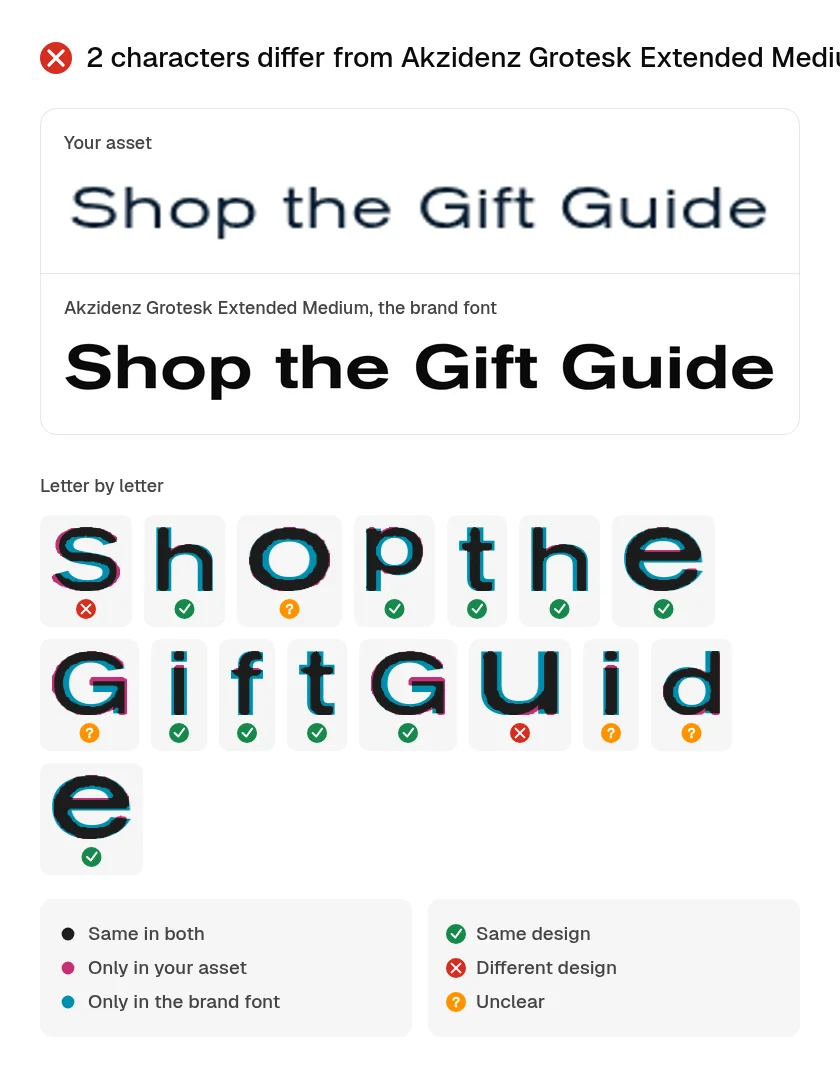
Round 2 typography evidence for the 1:1 post.
That left a typography failure after the last budgeted round. The budget decided what happened next: no third Review, and the brand lead took the decision. They moved the call to action to the 500-weight file from the same Brief, compared it by eye with the font’s specimen, and logged the change as made after the last check. Review doesn’t edit assets, so every change in the ledger was made by Claude or the brand lead and recorded against a round.

1:1 post, final

4:5 post, final

1.91:1 banner, final. All three are concept assets.
The finished assets hide most of this. They don’t show that none of them passed every check first time, which return path each failure took, or that the request isn’t finished: two placements are deferred and the offer is open.
Copy the ledger for your own requests:
Stage:        Intake, capacity, brief, scope,
              production, review, decision,
              approval, distribution
Owner:        A named person, agent or check
Input:        What this stage received
Output:       What it produced, with IDs
Return path:  Where a failure or change goes
Status:       Done, open, deferred, not run
Date:
Creative automation tools
Creative automation tools produce many versions of assets from fewer inputs. They come in two kinds that hold the brand in different ways, and it helps to keep them apart when choosing one.
Template-driven tools start from a master design. A designer builds it once, locks the brand elements and marks what may change; a data feed and a set of rules then produce every size, language, price and product. Bannerflow gives the arithmetic: a campaign across five markets in ten sizes and four formats is 200 creatives before any translation. Bynder’s Studio works on the same principle, as do the tools in Superside’s and Marq’s 2026 lists, each with its own emphasis: high-volume ad production tied to performance data for Celtra, print and digital templates for CHILI publish, multi-market rollout for Storyteq, and sales and franchise teams making their own materials inside locked templates for Marq.
Generative tools make new compositions. Image, video and language models, and the agents that call them, take a prompt and references and produce something that didn’t exist before. Adobe’s GenStudio for Performance Marketing generates campaign variations this way, and some template platforms, Bannerflow among them, now include generation too. Nothing is locked, so the brand holds only as well as the context that went in and the checks that come after.
| Template-driven | Generative | |
|---|---|---|
| Starts from | One approved master design | A prompt, reference images and brand context |
| What varies | Size, language, price, product, copy in fields | Composition, scene, styling, copy, anything not specified |
| How the brand holds | Locked layers in the template | Context supplied per task, then a check of each output |
| Typical failures | Long translations overflow, crops miss, wrong feed data | Redrawn logos, changed products, garbled lettering, invented claims |
| How to check | By exception: the outliers | Every output, including every variant |
| Best for | High-volume versions of a settled design | New ideas, new formats, one-off assets |
Dynamic creative optimisation is a third thing often lumped in. It decides which variant to serve to whom; it doesn’t make the variants.
Use templates when the design is settled and only the fields change. Use generation when the composition has to change, then check every output, not a sample. A common pattern runs both: generate options, pick a direction, then lock the winner into a template or an approved master that variants branch from. Agents can drive either route, filling a template through its API or calling a model directly.
Keeping assets on-brand at volume
At volume, three habits decide whether the brand holds.
One maintained source, not copies. Give each task the selection its output needs, as described under production, from one place that changes when the brand does. If each tool keeps its own pasted copy of the guide, the copies diverge the first time anything changes, and nobody can say which version made which asset. In Rainbrand, a change is a brand edit you inspect and apply; agents then request a fresh Brief. A Brief saved before the edit keeps the old version.
Every output checked, including every variant. A passed check on the master says nothing about the twelfth regenerated variant. Failures go back to the agent with a specific finding, and the revision is checked again, up to the cap you set. Findings the check can’t settle go to a person, as they did in the run above.
The cause fixed once. When the same failure keeps coming back, find where it started before fixing the next asset. If the guidance was wrong or missing, change the brand once, so every later task gets the correction. The guide to keeping AI-generated content on brand works through that loop with a real correction.
The team’s project management, proofing, asset library and publishing tools stay as they are, and so do the requests, assignments and approvals that run through them. The ledger above can live in any of them.
Measuring the operation
Most of the useful measures are the ones creative operations already tracked, plus a few that show whether the brand is holding.
| Measure | What it tells you |
|---|---|
| Time from request to publish | Where assets wait, and whether that’s intake, review or approval |
| Requests sent back at intake | Whether the request form asks for what makers need |
| First-pass rate on brand checks | How often assets clear every check on the first round |
| Revision rounds per asset | Brief quality; Superside treats two or three as normal |
| Items deferred or left open | Whether capacity matches demand, and which scope changes linger |
| Approval wait | Whether sign-off has a clear owner |
| Problems found after publishing | What review missed |
Read first-pass rate with care. In the run above it was zero of three, yet none of the first-round results showed missing or wrong brand context: the copy failure came from a layout choice, the logo failure cleared in round 2 with the logo unchanged, and the uncertain results came from lettering too small to measure. It moves with the mix of tasks, how assets are captured and which checks you run, not only with how good the brand context is. Compare it within one asset type and one check setup.
Adobe’s workflow guide tracks reuse, time to publish and approval cycle time in much the same way. For the brand-check measures in more depth, such as failures grouped by rule and the share of uncertain findings, see what brand compliance covers.
FAQ
What does a creative operations manager do?
They design how requests become delivered assets, rather than making the assets themselves: briefing standards, workflow stages and handoffs, capacity planning, tools and the measures that show what’s working. With AI agents, the role also covers what brand context each task gets, which checks every asset passes before approval, and who settles the findings a check can’t.
How many review rounds should an asset get?
Set a number per asset type before work starts, based on what a failure would cost and what checking costs you, and write down what happens when the last round still fails. We used two rounds, with a person deciding the rest, for the small social set above. A regulated claim or a print run may justify more; a quick internal graphic may need one.
More in AI tools
All 10 AI tools articles11 min read
How to build a brand prompt library for your marketing team
A brand prompt library is a shared set of tested prompts for the assets your team makes every week. Keep the brand out of each prompt and have it fetch current brand context instead, put an acceptance check at the end of every prompt, and test each one on a normal and an awkward task. With four prompts we tested, including what went wrong.
4 min read
How to give Claude Code and Cursor your brand, not just your design system
Coding agents read your design system and instruction files, but a landing page also needs your voice, product claims, imagery and logo rules. Keep code conventions in the repo, fetch the current brand for each task, and check the page before it merges.
3 min read
How to use ChatGPT for marketing and stay on brand
Use ChatGPT to research, draft, analyse and make campaign assets from real sources. Keep projects for campaign work, fetch current brand context through a connection, and check the deliverables before publication.