
Checked
Higgsfield with Rainbrand
Higgsfield MCP for on-brand video and images
Connect Rainbrand with Higgsfield's MCP to give Higgsfield your brand's logos and photos. Make on-brand video and images, and review each image against the brand.
Written by Siddharth Borderwala, Founding Engineer at Rainbrand
Higgsfield and Rainbrand each run an MCP server, and you connect both to the same agent, such as Claude or Codex. Before Higgsfield renders anything, the agent asks Rainbrand for a Brief with the guidance, reference photos, logo and fonts for that one task, passes it to Higgsfield with the prompt, and can then ask Rainbrand to Review the image. Higgsfield's MCP needs a paid Higgsfield plan, and Claude's Free plan holds only one custom connector, so adding both takes a paid Claude plan.
Connect both servers in Claude
Higgsfield doesn't read from Rainbrand. Claude sits between them: it requests a Brief from Rainbrand, imports the Brief's images into Higgsfield and writes the Higgsfield prompt from the Brief's guidance. So both go into the same Claude account as custom connectors.
- Open the Rainbrand connector in Claude. It opens Claude's Add custom connector dialog with the name and address filled in. Add it, then select Connect and sign in to Rainbrand.
- Do the same with the Higgsfield connector, whose address is
https://mcp.higgsfield.ai/mcp, and sign in to Higgsfield. There's no API key. If you're already signed in at higgsfield.ai, that step finishes by itself. - In a new chat, open the + menu, then Connectors, and check that both are switched on.
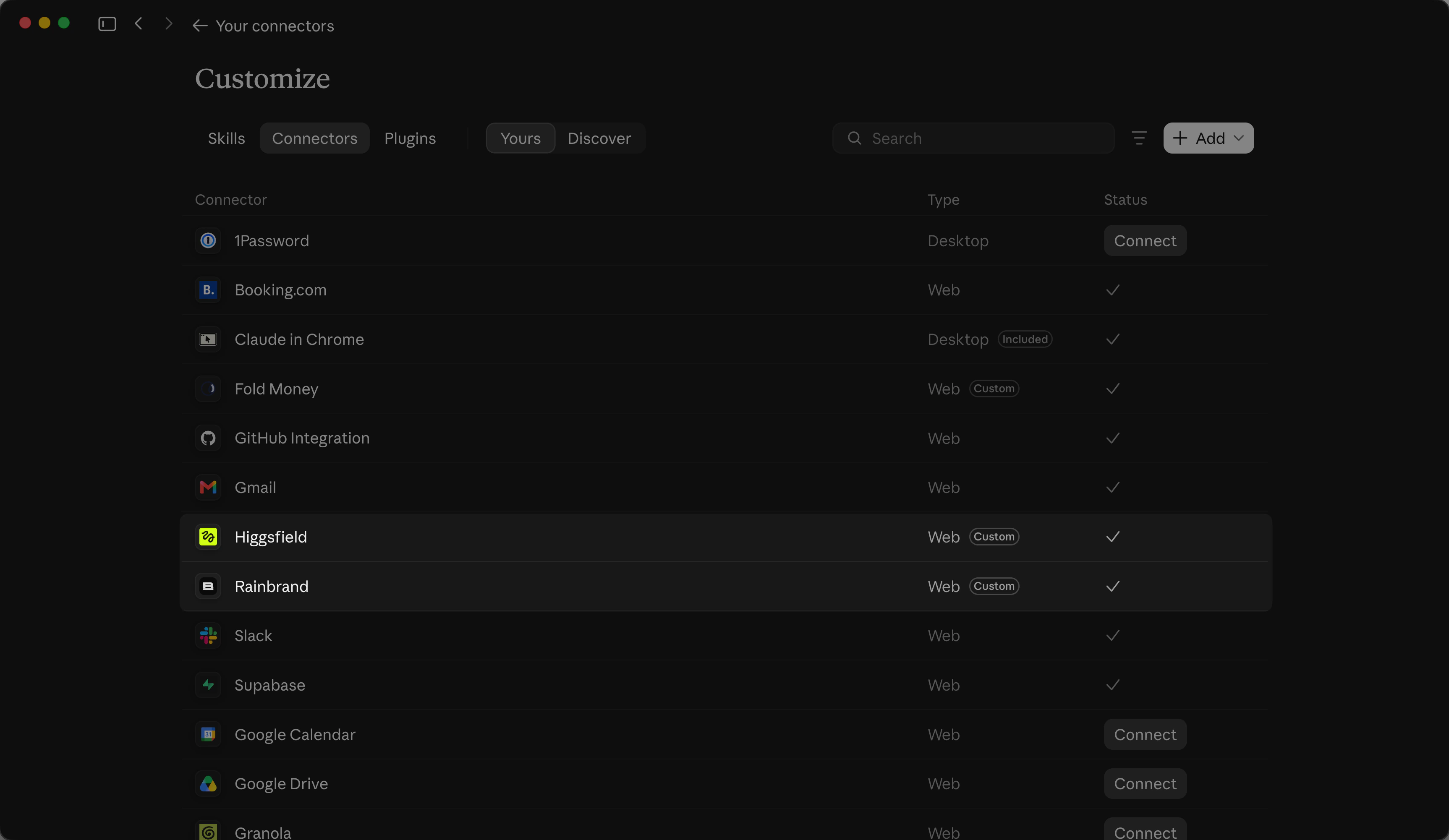
Then check that both accounts answer. Higgsfield suggests asking for your credit balance.
Show me which Rainbrand account is connected, then my Higgsfield credit balance.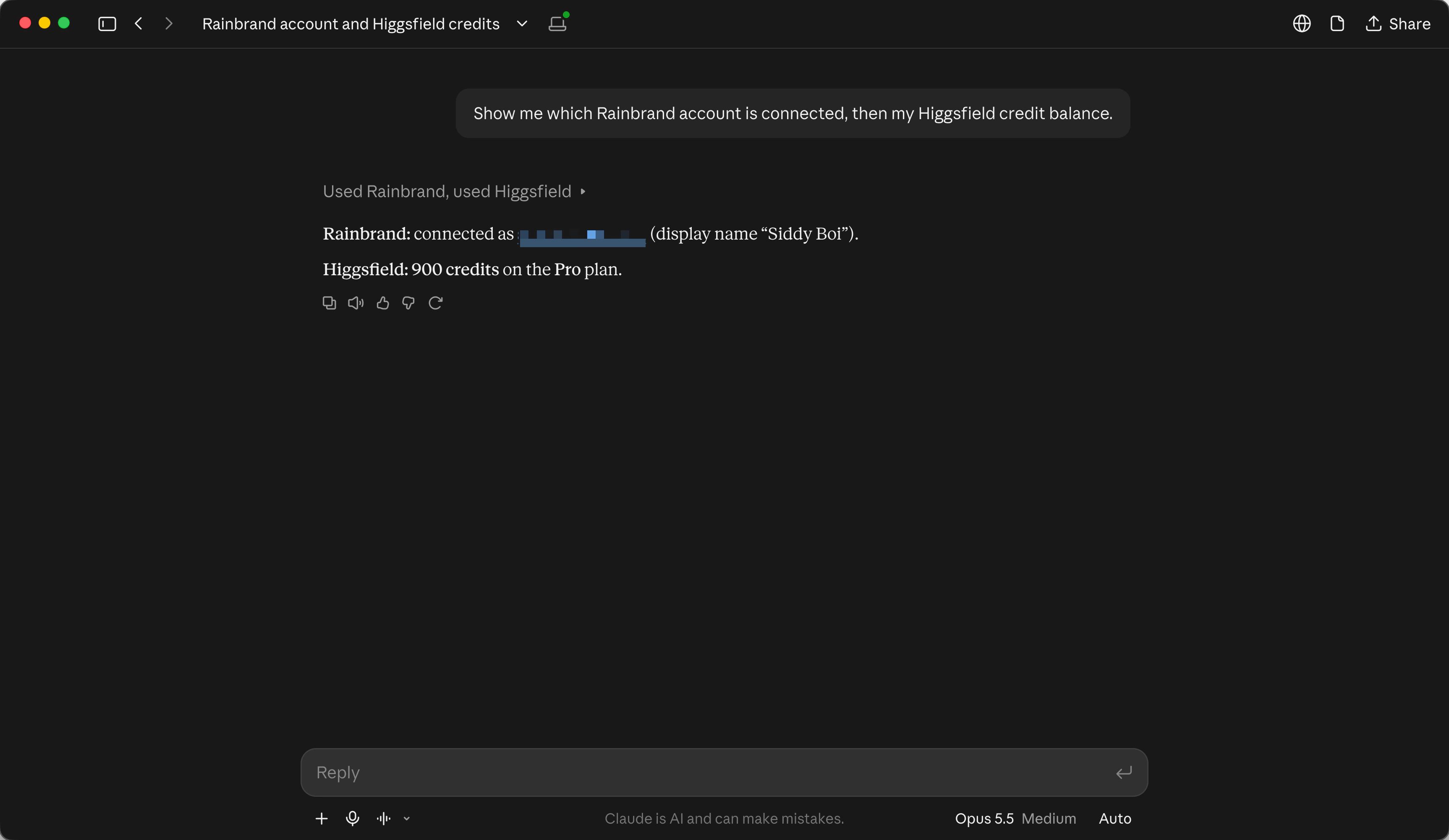
In Codex or Cursor
- Codex
Install the Rainbrand plugin, or add the server with
codex mcp add rainbrand --url https://mcp.rainbrand.com/mcpand sign in withcodex mcp login rainbrand. For coding agents, Higgsfield recommends its CLI and skills over its MCP server: runnpx skills add higgsfield-ai/skills, thenhiggsfield auth login.- Cursor
Install Higgsfield from the Cursor Marketplace (
/add-plugin higgsfieldin chat), which adds its MCP server. Add Rainbrand to~/.cursor/mcp.jsonwith the addresshttps://mcp.rainbrand.com/mcp, then sign in withagent mcp login rainbrand.
Which plans can use it
- Higgsfield
The MCP server needs an active paid Higgsfield subscription. Every generation through it uses credits at standard rates, even on models your plan has Unlimited access to on higgsfield.ai. Seedance 2.5 isn't on the Starter and Basic plans.
- Claude
Free accounts can add one custom connector, so connecting both needs Pro, Max, Ultra, Team or Enterprise. On Team, an Owner adds each connector for the organisation; on Enterprise, so can members whose role can manage the organisation's libraries. Then each person connects it.
- Rainbrand
Every Rainbrand plan works. Briefs and Reviews use Rainbrand credits.
Pick a brand, or add one
If your team already has brands in Rainbrand, ask Claude to list them. To add one, give Claude what defines it: a website, a brand guide PDF, logos or images. Files go through Rainbrand's file picker, which opens in the chat.
Get a Brief for the bottle shot
I used Graza, which sells olive oil in squeeze bottles: Drizzle, a finishing oil, and Sizzle, for cooking. The run makes a photograph of the two bottles for Instagram in Higgsfield, a 5-second clip from it, and a post with a headline and Graza's logo. Graza's page in Rainbrand's brand library shows its colours, type, logos and voice.
I ran it on October 31, 2026 in the Claude desktop app with Opus 5.5, on Higgsfield's Pro plan. I added Graza from graza.co with its three logo files: the wordmark, a cream wordmark for dark grounds and the olive symbol. Graza was already in my Rainbrand account from the brand library, so I said a duplicate was fine.
Add a brand in Rainbrand from graza.co and the logo files I upload. Open Rainbrand's file picker for the files. Wait until the brand is ready, then show me its name and a summary of its guidance. It's OK to create a duplicate brand.Claude opened Rainbrand's file picker in the chat, and I uploaded the three files.
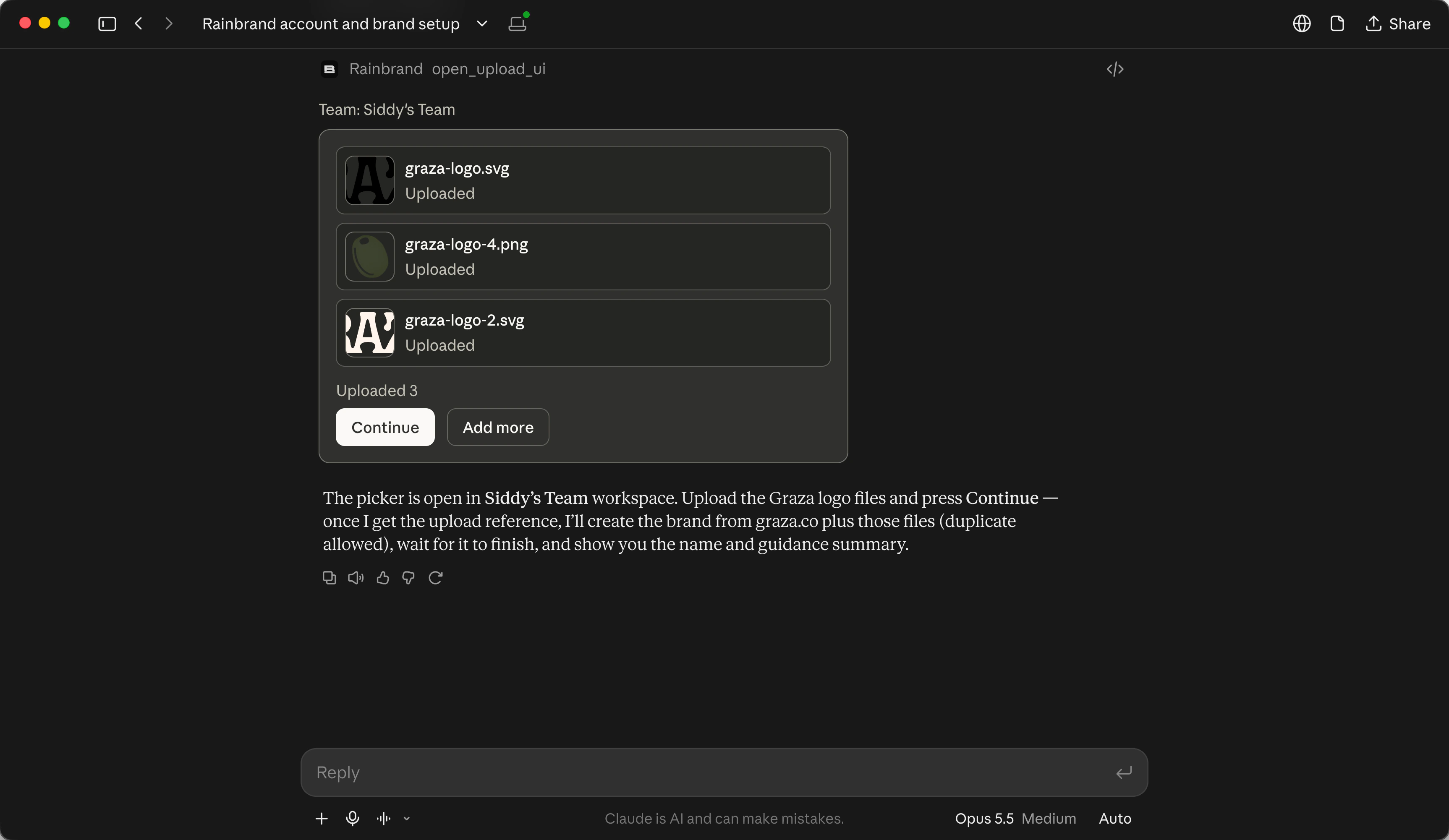
The brand came back with 31 files, product shots of both bottles among them. Its summary gave chartreuse #9EEF80 as the accent and button colour, dark olive #3C422E for text, warm cream #F6E6D9 for backgrounds, ITC Garamond Condensed for headings and body copy, GT Alpina Typewriter for labels, and four logo files.
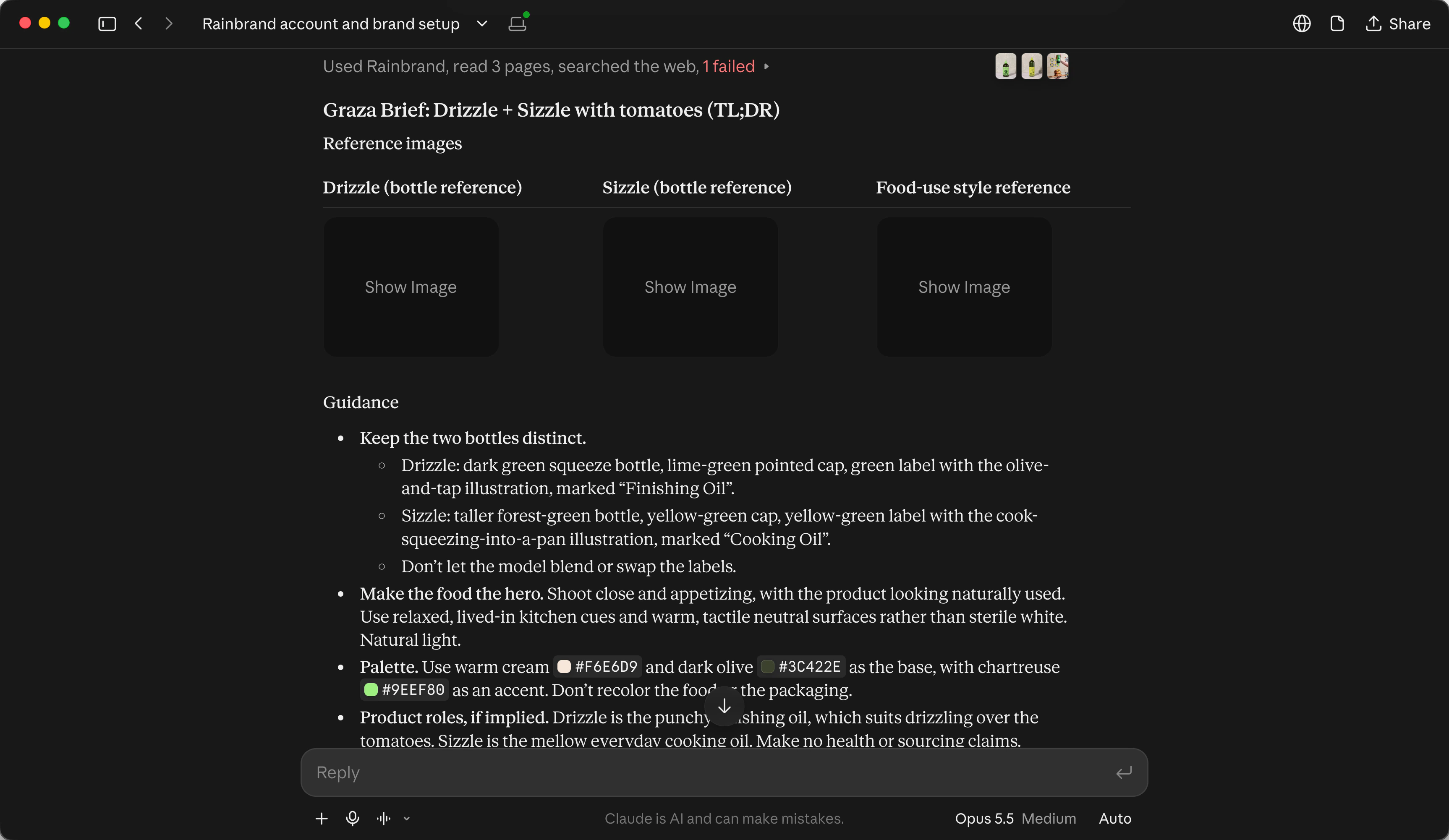
Higgsfield works from a prompt and reference images, and the Brief tells Claude which images to send and what the prompt has to respect.
Request a Rainbrand Brief for Graza. The task is a 4:5 photograph for Instagram of a Drizzle bottle and a Sizzle bottle beside a plate of sliced tomatoes, made in Higgsfield with Nano Banana Pro, then animated into a 5-second clip with Seedance 2.5. No text or logo apart from the bottles' own labels. Check the bottles against their pages on graza.co. Wait for the Brief, then show me its guidance and reference images in a TL;DR format.The Brief came back in 24 seconds with three images: a studio shot of each bottle, and a hand squeezing Drizzle over a sandwich. It said to keep the two bottles distinct and not let the model blend or swap their labels. Drizzle is the dark green bottle with a lime cap and a green label with an olive-and-tap drawing, marked "Finishing Oil". Sizzle is the taller one, with a yellow-green label showing a cook squeezing oil into a pan, marked "Cooking Oil". The food should be the hero, in a lived-in kitchen with natural light and warm surfaces rather than sterile white, with cream and olive as the base and chartreuse as an accent, and no added text.
It also said what the brand couldn't settle: it has no photo with tomatoes, and its bottle photos weren't checked against the current product pages. Claude checked graza.co itself. Drizzle is the 500 mL "Punchy" finishing oil and Sizzle the 750 mL "Mellow" cooking oil, which matched the Brief's labels. It couldn't load the site's product photos to compare them, and it noticed Graza now sells both oils in glass too, so it said to ask the model for squeeze bottles by name.
Make the still in Higgsfield
Higgsfield can't see images attached to a chat. Claude imports each one into Higgsfield from its link, and Higgsfield passes the imports to the model as references.
Import the Brief's reference images into Higgsfield, plus the Drizzle and Sizzle product photos from graza.co. Then generate the photograph in Higgsfield with Nano Banana Pro at 4:5, in the setting and light the Brief describes, with both bottles and their labels as they are in the product photos.Higgsfield imported all five images from their links: the Brief's three, which are rainbrand.com links, and two product photos from graza.co. Searching Higgsfield's models didn't turn up Nano Banana Pro, so Claude asked for it by its ID, at 4:5 and 2K, with the five images as references.
The still took about a minute and a half and came back at 1856 by 2304. Higgsfield's card labelled it Nano Banana Pro, and the job record named nano_banana_2, which Higgsfield's model catalogue lists as another ID for Nano Banana Pro. Claude couldn't look at the result itself: its sandbox wasn't allowed to download from Higgsfield's image host, so it asked me to check the labels and that Sizzle was the taller bottle. Both came out right.
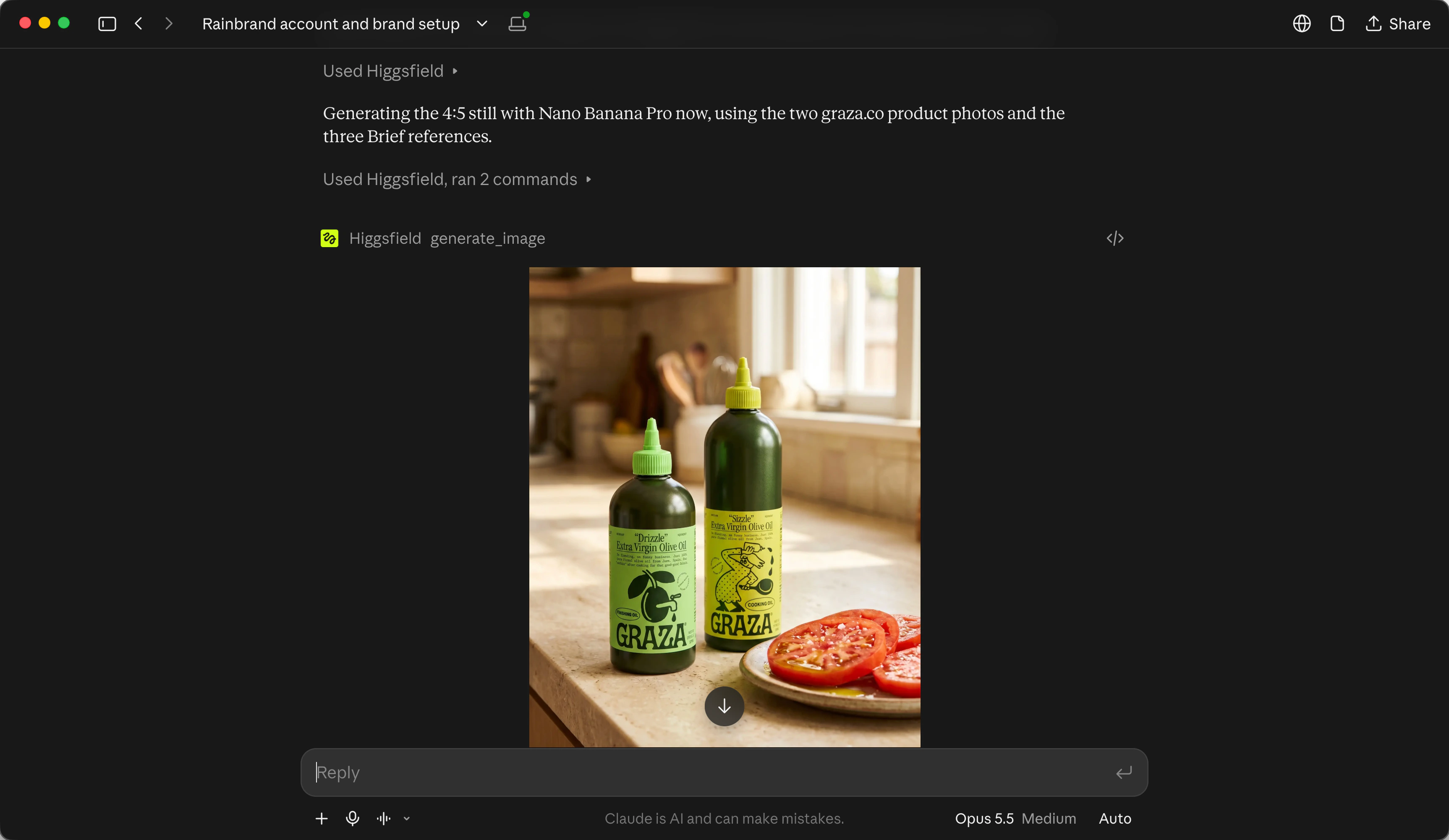
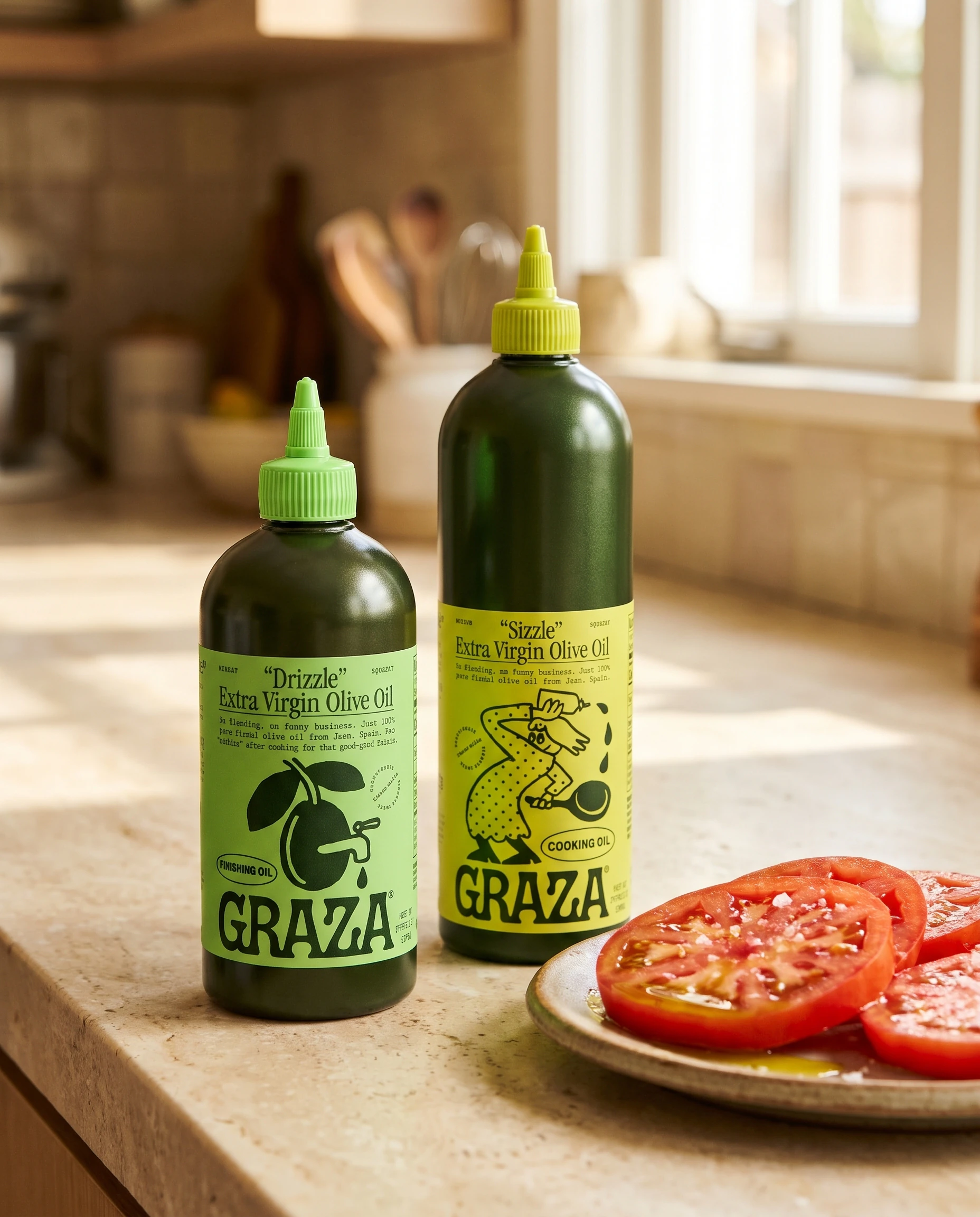
Made in Higgsfield, Oct 31, 2026.
The large lettering on the labels is right. The small print isn't: the line on Drizzle reads "Sa flending, on funny business. Just 100% pare firmial olive oil from Jsen", which isn't real text.
Animate it into a 5-second clip
Animate that still in Higgsfield with Seedance 2.5: 5 seconds at 720p, starting on the still. A hand comes in, picks up the Drizzle bottle and squeezes a thin line of oil over the tomatoes. The camera stays still. Keep both labels steady and readable. No added text and no cuts.Seedance 2.5 in Higgsfield lists no 4:5 size, so Claude set the aspect ratio to auto. Higgsfield's job record then gave the clip as 1280 by 720, so Claude told me it had come out landscape and offered a second render at 3:4. The file itself is 864 by 1072, the same shape as the still, so it didn't need one.
The clip starts on the still and has sound, which Seedance adds unless you turn it off. In the first quarter of a second the camera pulls back a little, which the prompt asked it not to do, then it holds still. A hand picks up Drizzle, turns it over and squeezes a thin line of oil onto the tomatoes, while Sizzle stays where it is. Both labels stay readable.
Seedance 2.5 in Higgsfield, 5 seconds, Oct 31, 2026.
Make the post and check it against the brand
A headline and a logo need different guidance from a photograph, so I asked for a second Brief for the post.
Request a Rainbrand Brief for an Instagram post made from that still, with the headline “Drizzle to finish. Sizzle to cook.” and the Graza logo. Make the post in Higgsfield with Nano Banana Pro at 4:5 from the still, using the Brief's logo file and type guidance. Then request a Rainbrand Review for colour, typography, logo and copy. Fix anything that fails and review again.The second Brief took 44 seconds. It chose the black wordmark for a light, warm photo, approved the dark olive version as an alternative, and kept the cream one for dark backgrounds. It set the headline in ITC Garamond Condensed, as written with its sentence case and full stops, in dark olive #3C422E, and noted that the font file the brand has is the 300 weight. On copy, it said the line fits Graza's voice and keeps finishing and cooking apart, and to add no other claims.
Higgsfield couldn't import the black wordmark, an SVG file: "URL import failed: Something went wrong." Claude switched to the dark olive wordmark, a PNG, and imported the font specimen from the Brief as the reference for the type. It then sent each post to the Review by its Higgsfield link, which Rainbrand could download.
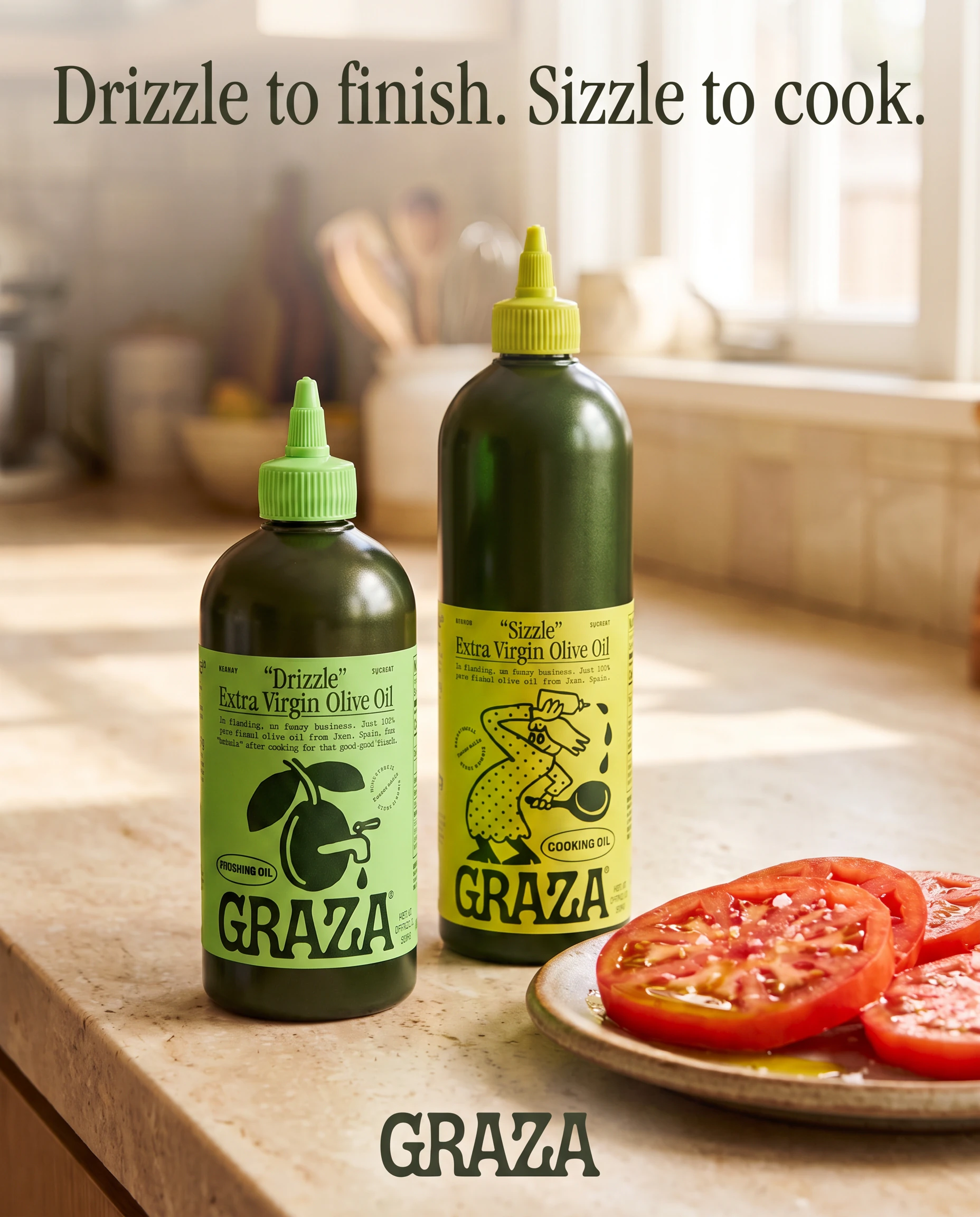
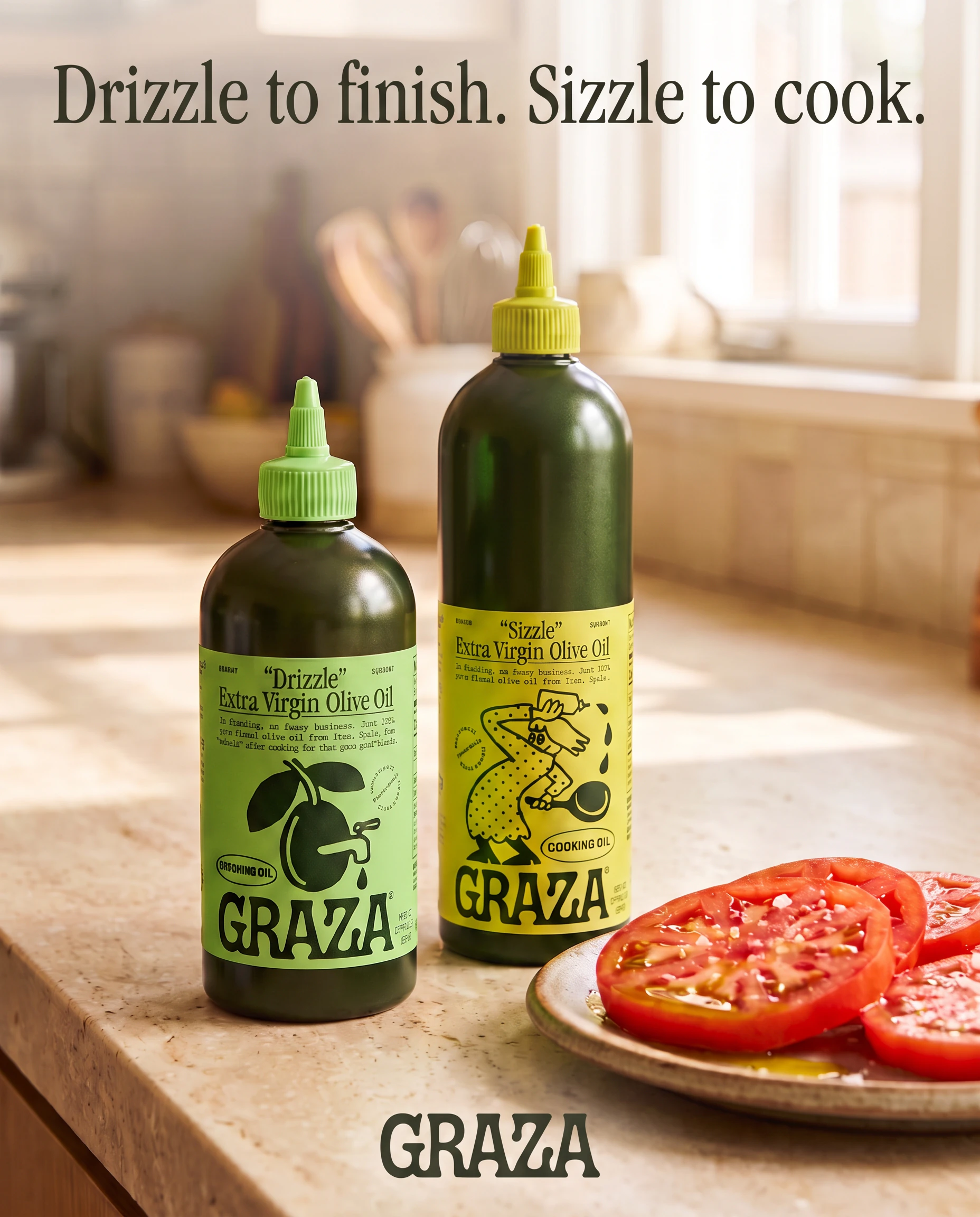
Made in Higgsfield from the still, Oct 31, 2026.
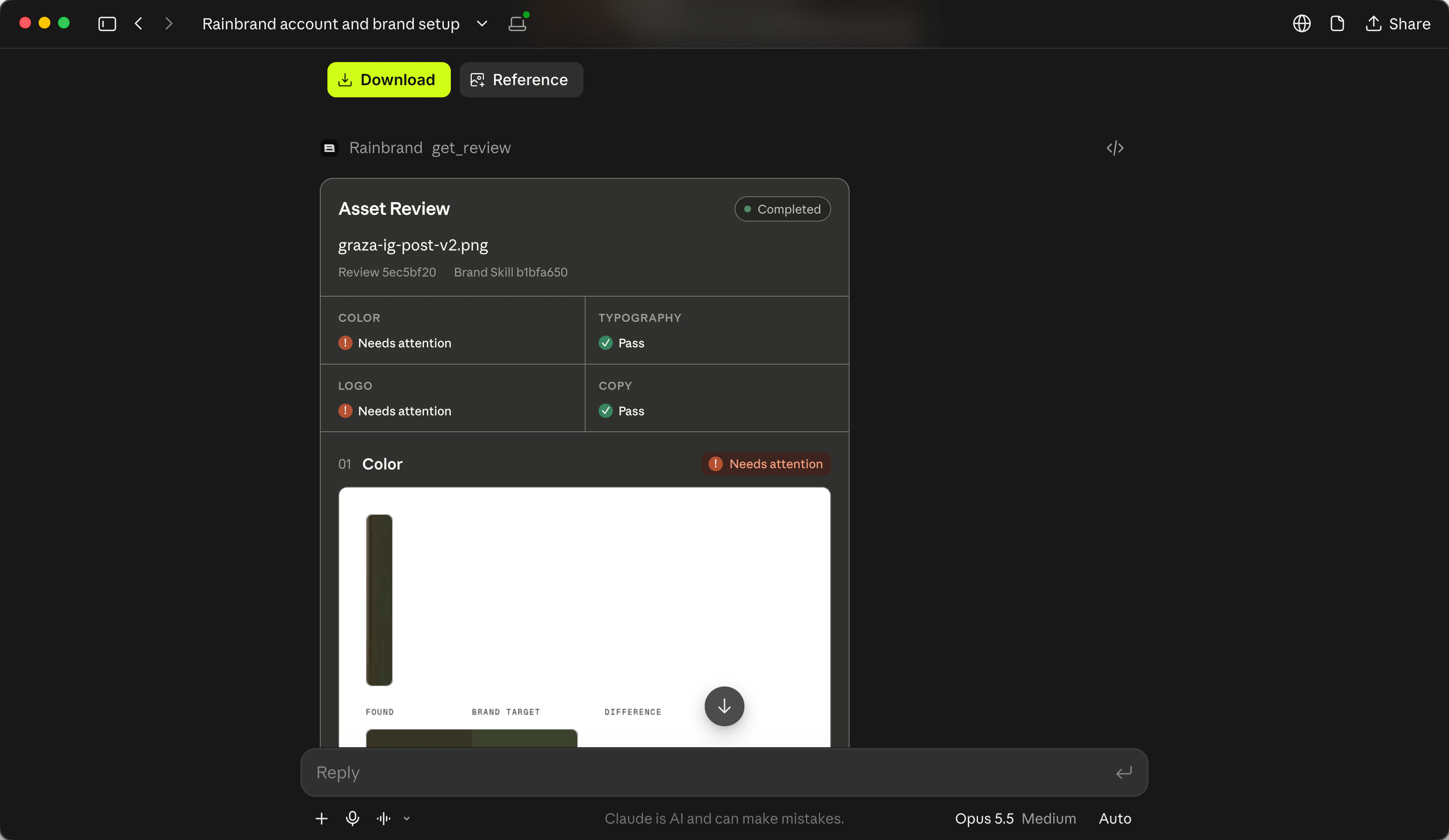
The first Review took four minutes. It passed the copy and the type, "set in the approved ITC Garamond Condensed font", and failed the other two: the wordmark was "horizontally squashed", and the headline was a darker olive than #3C422E. Claude asked Higgsfield to fix both, and the second post failed the same way. The wordmark was "still horizontally compressed", and the headline had turned "an off-palette brown-black". Each version also rewrote the labels' small print into different made-up words. The copy check didn't look at it, because Claude had told the Review the labels were packaging, not added text.
Claude's explanation was that the model repaints the logo and the headline rather than placing the files, so it can't hold a logo's proportions or an exact colour. It suggested placing the real wordmark and setting the headline with the brand's font file in code, over the still, which is how Cursor fixed its link preview on the Cursor page. I stopped there, so the post still fails logo and colour.
- Logo
Fail both times: "horizontally squashed and altered in proportion", then "horizontally compressed and distorted".
- Colour
Fail both times: the headline measured darker than
#3C422E, then "an off-palette brown-black".- Typography
Pass both times: "set in the approved ITC Garamond Condensed font".
- Copy
Pass both times: "Headline copy matches the request exactly".
Why not keep the brand in Higgsfield?
Higgsfield has its own tools for keeping work consistent. Soul characters and reference Elements keep a face, a product or a setting the same from one generation to the next. Marketing Studio can build a brand kit from a website address, with the brand's name, logo, hero images, colours, fonts and tone, and reuse it across its ad images. If you only make Marketing Studio ads from your own product pages, that kit may be all you need.
The kit stays inside Higgsfield and is made from a website only. A brand in Rainbrand serves every agent you connect, such as Claude, Codex, Cursor and ChatGPT, and your own product through the API, which returns the same Briefs. A change to the brand shows up in the next Brief any of them requests. Rainbrand builds a brand from a brand guide PDF or a website in about 90 seconds on average, and a Review checks the image against it before it goes out.
What it can't do in Higgsfield
Higgsfield and Rainbrand don't connect to each other, so both have to be in the same agent, which carries the Brief across. Higgsfield can't see images attached to the chat: it takes images imported from a link or added through its upload window, and in my run it couldn't import an SVG logo. Its image models redraw a logo and a headline rather than placing them, so in my run the post failed the logo and colour checks twice. Higgsfield's job record also gave the wrong size for the clip in my run. Reviews check images, not video. Every generation through Higgsfield's MCP uses Higgsfield credits, because Unlimited models and free generations work only on higgsfield.ai. Through MCP, Marketing Studio has a smaller set of ad presets than on the website.
Fix common problems
- Claude generates through Rainbrand instead of Higgsfield
Both servers have tools named
generate_imageandgenerate_video. Name Higgsfield in the request, as the prompts on this page do.- Claude answers without calling Higgsfield or Rainbrand
Start a new chat, name the service, and check that its connector is switched on under +, then Connectors.
- “Authorization with the MCP server failed”
Higgsfield's sign-in has expired. In Claude's connector settings, disconnect Higgsfield, then connect it again and sign in.
- Higgsfield charged credits on an Unlimited model
That's expected. Unlimited access applies only on higgsfield.ai.
- A Brief or brand is still processing
Ask Claude to check the same Brief or brand again. Starting the task over can create a duplicate.
- Out of Rainbrand credits
Follow the link in the error to add credits or upgrade.
- Higgsfield can't import the logo
In my run it failed on an SVG file. Use a PNG version of the logo from the Brief.
- Claude says the clip is the wrong shape
Check the downloaded file. In my run, Higgsfield's job record said 1280 by 720 for a clip that came out 864 by 1072, the shape of the still.
More fixes are in Rainbrand's troubleshooting guide.
Questions
Does Higgsfield have an official MCP server?
Yes. Higgsfield hosts it at https://mcp.higgsfield.ai/mcp, and you sign in with your Higgsfield account rather than an API key. Through it, an agent can generate images, video and audio, use Soul characters and Elements, upscale and reframe, and run Marketing Studio presets on your plan's credits. In ChatGPT, Higgsfield offers a plugin instead of the address.
Should I use the Higgsfield API instead?
Only if you're building generation into your own product. The API is a separate product with its own key from open.higgsfield.ai and a prepaid balance in US dollars, and it doesn't touch your plan or credits. Your product can request a Brief through Rainbrand's API and pass its guidance and images to Higgsfield's API, the same way Claude does on this page.
Does it work in Claude Code?
Yes. Higgsfield sets up Claude Code with its CLI and skills, and Rainbrand installs as a Claude Code plugin with its MCP connection; see Claude Code with Rainbrand.
What does it cost?
Higgsfield's MCP needs a paid Higgsfield plan, and each generation uses Higgsfield credits. The Rainbrand side works on every Rainbrand plan: Briefs and Reviews use Rainbrand credits, listed on our pricing page. Claude needs a paid plan to hold both connectors.
Read next
- MCP quickstart
Connect any agent, add a brand and request your first Brief.
- How to apply your brand guidelines to AI-generated images
Give the image model the rules and references that matter for the picture, then finish exact elements with real assets. A brand name and a hex code are only a starting point.
- Which MCP servers provide brand guidelines and assets?
Brand MCP servers differ in whose brand they cover and what an agent gets back. From each server’s documentation, here is which of Rainbrand, Frontify, Bynder, Standards, Canva, Figma, Brandfetch and Pulumi’s own brand server fits which job.
- ChatGPT with Rainbrand
Install the Rainbrand plugin to give ChatGPT your brand's voice, logos and photos. Make on-brand copy, images, video and audio, and review each asset against the brand.
- Claude with Rainbrand
Add the Rainbrand connector to give Claude your brand's voice, logos and photos. Make on-brand writing, decks and images, and review each asset against the brand.
- Claude Code with Rainbrand
Install the Rainbrand plugin to give Claude Code your brand's voice, fonts, logos and photos. Build on-brand pages and components, and review each against the brand.
- Codex with Rainbrand
Install the Rainbrand plugin to give Codex your brand's fonts, colours, logos and voice. Build on-brand app screens and link previews, and review each against the brand.
- Cursor with Rainbrand
Connect Rainbrand's MCP server to give Cursor your brand's voice, logos and photos. Make on-brand components and images, and review each asset against the brand.



