Checked
Cursor with Rainbrand
Cursor skills and MCP for on-brand components and images
Connect Rainbrand's MCP server to give Cursor your brand's voice, logos and photos. Make on-brand components and images, and review each asset against the brand.
Written by Siddharth Borderwala, Founding Engineer at Rainbrand
Add Rainbrand's MCP server to Cursor's mcp.json and sign in with your
Rainbrand account. Before Agent writes a component or makes an image, it can
ask Rainbrand for a Brief with the colours, fonts, logo files and voice that
task needs, then send a screenshot of the result for a Review. Cloud Agents,
on Premium and higher plans, need their own sign-in, and Enterprise admins
can limit which MCP servers run.
Add Rainbrand to Cursor
Cursor reads MCP servers from ~/.cursor/mcp.json, which covers every project, or from .cursor/mcp.json in one repository. Rainbrand's entry is only the server's address. You sign in with your Rainbrand account, so there's no key in the file, and you can commit the project version for your team.
Add Rainbrand to ~/.cursor/mcp.json.
Sign in from the Cursor CLI.
You can also install the Rainbrand Skill (opens in a new tab) or the plugin (downloads in a new tab).
agent is Cursor's command-line tool, and it reads the same mcp.json as the editor. Once you're signed in, Rainbrand appears under Customize in the sidebar, where you can switch it off. Agent uses its tools when a request needs them. Depending on your run mode, Cursor asks before each call, lets Auto-review decide, or runs it.
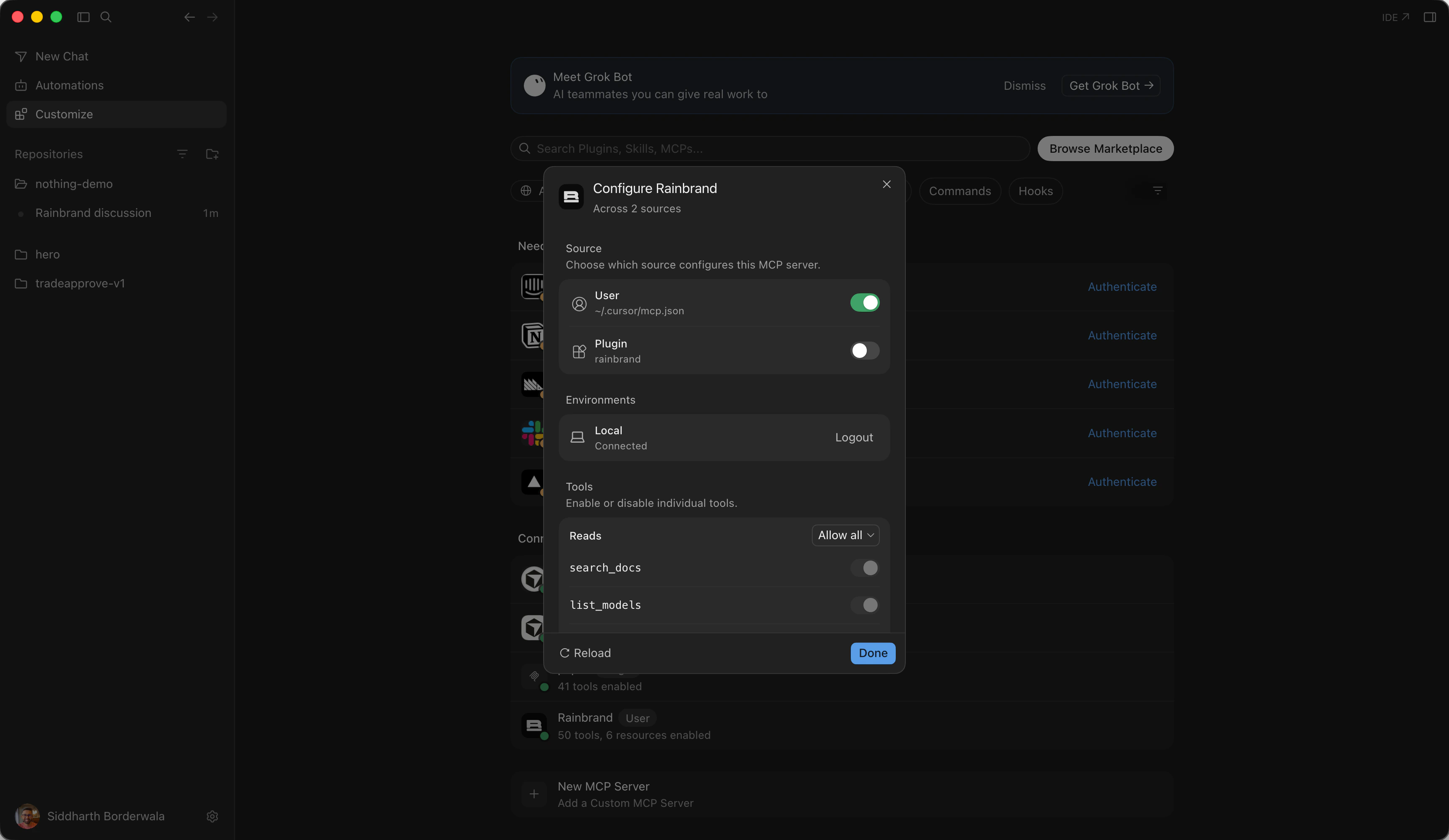
I had both the mcp.json entry and the plugin. Cursor lists them as two
sources for one server and uses the one you switch on.
Then open a new Agent chat and check which account is connected.
Show me which Rainbrand account is connected.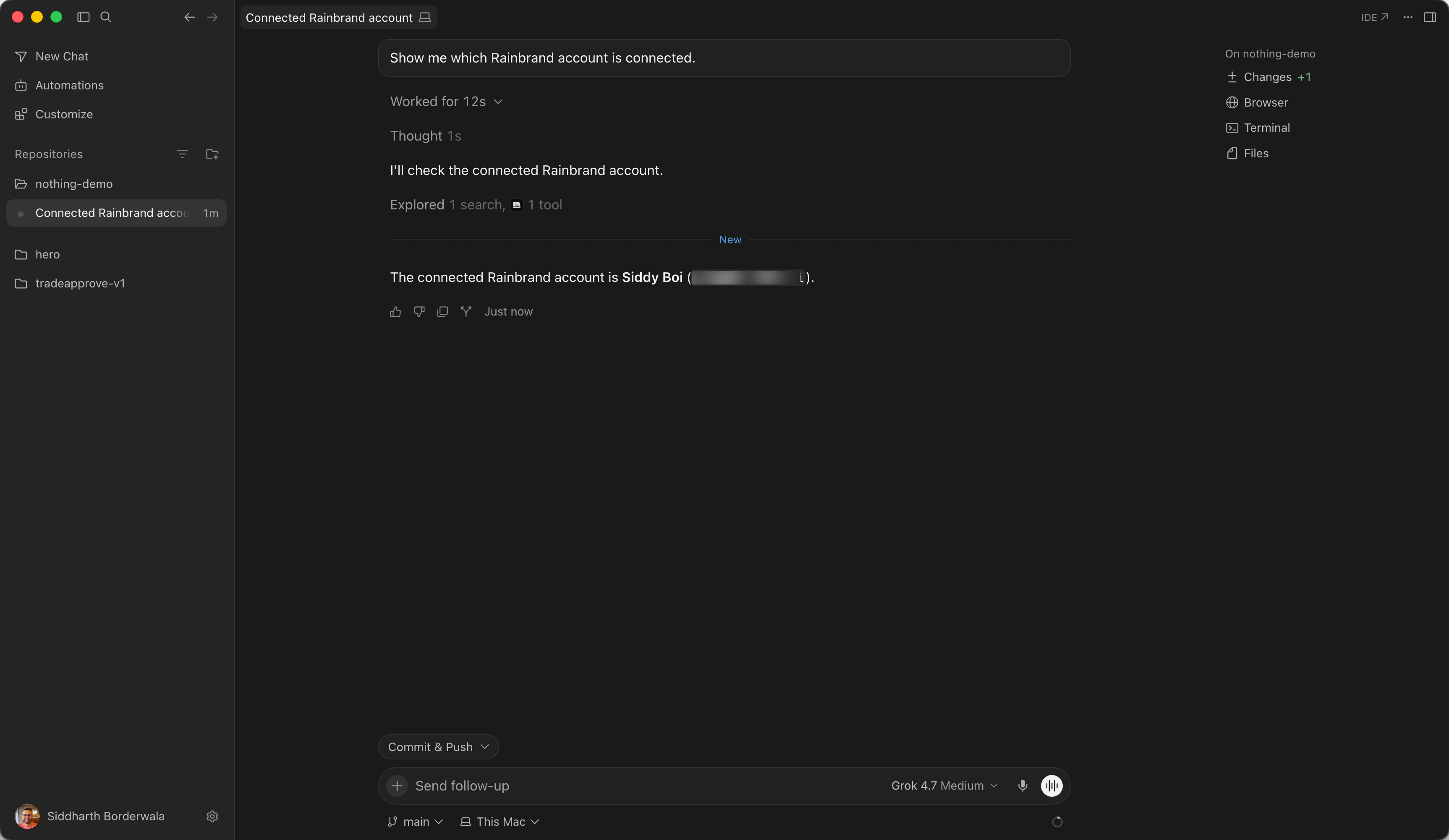
The installer also links Rainbrand's Cursor plugin, which adds the same connection with the Rainbrand Skill, a short set of instructions for using Rainbrand's tools. The plugin isn't in the Cursor Marketplace: extract the zip to ~/.cursor/plugins/local/rainbrand and run Developer: Reload Window. It needs Cursor 3.13 or later.
Which plans can use it
- Agent in the editor and CLI
Agent is on every Cursor plan, including Free with limited requests. Cursor's docs don't limit MCP by plan.
- Cloud Agents
Premium, Super, Ultra, Teams, Enterprise and legacy paid plans such as Pro. Add Rainbrand from the MCP menu at cursor.com/agents and sign in there too, because Cloud Agents keep their own sign-ins.
- Teams and Enterprise
Admins can add Rainbrand for the team's Cloud Agents under Dashboard → Plugins & MCPs. In the editor, each person still adds it and signs in with their own Rainbrand account.
- Enterprise MCP allowlist
If your admins only allow approved MCP servers, ask them to add
https://mcp.rainbrand.com/mcp.
Pick a brand, or add one
If your team already has brands in Rainbrand, ask Agent to list them. To add one, point it at what defines the brand: a website, a brand guide PDF, logos or images, including files in your repository. Agent uploads local files to Rainbrand itself with a curl command, so there's no file picker step.
Get a Brief for the Headphone (1) Pro launch
I used Nothing's brand to build a launch section for Headphone (1) Pro, which Nothing calls its most advanced headphone ever, with a product image made for the section and the image that shows when the page is shared. Nothing's page in Rainbrand's brand library shows its colours, type, wordmark and voice, and sets product names in Ndot, a dot-matrix face, so I asked for the product name in dot-matrix type.
I ran it on October 31, 2026 in the Cursor app, with Grok 4.7 as the model, in a new Next.js project with Nothing's dot-matrix wordmark in ./brand. Nothing was already in my Rainbrand account from the brand library, so I said a duplicate was fine.
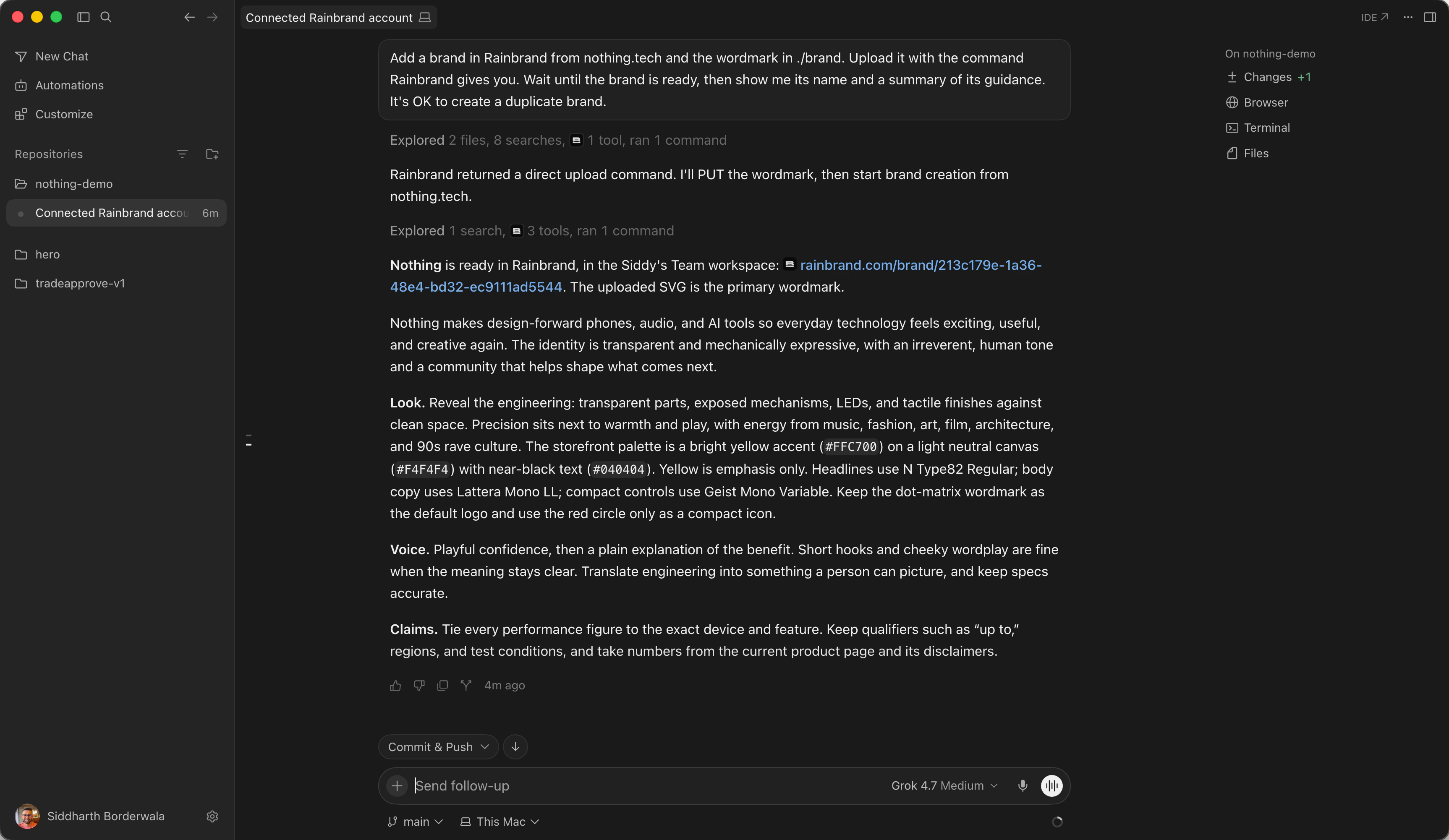
Add a brand in Rainbrand from nothing.tech and the wordmark in ./brand. Upload it with the command Rainbrand gives you. Wait until the brand is ready, then show me its name and a summary of its guidance. It's OK to create a duplicate brand.Agent uploaded the wordmark with the curl command Rainbrand returned, then created the brand from nothing.tech and the file. Its summary gave the storefront's yellow, #FFC700, as an accent on a light grey #F4F4F4 canvas with near-black #040404 text; N Type82 for headlines, Lettera Mono for body copy and Geist Mono for small controls; and the dot-matrix wordmark as the default logo.
Then I asked for the Brief before any code, and said what the section holds and where the product facts come from.
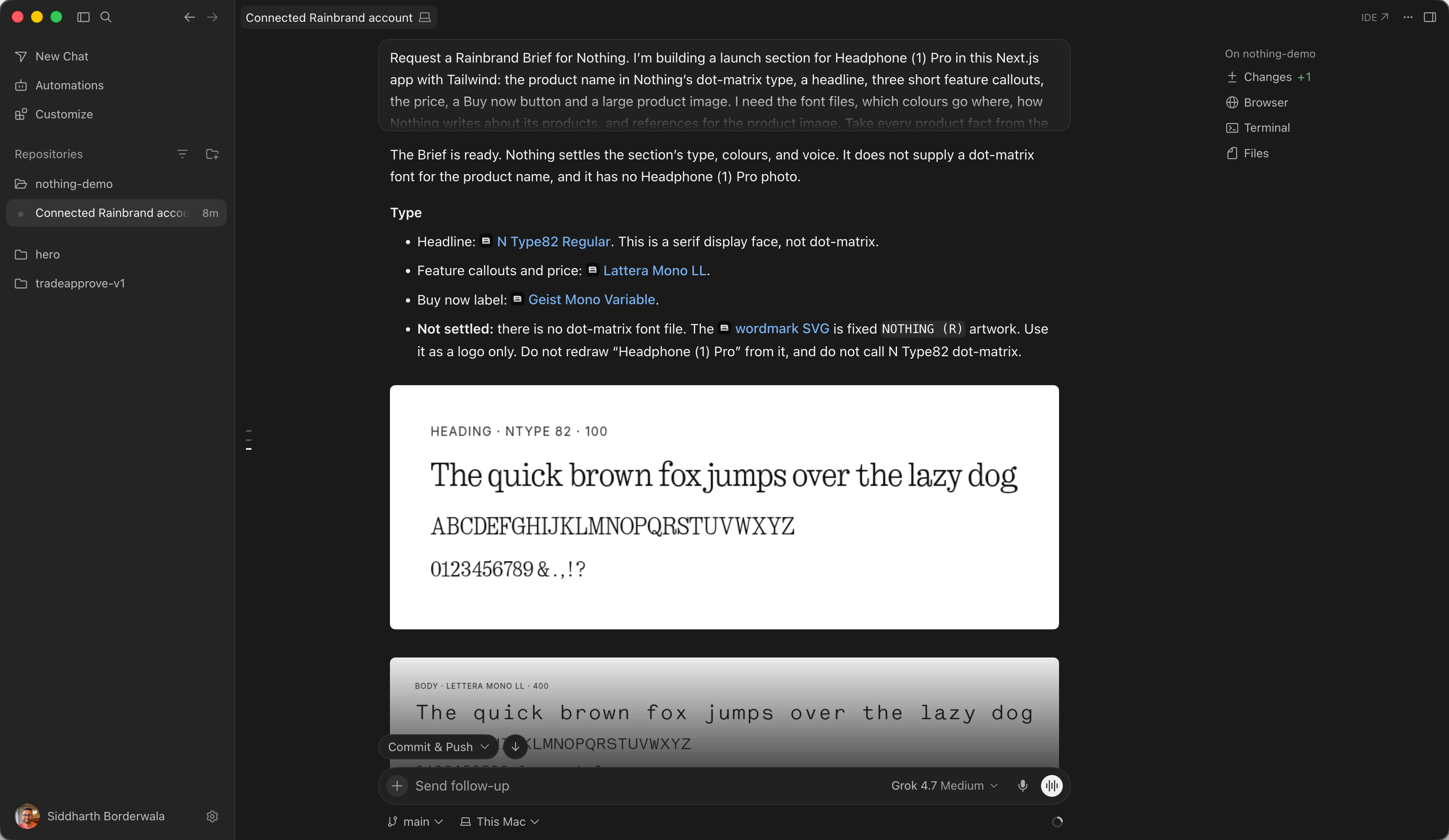
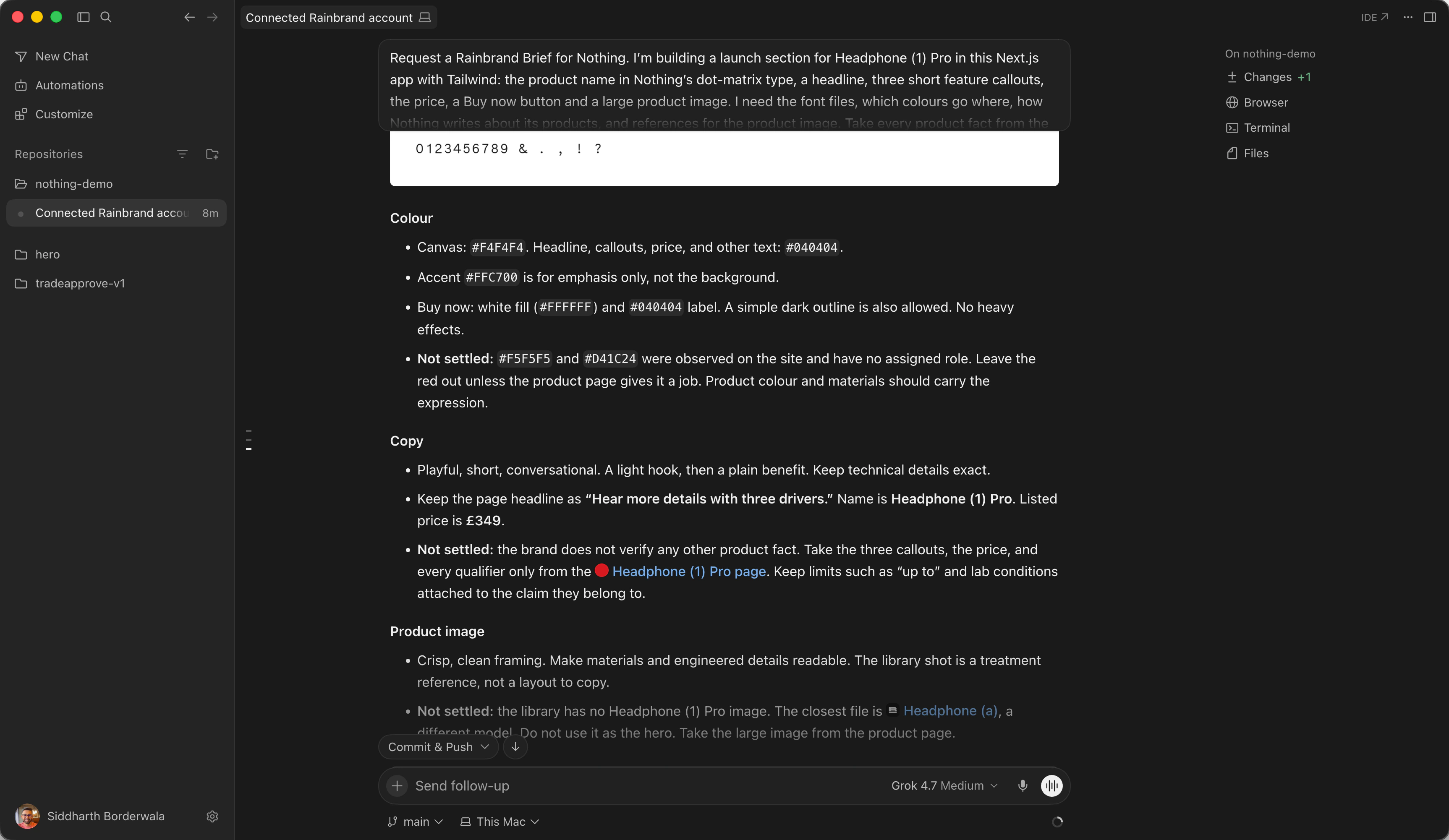
Request a Rainbrand Brief for Nothing. I'm building a launch section for Headphone (1) Pro in this Next.js app with Tailwind: the product name in Nothing's dot-matrix type, a headline, three short feature callouts, the price, a Buy now button and a large product image. I need the font files, which colours go where, how Nothing writes about its products, and references for the product image. Take every product fact from the Headphone (1) Pro page on nothing.tech. Wait for the Brief and show me its guidance in a TL;DR format, including anything the brand doesn't settle.The Brief came back in 38 seconds with a file for each font: N Type82 for the headline, Lettera Mono for the callouts and the price, and Geist Mono for the Buy now label. It said the brand has no dot-matrix font. The only dot-matrix artwork is the fixed NOTHING wordmark, which it said not to use to letter "Headphone (1) Pro", and not to call N Type82 dot-matrix either.
For colour it gave #F4F4F4 for the canvas, #040404 for all the text, the yellow for emphasis only, and a white Buy now button with a dark label. It kept the page's headline, "Hear more details with three drivers", and the price nothing.tech showed, £349 (Nothing's US store lists it at $399), and said every other product fact had to come from that page. The brand had no photo of Headphone (1) Pro. The closest was Headphone (a), a different model, and the Brief said not to use it for the main image.
Make the product image
Cursor's Agent can make images itself and saves them to the project's assets/ folder. I made this one through Rainbrand's AI Gateway instead, because the request carries the Brief's guidance and reference images, and the image is saved in Rainbrand, where a Review can check it.
Generate the product image through Rainbrand's AI Gateway with Nano Banana 2.1 at 16:9, using the same Brief. Show Headphone (1) Pro in White, in the setting and light the Brief describes, with empty space on the left for the text and no words or logos. If none of the Brief's references shows Headphone (1) Pro, add its product photos from nothing.tech as references. Save the image to public/images, then request a Rainbrand Review of it for colour, typography, logo and copy.Agent fetched Headphone (1) Pro photos from nothing.tech and sent three of them as references with the Brief. Nano Banana 2.1 returned a 2752 by 1536 image: white headphones on the right, open space on the left.
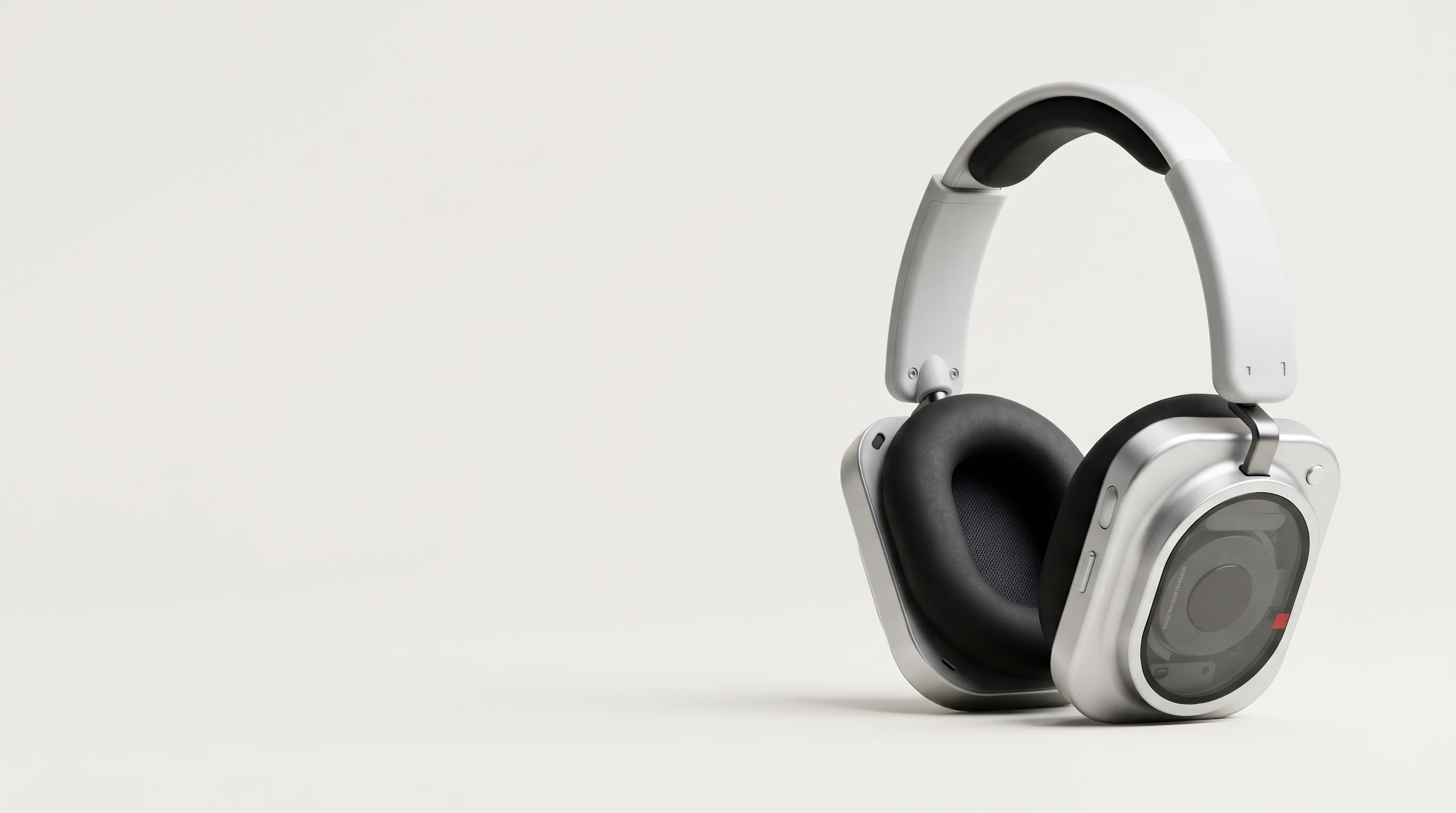
Made through Rainbrand's AI Gateway with Nano Banana 2.1, Oct 31, 2026.
The Review took under four minutes and failed colour: the ground was a warmer, darker grey, #E8E7E3, than the brand's #F4F4F4. Typography, logo and copy came back uncertain, because faint curved lettering on the driver window was too skewed and small to read. I asked Agent for a better image. The second one dropped the lettering but still had a grey ground, which Agent repainted to #F4F4F4. I preferred the first image and went back to it.
Build the launch section around the image
Cursor's Agent can open a page in its own browser and take screenshots, so the build and the check happen in the same chat.
Build the section as a React component with Tailwind around that image. Save the Brief's font files into the project, load them with next/font, and use the dot-matrix face only where the Brief says to. Then open the page in Cursor's browser and screenshot the section at 1440 and 390 pixels wide.With no dot-matrix font in the Brief, Agent set the product name and the headline in N Type82, the callouts and the price in Lettera Mono, and left the dot-matrix look to the wordmark. The Brief's Geist Mono file turned out to hold about 40 characters, a capital A and some Cyrillic among them, but not the letters of "Buy now", so the button fell back to a system font. The first layout put the copy on a flat panel beside the photo. I asked for one continuous background, and Agent set the type over the empty left side of the photo instead. This is part of what it wrote, as it ended up after the Reviews:
export const nType = localFont({
  src: "./fonts/n-type82.woff2",
  weight: "400",
  display: "swap",
  variable: "--font-n-type",
});

// …

<img
  src="/nothing-wordmark.svg"
  alt="Nothing"
    className="h-10 w-auto self-start lg:h-16"
/>
<div className="flex flex-col gap-4">
  <p className="font-display text-2xl leading-none">Headphone (1) Pro</p>
  <h1 className="max-w-[12ch] font-display text-4xl leading-[1.05] sm:text-5xl lg:text-6xl">
    Hear more details with three drivers
  </h1>
</div>
Agent took the screenshots in Cursor's browser, setting the window to 1440 and 390 pixels wide itself, and saved them to a temporary folder outside the project.
Upload both screenshots to Rainbrand for this Review only, not to the Brand Library, and request a Review of each for colour, typography, logo and copy. Give it the exact copy. Fix anything it flags, then review again.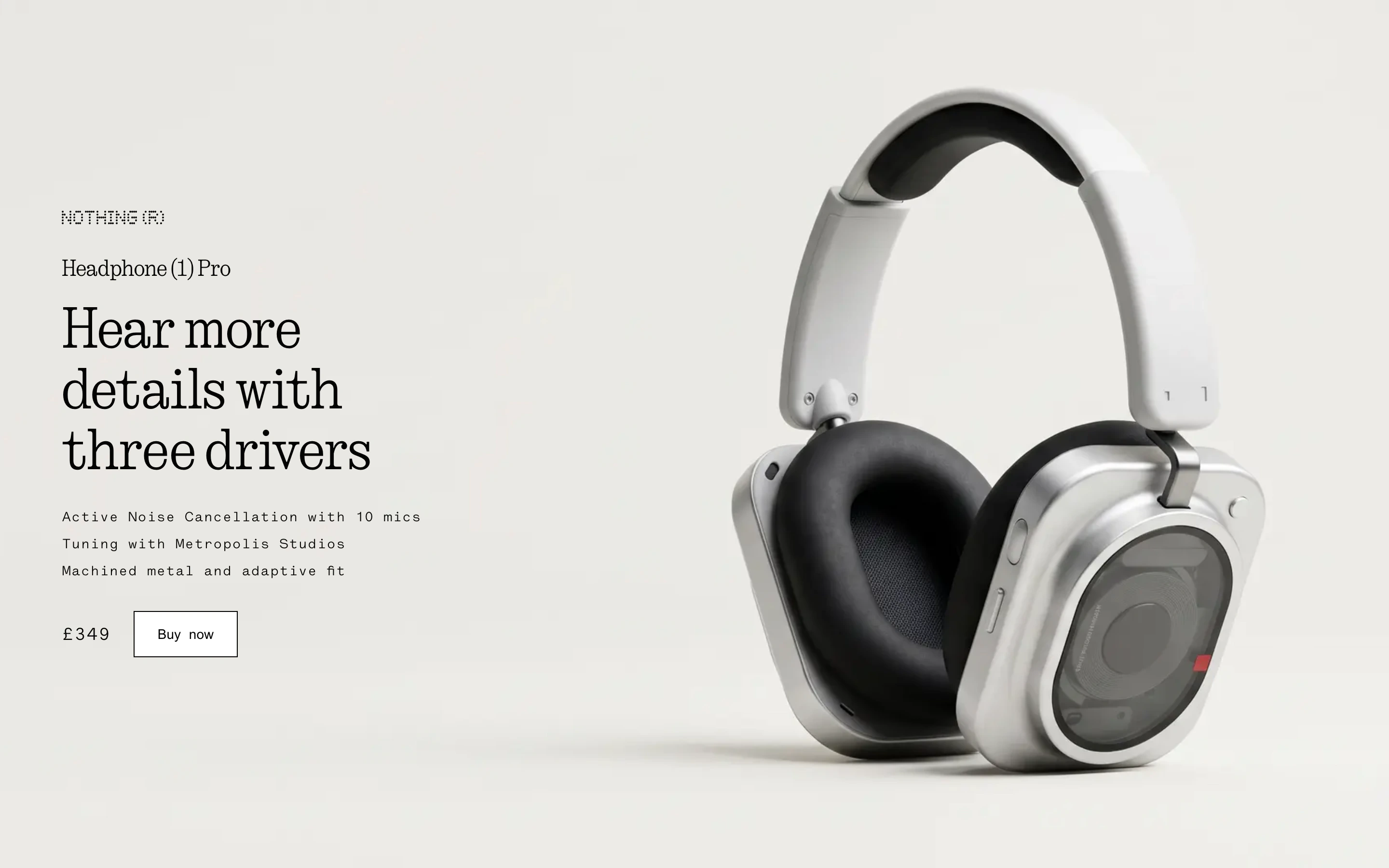
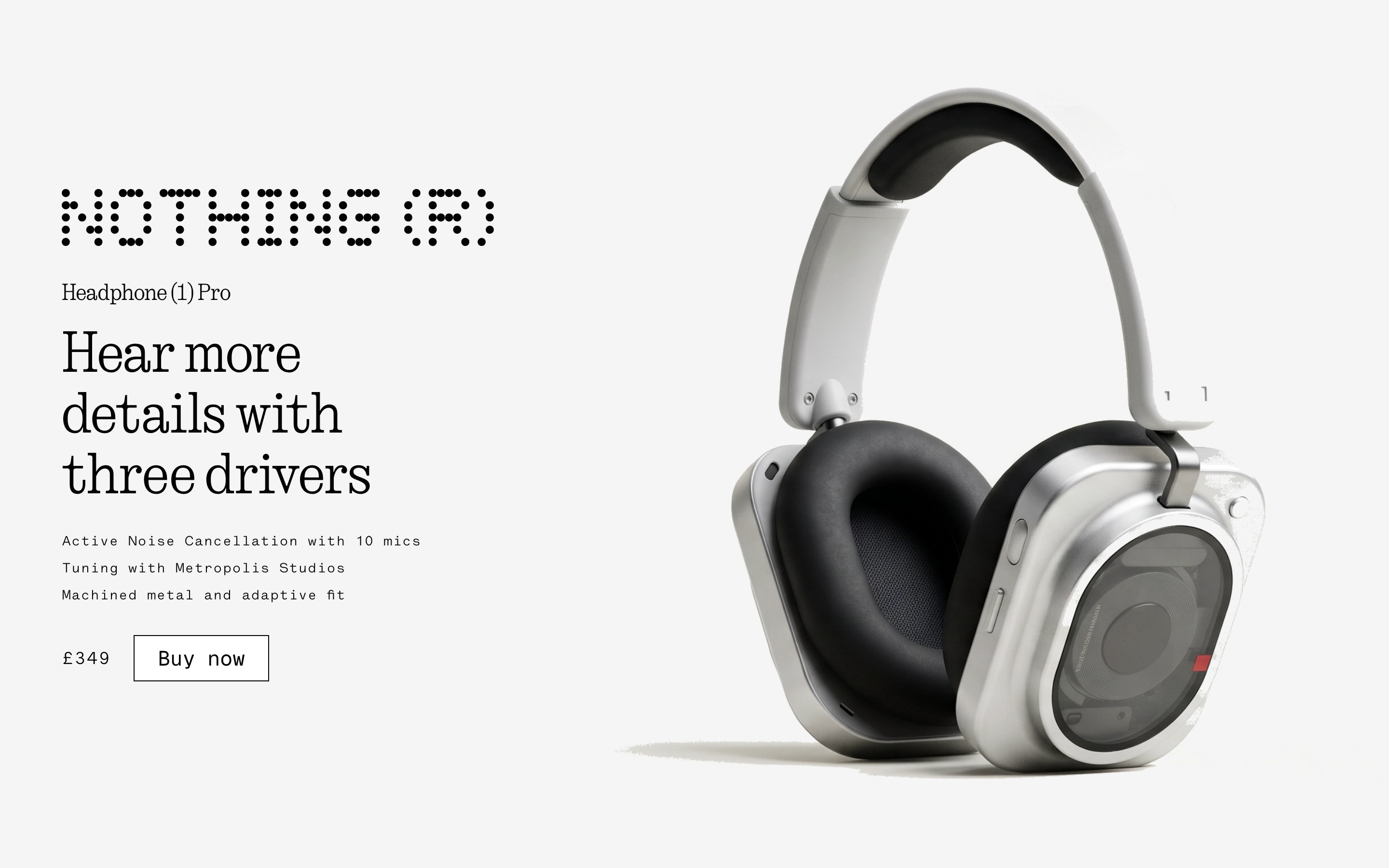
Cursor's screenshots at 1440 pixels wide, Oct 31, 2026.
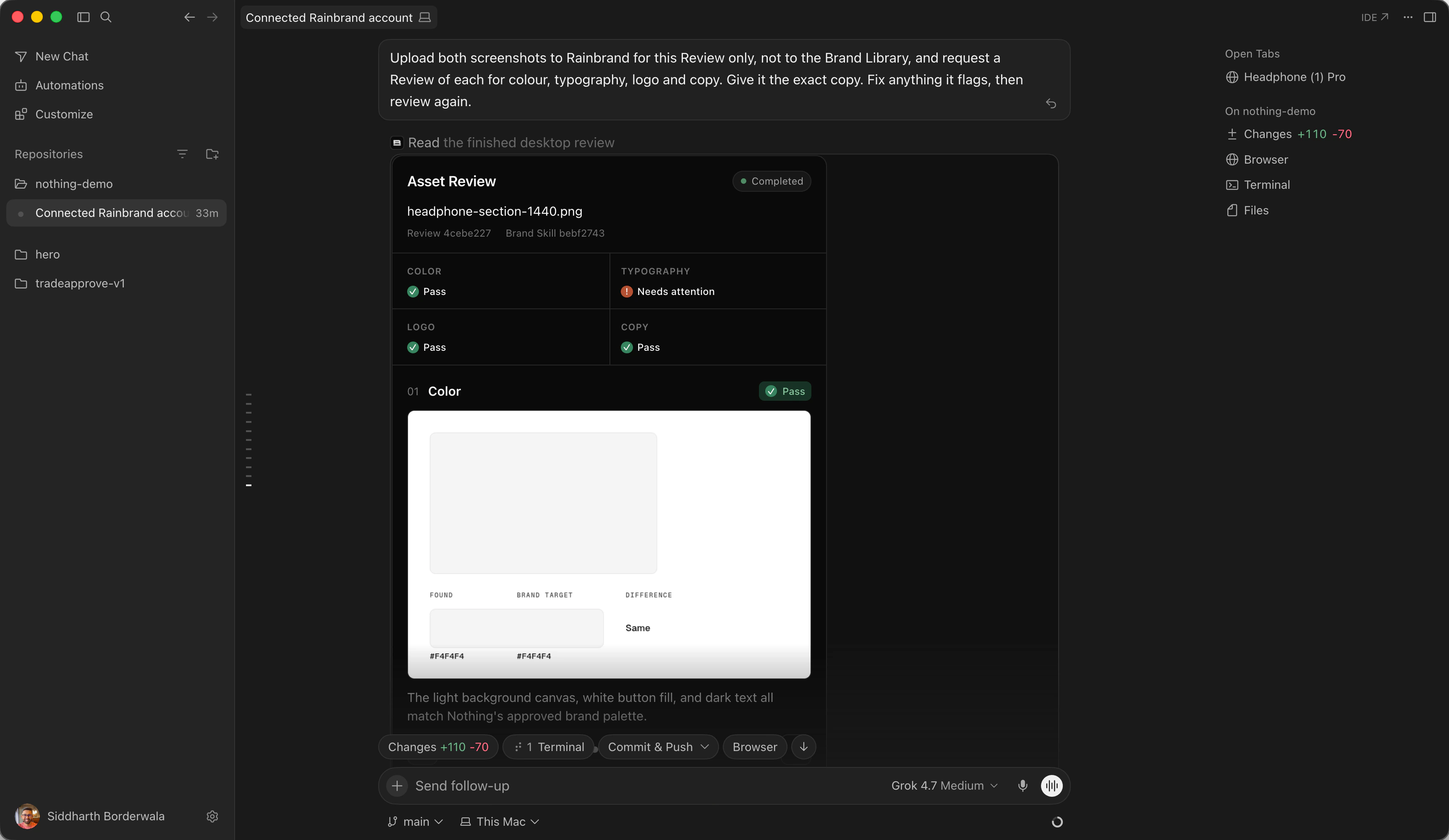
Agent reviewed both screenshots four times, and each round took two to four minutes. Copy passed every time. The first Review failed the canvas colour on both, because the photo's warmer grey showed instead of #F4F4F4, and Agent repainted the photo's background to match. It failed the Buy now label on both for not being Geist Mono. And on the desktop screenshot alone, it failed the logo, saying the wordmark "was typeset using an unapproved dot-matrix font instead of the official brand artwork". It was the official file, and the phone screenshot with the same file passed. The second Review said the same. When Agent attached the wordmark file to the third Review as a reference, the logo passed on both.
The button never passed. Agent copied a complete Geist Mono from Next.js's own files in node_modules, then drew the label as an SVG from it, and the fourth Review still said the label "is not set in Geist Mono". The brand's own Geist Mono file has none of those letters, which is probably why. I stopped there, so the section still fails typography on two words. Repainting the photo's background also left a rough edge around the headphones, which none of the checks mentioned.
- Colour
First: fail on both, the background "noticeably deviates from the brand's approved light neutral backgrounds". From the second Review: pass.
- Logo
First and second: fail on desktop, pass on phone. From the third, with the wordmark file attached: pass on both.
- Typography
Fail every time, on the button only: "While the display text uses N Type82, the requested button label is not set in Geist Mono."
- Copy
Pass every time: "All requested text, product claims, pricing, and callouts appear verbatim and error-free".
Cursor shows each Review as Rainbrand's own card in the chat, with each check's verdict and the colour it measured beside the brand's.
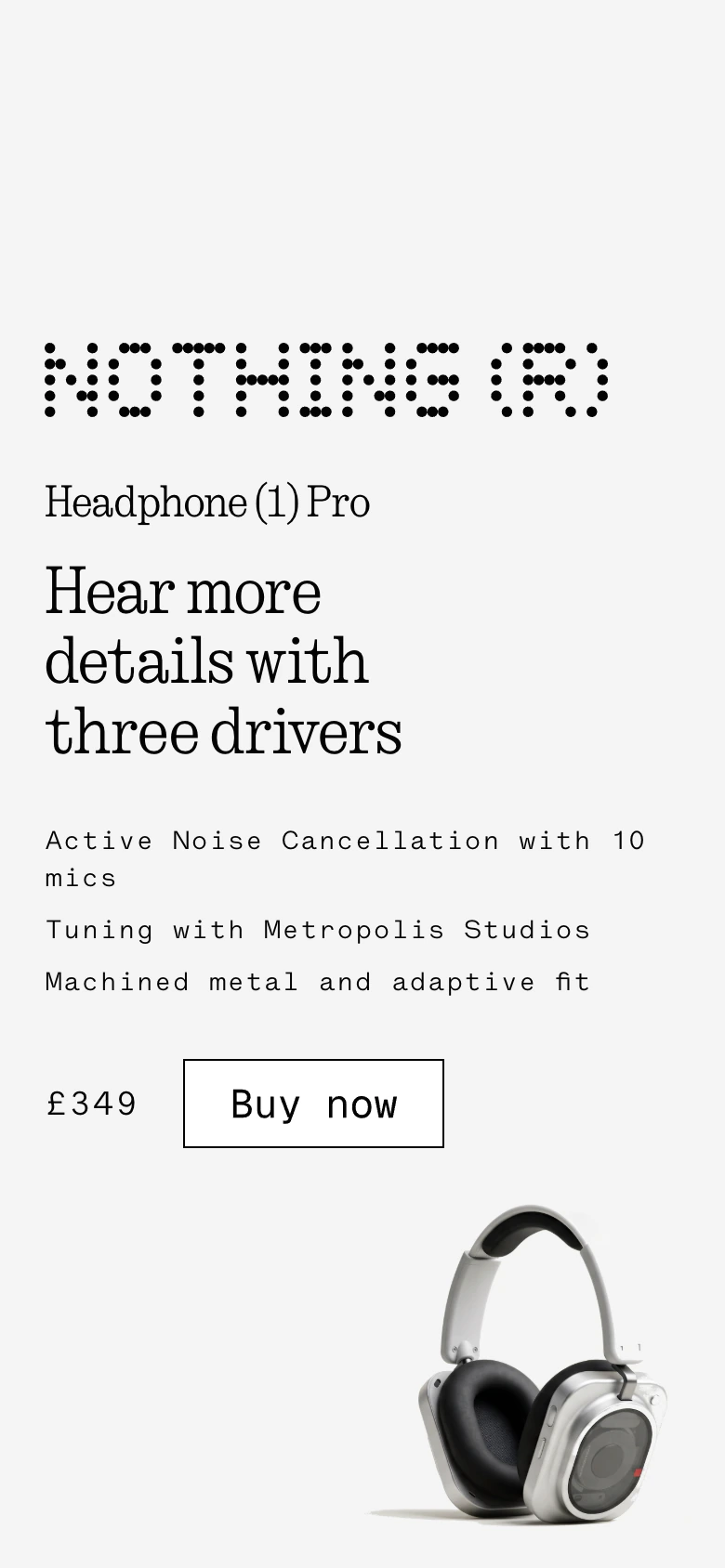
At 390 pixels, after the fourth Review.
Make the link preview image
The launch page also needs an image for when its link is shared. That's a different job from the section, so I asked for a second Brief and had the AI Gateway make the image.
Request a Rainbrand Brief for Nothing for the launch's link preview image. Then generate it through Rainbrand's AI Gateway with GPT Image 2.5 Flare at 2048×1152, with the product image, the name Headphone (1) Pro and the NOTHING wordmark. Resize and crop it to 1200×630 as the page's Open Graph image, then request a Review for colour, typography, logo and copy. Fix anything it flags, then review again.The second Brief took 38 seconds. It set the name in N Type82, put the dark wordmark on the #F4F4F4 canvas, and noted again that the brand had no photo of Headphone (1) Pro. Agent rendered the wordmark and the name in N Type82 as images and sent them to GPT Image 2.5 Flare as references, with the product photo from the section, then cropped the result from 2048 by 1152 to 1200 by 630.
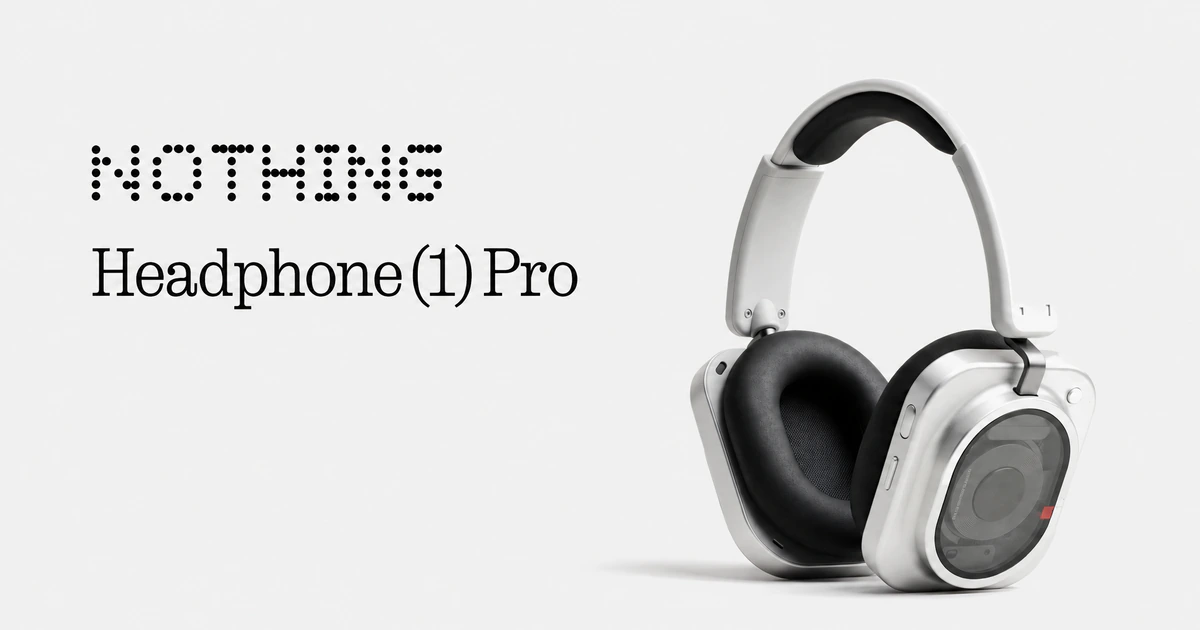
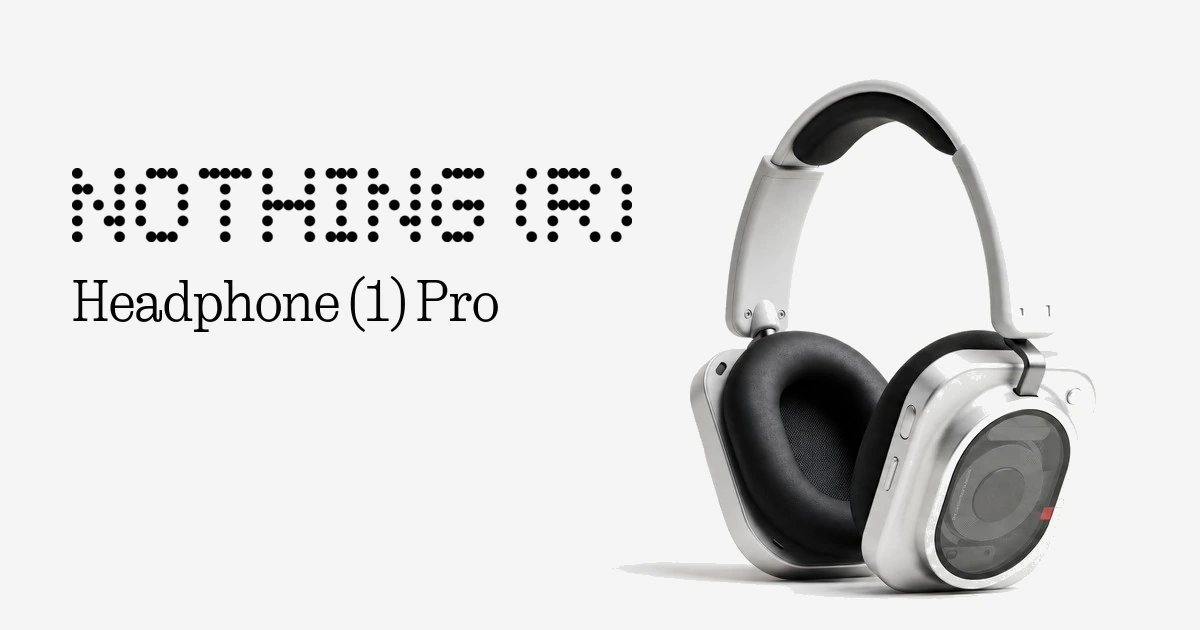
Made through Rainbrand's AI Gateway with GPT Image 2.5 Flare, Oct 31, 2026, and cropped to 1200 by 630.
The first Review passed colour and typography and failed the other two. The model had dropped the ® from the wordmark, and the copy check read the name as "Headphone(1)". Agent painted over the left side of the image and placed the official wordmark file and the name set in N Type82 on top, with a Python script. The second Review passed all four checks.
- Logo
First: "missing the registered trademark symbol". After: "The official Nothing dot-matrix wordmark with registered symbol is unaltered".
- Copy
First: "Missing requested '(R)' and space in 'Headphone(1)'". After: "matches the requested product name exactly".
- Typography
Pass both times: "Headphone (1) Pro is set correctly in N Type82 Regular."
- Colour
- Pass both times.
Why not keep the brand in Cursor rules or skills?
Rules are good at code conventions. A project rule in .cursor/rules can attach itself to matching files, and AGENTS.md works for simple instructions. Cursor's advice is to keep each rule under 500 lines and to point to files rather than copy them in, so rules stay short. A rule is text that goes into the prompt, so logo files and font files sit elsewhere, and a project rule only covers its own repository. Team Rules reach every repository, on Teams and Enterprise plans.
Skills come closer. A skill folder can hold reference files and images, loads only when a task calls for it, and follows the open Agent Skills standard; Cursor also reads skills from Claude Code's and Codex's folders. Personal skills stay on your machine until you sync them for your own Cloud Agents, and on Teams and Enterprise, teammates install a published skill themselves. Each copy is a set of files someone updates when the brand changes.
Rainbrand holds the brand once for Cursor, Claude, ChatGPT, Codex and your own product through the API, and each of them gets the current version with its next Brief. A brand takes about 90 seconds on average to build from a PDF or a website. Each Brief carries only what its task needs, and a Review checks what Agent built against the brand.
What it can't do in Cursor
Rainbrand isn't in the Cursor Marketplace, so you add it from mcp.json or the plugin zip instead of with one click in Customize. Cloud Agents don't use the editor's sign-in; add Rainbrand at cursor.com/agents and sign in there. Cursor's sandbox blocks terminal commands from reaching most of the internet, so when Agent downloads a Brief's files or uploads a screenshot, Auto-review checks the command or Cursor asks you to approve it. Reviews check images, including screenshots and SVG files, but not the component's code. A Brief can only send the font files Rainbrand has for the brand: Nothing's had no dot-matrix face, and its Geist Mono file lacked the letters of "Buy now", which then failed the typography check four times. Rainbrand doesn't read or change your rules, skills or AGENTS.md.
Fix common problems
- Rainbrand isn't in Customize's plugin search
It isn't listed in the Cursor Marketplace. Add it to
mcp.jsonwith the installer above, or install the plugin from its zip.- Agent answers without Rainbrand
Check that Rainbrand is switched on under Customize, then ask for a Rainbrand Brief by name.
- Agent makes an image with its own tool
Name Rainbrand's AI Gateway and the model in the request, as the prompts on this page do.
- Sign-in fails or tools are missing
Run
agent mcp login rainbrandagain. MCP Logs in the Output panel (Cmd+Shift+U on a Mac) show connection and sign-in errors.- A Cloud Agent can't use Rainbrand
Add it from the MCP menu at cursor.com/agents and sign in there. Signing in on your machine doesn't carry over.
- An upload or download command is blocked
Approve it when Cursor asks, or add the hosts it names to
.cursor/sandbox.json.- The plugin doesn't appear
Check you're on Cursor 3.13 or later and reload the window. On Enterprise, an admin has to turn on Allow Local Plugin Imports.
- A Brief or brand is still processing
Ask Agent to check the same Brief or brand again. Starting over can create a duplicate.
- A font file from the Brief is missing letters
Rainbrand keeps the font files it finds on the brand's site, and some hold only a few characters. Ask Agent which characters a file covers, and add the full font to the brand if you have it.
More fixes are in Rainbrand's troubleshooting guide.
Questions
Does it work with Cloud Agents or Background Agents?
Yes. Cloud Agents, which Cursor used to call Background Agents, can use remote MCP servers like Rainbrand. Cursor makes those calls from its own servers, so your sign-in never reaches the agent's machine. Add Rainbrand from the MCP menu at cursor.com/agents and sign in. On a team, an admin can add it for everyone under Dashboard → Plugins & MCPs, and each person signs in once.
Do I need the Rainbrand Skill as well as MCP?
No. MCP is what connects Cursor to your brands. The Rainbrand Skill adds instructions for using Rainbrand's tools and doesn't connect anything by itself. The plugin installs both.
Can I keep the brand as a skill in my repository?
Yes. Rainbrand's API can export a brand as a Brand Skill folder with a SKILL.md, which Cursor reads from .cursor/skills/ when the folder name matches the skill's name. It's a copy of that version of the brand, so export it again after the brand changes. Through MCP, every Brief uses the current version.
Can my team share the setup?
Commit .cursor/mcp.json with Rainbrand's entry, which holds only the address. Each person signs in with their own Rainbrand account, and brands in a Rainbrand team are available to everyone in it.
What does it cost?
Your Cursor plan covers Cursor. Rainbrand works on every Rainbrand plan, and Briefs, Reviews and generations through Rainbrand's AI Gateway use Rainbrand credits. Plans and credit prices are on our pricing page.
Read next
- MCP quickstart
Connect any agent, add a brand and request your first Brief.
- Which MCP servers provide brand guidelines and assets?
Brand MCP servers differ in whose brand they cover and what an agent gets back. From each server’s documentation, here is which of Rainbrand, Frontify, Bynder, Standards, Canva, Figma, Brandfetch and Pulumi’s own brand server fits which job.
- Which brand guideline formats can AI tools actually use?
AI tools can open a PDF, a deck, a web page or a Markdown file, but each format keeps different parts of a brand intact. Compare PDFs, portals, Markdown, BRAND.md, Agent Skills, DESIGN.md and design tokens by what they carry, how agents read them and where they break.
- ChatGPT with Rainbrand
Install the Rainbrand plugin to give ChatGPT your brand's voice, logos and photos. Make on-brand copy, images, video and audio, and review each asset against the brand.
- Claude with Rainbrand
Add the Rainbrand connector to give Claude your brand's voice, logos and photos. Make on-brand writing, decks and images, and review each asset against the brand.
- Claude Code with Rainbrand
Install the Rainbrand plugin to give Claude Code your brand's voice, fonts, logos and photos. Build on-brand pages and components, and review each against the brand.
- Codex with Rainbrand
Install the Rainbrand plugin to give Codex your brand's fonts, colours, logos and voice. Build on-brand app screens and link previews, and review each against the brand.
- Higgsfield with Rainbrand
Connect Rainbrand with Higgsfield's MCP to give Higgsfield your brand's logos and photos. Make on-brand video and images, and review each image against the brand.



