Checked
Codex with Rainbrand
Codex MCP and skills for on-brand UI and link previews
Install the Rainbrand plugin to give Codex your brand's fonts, colours, logos and voice. Build on-brand app screens and link previews, and review each against the brand.
Written by Siddharth Borderwala, Founding Engineer at Rainbrand
Install the Rainbrand plugin in Codex, or add Rainbrand's MCP server to Codex's config, and sign in to Rainbrand. Before Codex builds a screen or a component, it can then ask Rainbrand for a Brief: the fonts with their files, the colours, which logo to use and which claims to check for that one task. On Business, Enterprise and Edu, your admin decides which plugins you can install, and Enterprise admins can also limit Codex to approved MCP servers.
Install the plugin or add the server
Since July 9, 2026, the Codex app is part of the ChatGPT desktop app. Codex also runs in the CLI and the IDE extension, and it shares ChatGPT's plugin directory. The Rainbrand plugin connects Codex to Rainbrand's MCP server, so Codex can list your brands and request Briefs and Reviews. It also adds the Rainbrand Skill, which tells Codex how to use those tools.
Open the Rainbrand plugin and add it.
Open Rainbrand plugin (opens in a new tab)Connect your Rainbrand account when asked. It works in ChatGPT and in Codex.
In the ChatGPT desktop app, open Plugins, find Rainbrand, install it and connect your Rainbrand account when asked. Start a new chat afterwards. In Codex CLI, /plugins opens the plugin browser. The IDE extension doesn't support plugins, so add the server there instead.
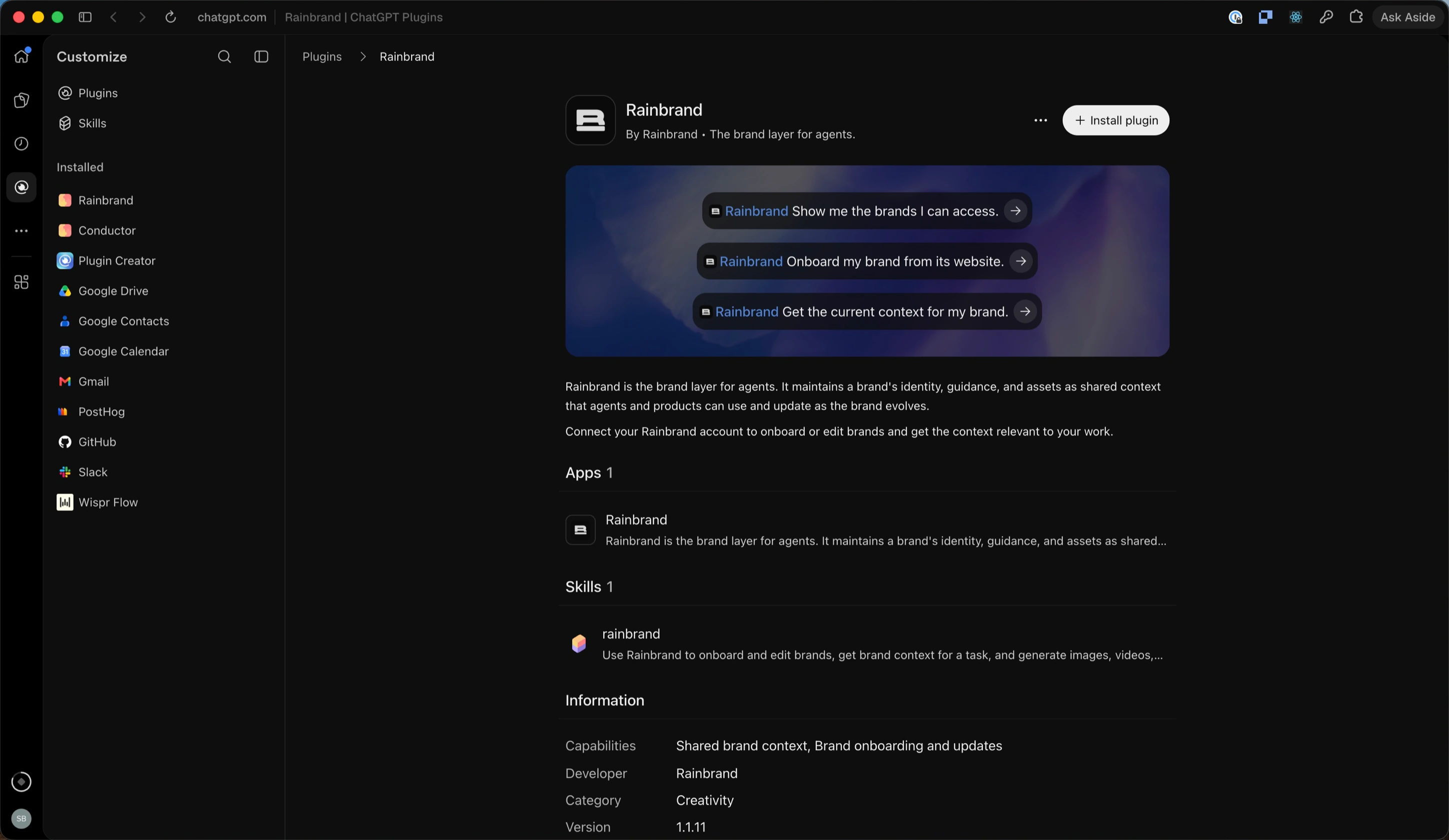
ChatGPT and Codex share this plugin directory.
Add the MCP server yourself
The desktop app, the CLI and the IDE extension read MCP servers from one file, ~/.codex/config.toml, so adding Rainbrand once covers all three. codex mcp add rainbrand --url https://mcp.rainbrand.com/mcp writes the first two lines; add the third yourself.
[mcp_servers.rainbrand]
url = "https://mcp.rainbrand.com/mcp"
tool_timeout_sec = 300
Then run codex mcp login rainbrand, or select Authenticate next to Rainbrand under MCP servers in the app's settings or the IDE extension's gear menu. Codex stops a tool call after 60 seconds unless you raise tool_timeout_sec, and Rainbrand's tools can wait up to 295 seconds for a Brief or a Review to finish. Through the plugin, Codex in my run waited on each Review in one- and two-minute calls and kept checking the same Review until it finished.
Before anything else, check which account Codex is using, especially if you have more than one Rainbrand account.
Show me which Rainbrand account is connected.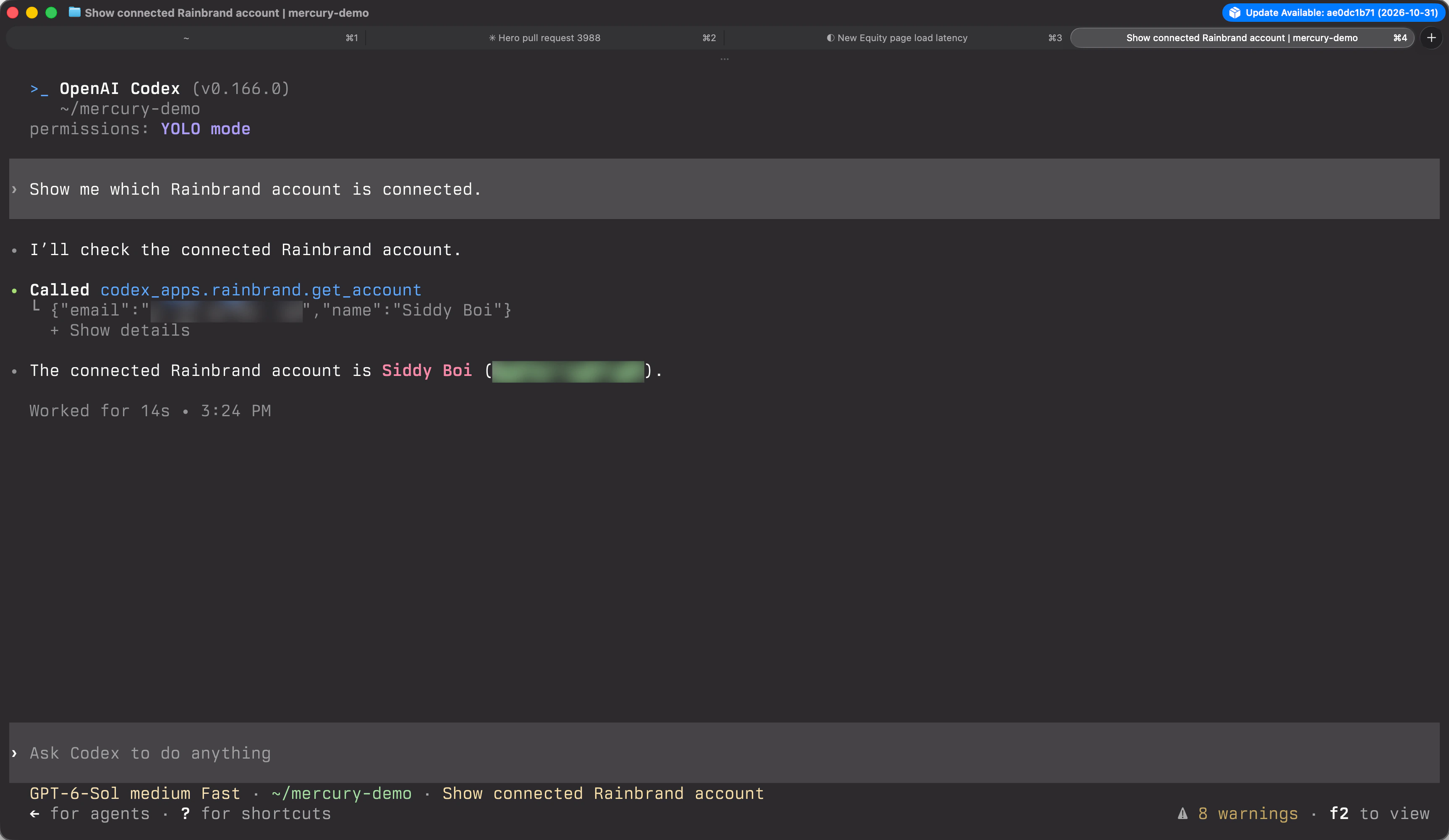
Which plans can use it
Codex is on every ChatGPT plan. OpenAI lists Codex in the desktop app for Free and Go, where it's still rolling out, and the CLI, IDE extension and Codex Cloud from Plus up.
- Business, Enterprise and Edu
Admins choose which plugins members can install. If Rainbrand shows Disabled by admin, ask your ChatGPT admin. Enterprise admins can also limit Codex to an approved list of MCP servers.
- Signed in with an OpenAI API key
Codex offers only supported OpenAI-curated plugins, so add the server directly.
Pick a brand, or add one
If your team already has brands in Rainbrand, ask Codex to list them. To add one, point Codex at what defines it: a website, a brand guide, written rules, logos or images. For files in your repo, Rainbrand returns an upload address and a curl command for each. Codex's default sandbox gives commands no network access, so Codex asks before it runs one, and you approve it.
Get a Brief for the payment screen
I used Mercury's brand to build one screen of its web app: the review step before an instant payment goes out. Mercury added instant payments on August 25, 2026. Its release note says the money arrives in seconds, at any hour, and that sending is free from accounts provided through Column, N.A. Mercury's page in Rainbrand's brand library shows its colours, type, logos and voice.
I ran it on October 31, 2026 in Codex CLI 0.166.0 with the Rainbrand plugin, in a new Next.js project with Mercury's two logo files in ./brand: the full logo and the knot symbol. Codex lists the plugin's tools as codex_apps.rainbrand. I'd given Codex full access, which the CLI calls YOLO mode, so it ran Rainbrand's upload commands without asking. In the default sandbox it asks first.
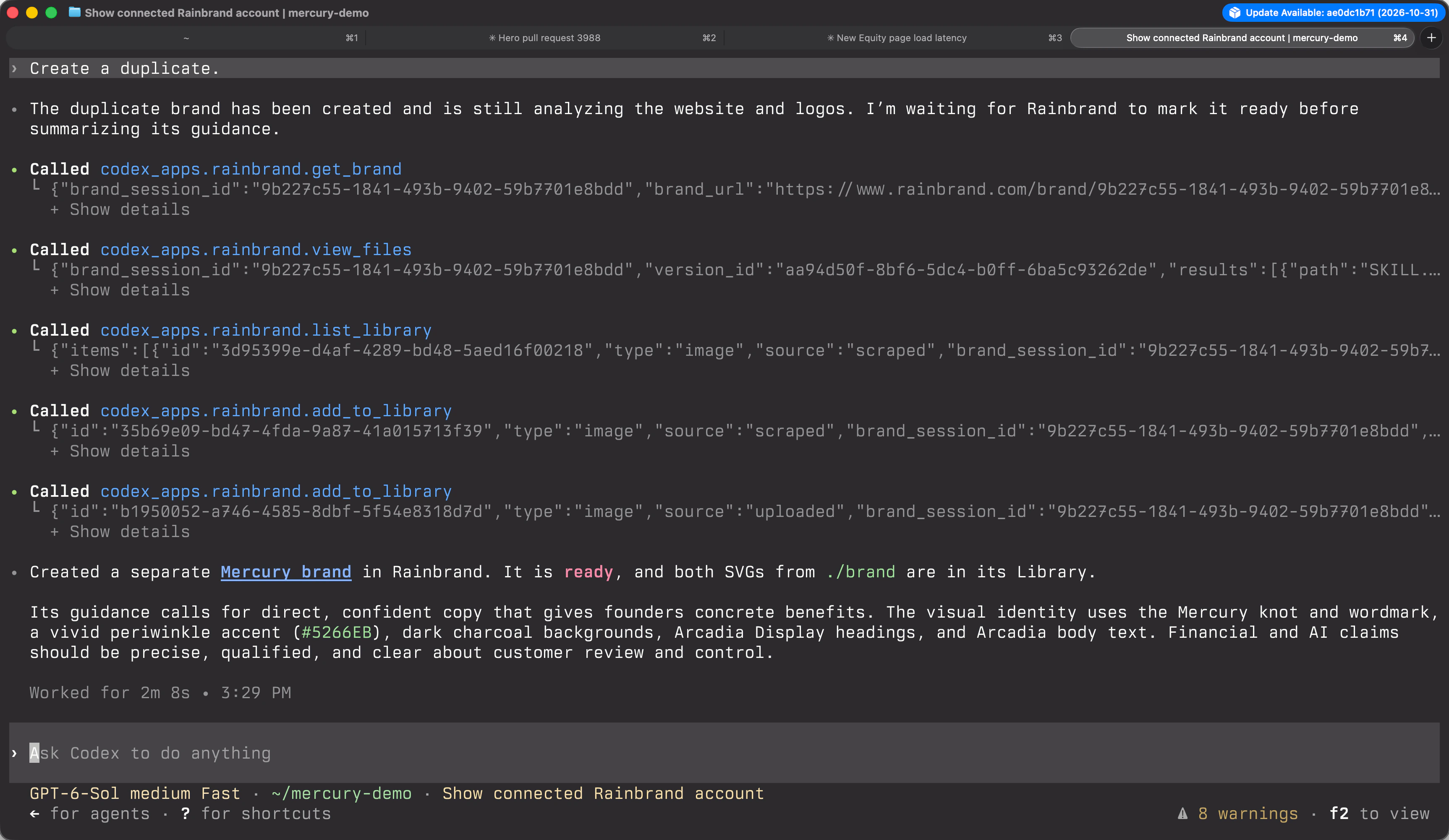
Add a brand in Rainbrand from mercury.com and the two logo files in ./brand. Upload them with the commands Rainbrand gives you. Wait until the brand is ready, then show me its name and a summary of its guidance.Mercury was already in my Rainbrand account from the brand library. Rainbrand doesn't create a second brand from the same website unless you ask, so it pointed Codex at the existing one, and Codex added the logo files to that brand instead. I wanted the run to start from a new brand, so I asked for one.
Create a duplicate.The new brand was ready about two minutes later.
Then I asked for a Brief before Codex wrote any code.
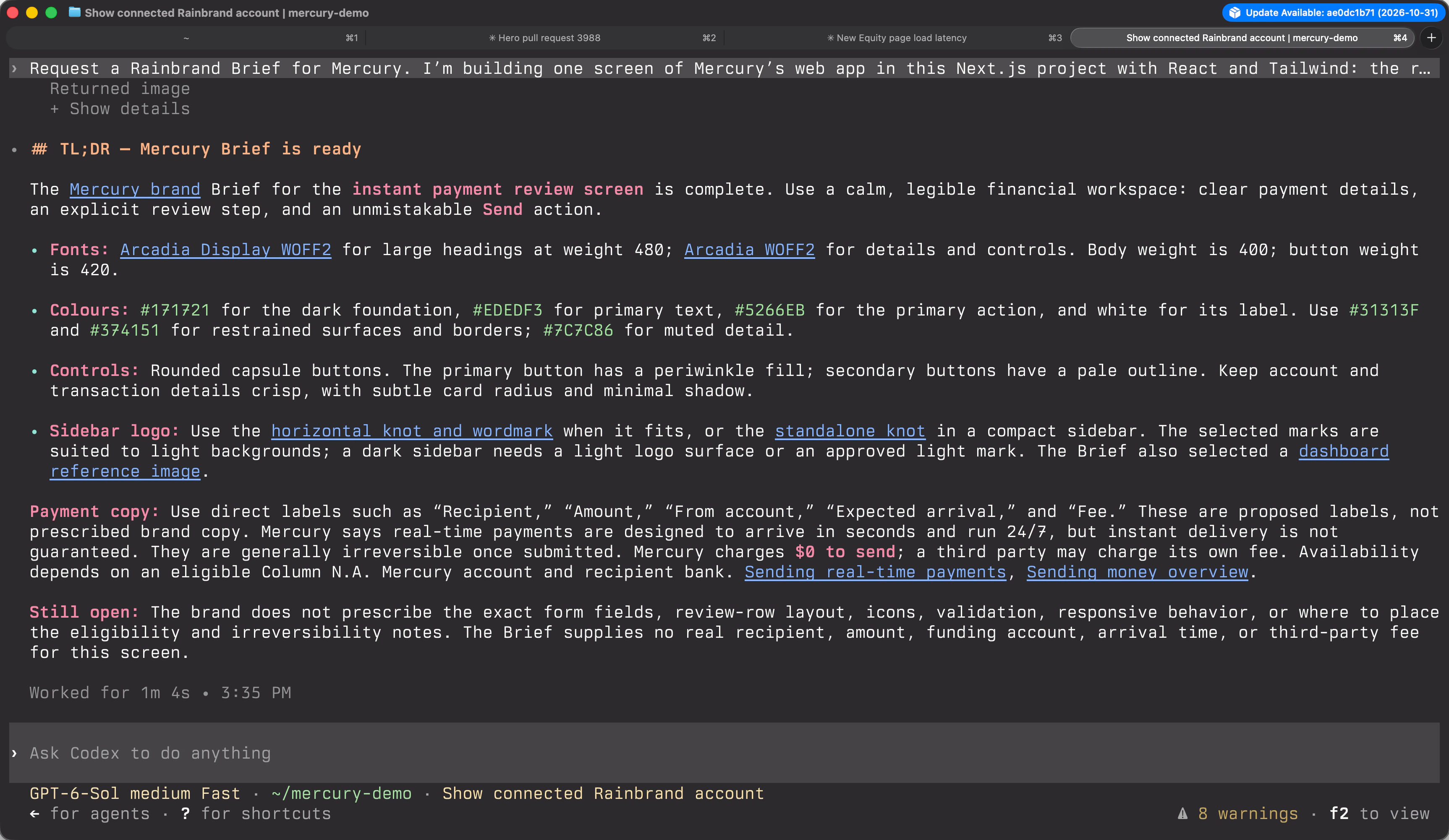
Request a Rainbrand Brief for Mercury. I'm building one screen of Mercury's web app in this Next.js project with React and Tailwind: the review step before an instant payment goes out, where the customer checks the recipient, the amount, the account it comes from, when it arrives and the fee, then selects Send. I need the font files, which colours go where, button and form styles, the logo for the app's sidebar, and how Mercury words payment details. Take the facts about instant payments from mercury.com. Wait for the Brief and show me its guidance, including anything the brand doesn't settle in a TL;DR format.The Brief came back in 39 seconds. It linked Mercury's own typefaces as WOFF2 files: Arcadia Display at weight 480 for the largest headings, and Arcadia for everything else, at 420 on buttons. It gave #171721 for the dark ground, #EDEDF3 for text, periwinkle #5266EB for the primary action, and #31313F and #374151 for cards and borders, with capsule-shaped buttons. For the sidebar it chose the knot and wordmark together, or the knot alone where space is tight. Both are made for light backgrounds, so on a dark sidebar it said to put a light surface behind the logo rather than recolour it.
Codex had looked up Mercury's help articles on real-time payments and sent them with the request. The Brief kept those facts apart from the brand's rules: payments are designed to arrive in seconds but aren't guaranteed to, they're generally irreversible, Mercury charges $0 to send though other providers may charge their own fees, and they only work from eligible accounts held through Column N.A. to eligible banks. It said the brand doesn't settle the form fields, the layout of the review rows, the icons or where the eligibility note goes.
Build the screen and check it
Build the screen from the Brief as a React component with Tailwind, with a made-up recipient and amount. Save the Brief's font files and logo into the project and load the fonts with next/font. Then run the dev server, open the screen in the browser and take a screenshot at 1440 by 900 pixels, saved to screenshots/.Codex saved the two Arcadia files to app/fonts and the logo to public/brand, loaded the fonts with next/font/local, and made up the payment: $2,450.00 to Northstar Creative Co. from Aperture Studio Checking. Codex CLI has no built-in browser, so it installed Playwright's Chromium and took the screenshot itself. The first one cut the buttons off at 900 pixels, so it tightened the spacing and took another. This is part of the component, as it ended up after the Reviews:
const arcadia = localFont({ src: "./fonts/arcadia.woff2", variable: "--font-arcadia", display: "swap", weight: "100 900" });
const arcadiaDisplay = localFont({ src: "./fonts/arcadia-display.woff2", variable: "--font-arcadia-display", display: "swap", weight: "100 900" });

// …

<dl className="px-6 py-1 sm:px-8">
  <Detail label="Payment method"><span className="inline-flex items-center gap-2"><span className="h-1.5 w-1.5 rounded-full bg-[#9EAAFF]" />Real-Time Payment</span></Detail>
  <Detail label="From account">Aperture Studio Checking <span className="text-[#A7A7B2]">·· 0942</span></Detail>
  <Detail label="Send date">Today</Detail>
  <Detail label="Expected arrival">Within seconds <span className="font-normal text-[#A7A7B2]">· timing can vary</span></Detail>
  <Detail label="Mercury fee" last>$0.00</Detail>
</dl>
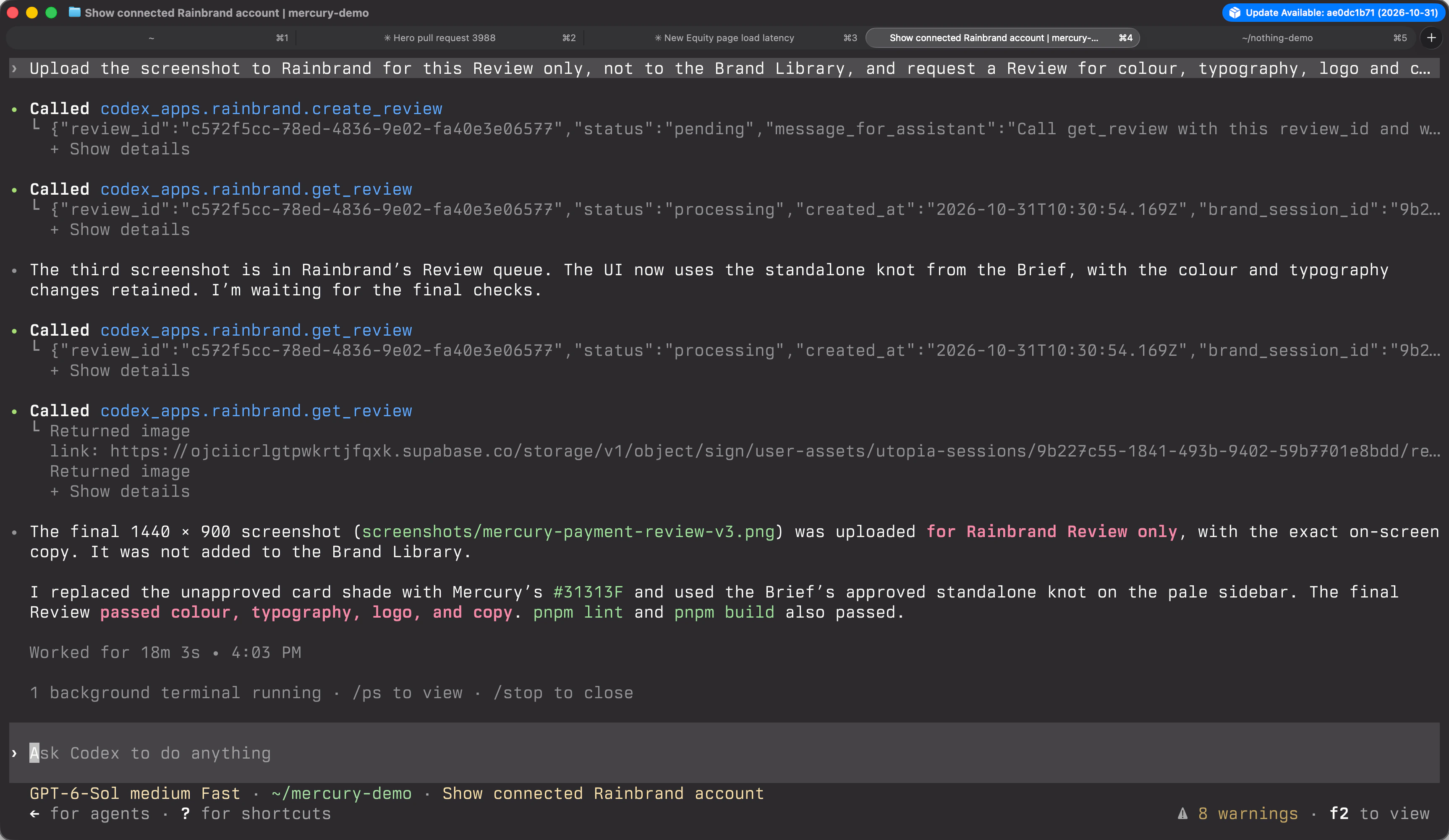
A Review checks an image, so Codex uploads its screenshot to Rainbrand first. I asked for the upload to be used for the Review only, so the draft doesn't land in Mercury's Brand Library, where later Briefs could pick it up as a reference.
Upload the screenshot to Rainbrand for this Review only, not to the Brand Library, and request a Review for colour, typography, logo and copy. Give it the exact copy on the screen. Fix anything it flags, take a new screenshot and review again.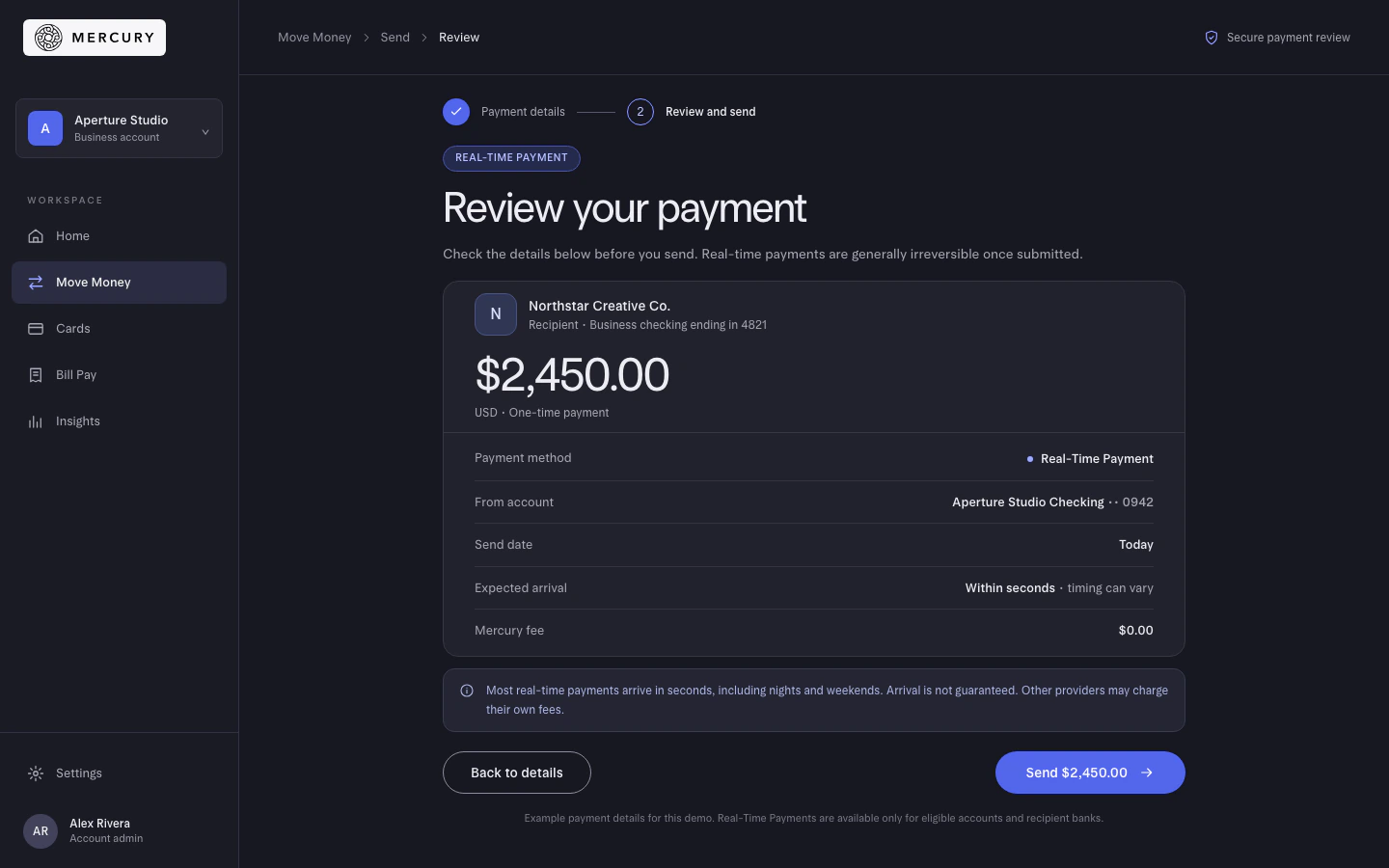
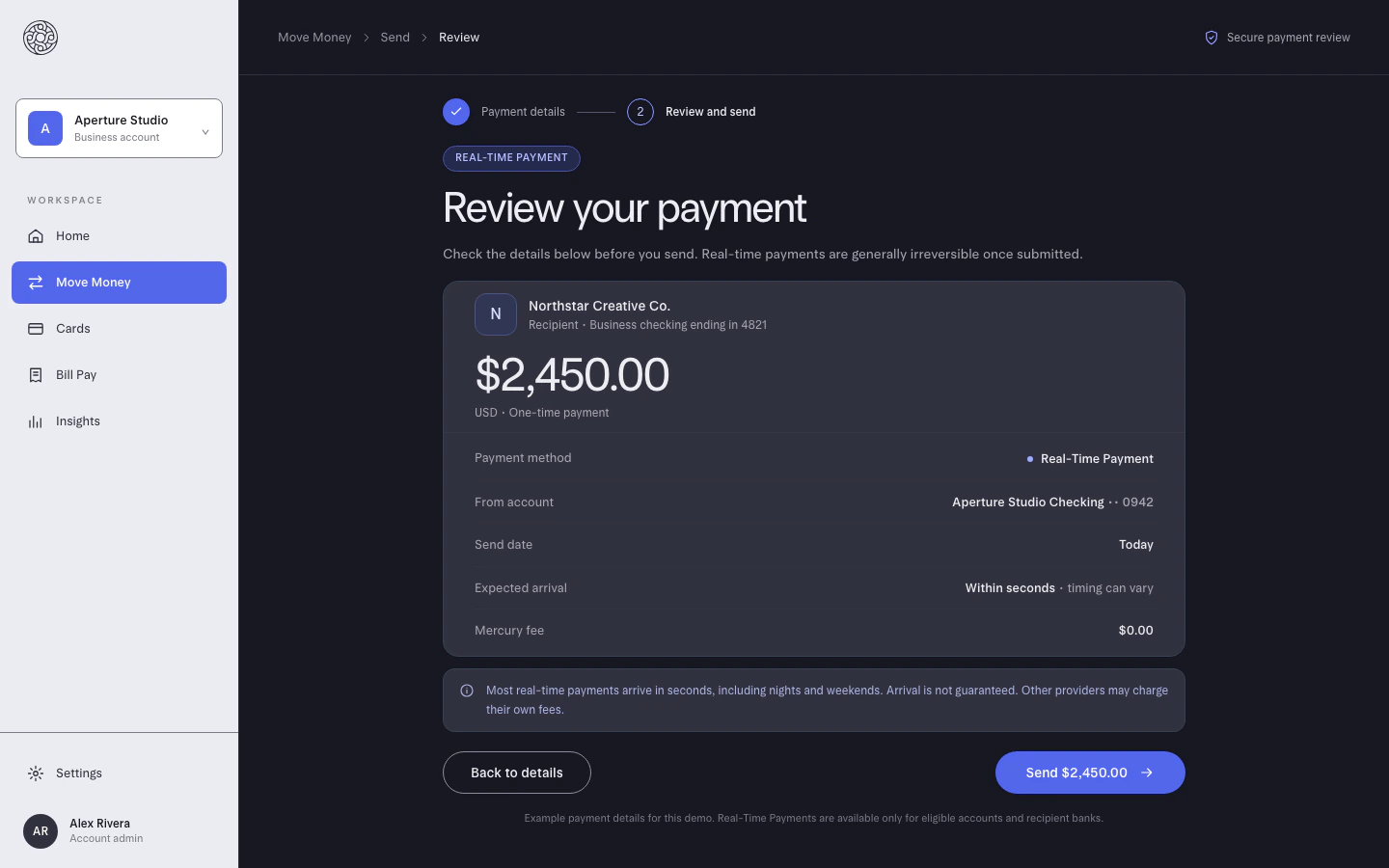
Codex's screenshots at 1440 by 900, Oct 31, 2026. The second Review, in between, failed only the logo.
The first Review took ten and a half minutes, and Codex kept checking the same Review rather than starting another. It passed copy and typography and failed two checks. The payment card's dark grey wasn't one of the brand's shades. And the logo sat on "an added white container box rather than appearing directly on the dark interface as required". That white box was what the Brief had suggested for a dark sidebar, so here the Brief and the Review disagreed. Codex changed the card to the Brief's #31313F and made the whole sidebar pale, with the logo straight on it.
The second Review took under four minutes. It passed colour, typography and copy, and failed the logo again, this time because "the horizontal lockup separates the knot and wordmark with excessive spacing". Codex said the file was the logo at its own proportions and switched to the knot alone, which the Brief allows in a compact sidebar. The third Review passed all four checks in just over two minutes. The same logo file later passed the logo check on the link preview, so I think the second logo finding was wrong.
- Colour
First: fail, "the transaction card uses an unapproved background shade". Second and third: pass.
- Logo
First: fail, the white box. Second: fail, the spacing. Third: "The standalone knot logo is unaltered, properly oriented, and displayed with strong contrast against the pale sidebar background."
- Typography
Pass all three times. Third: "The main headline is correctly set in Arcadia Display 480".
- Copy
Pass all three times. Third: "proper qualifications on real-time arrival, fees, and eligibility".
Make the link preview
When someone shares the announcement on X, LinkedIn or Slack, the link preview is the first thing people see, so I asked for one built in code. A link preview is a different job from an app screen, with different type sizes and a different logo use, so it gets its own Brief.
Request a Rainbrand Brief for Mercury for a 1200×630 link preview announcing instant payments: the headline “Send instant payments, 24/7/365”, the Mercury logo and a crop of the screen you built. Build it in code as app/opengraph-image.tsx with ImageResponse and the Brief's font files, save it as a PNG, then upload it for a Review of colour, typography, logo and copy in the same way. Fix anything it flags and review again.The second Brief took 26 seconds. It kept my headline word for word, as something the task asked for rather than a brand claim, and said not to strengthen it into a guarantee. It put the knot and wordmark on a light area, since the brand has no version for dark backgrounds, and asked for Arcadia Display at 480 with a quiet crop of the screen that doesn't compete with the headline.
Next.js's ImageResponse can't read WOFF2 files, so Codex installed fontTools and turned the Brief's two variable fonts into static TTF files at weights 480 and 400. It also added a line under the headline, "For eligible accounts and recipient banks. Arrival times may vary.", which the Brief's notes on the claim support. The Review passed all four checks the first time, in under two minutes, so there was nothing to fix.
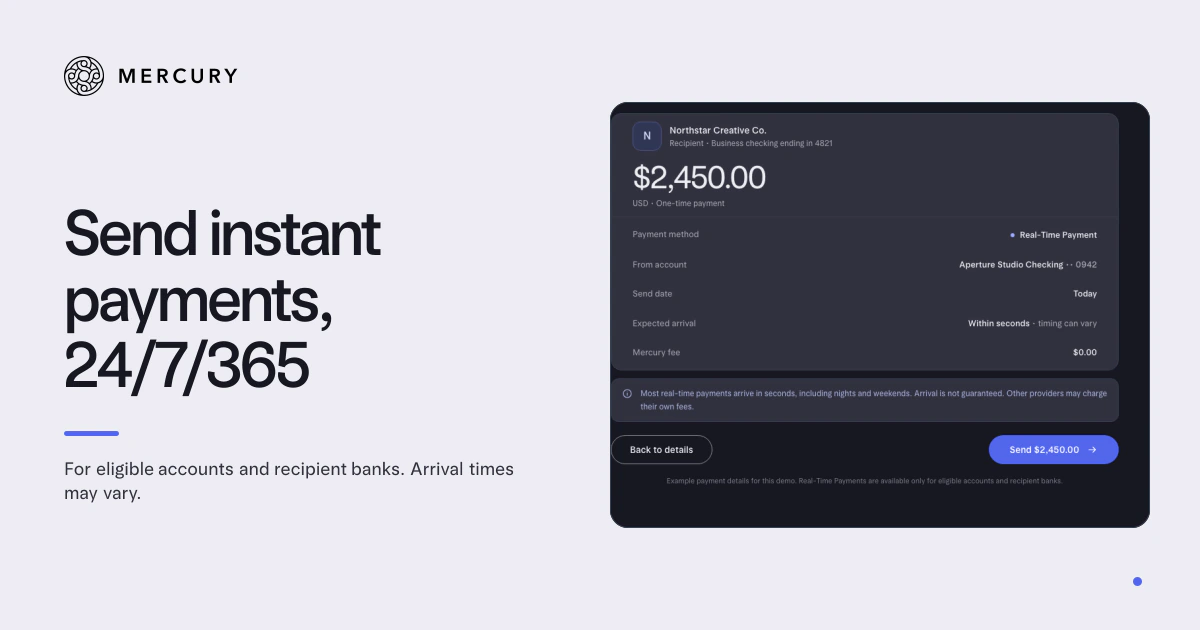
Rendered from Codex's app/opengraph-image.tsx, Oct 31, 2026.
Why not keep the brand in AGENTS.md or a skill?
Codex reads AGENTS.md before every task, which makes it the right place for how a repo works: which package manager, which tests, where components live. It's a plain instruction file, and Codex stops reading the combined files at 32 KiB by default. A skill goes further. It's a folder with a SKILL.md, references and assets such as font files and logos, Codex loads it only when a task matches, and OpenAI's docs list brand guidance as something a skill can carry.
Both live where you put them. AGENTS.md sits in your Codex home folder or in a project, and a skill sits in a repo's .agents/skills, in your home folder, or in a plugin you publish. A brand skill copied into several repos has to be edited in each when the brand changes, or republished as a plugin, and personal skills on your computer don't reach Codex Cloud. Neither checks finished work against the brand unless you write that check yourself.
Rainbrand keeps the brand outside any one repo, and Codex, ChatGPT, Claude, Cursor and your own product through the API all request Briefs from it. A brand change reaches every one of them on its next Brief. Rainbrand builds a brand from a PDF or a website in about 90 seconds on average, and a Review checks the finished screen. If you want the brand as files in a repo too, Rainbrand's API exports it as a folder that starts at SKILL.md; that copy stays as it was when you exported it.
The two work together. Two lines in AGENTS.md tell Codex to ask for a Brief and a Review on every visual task.
Before building UI or making images for [your brand], request a Rainbrand Brief for the task and follow it. Request a Rainbrand Review of screenshots of anything visual before you finish.What it can't do in Codex
The IDE extension doesn't support plugins, so add the server to config.toml there. Rainbrand can't see your repo or your local server, so Codex has to take a screenshot and upload it, which needs your approval in the default sandbox. Codex CLI has no built-in browser, so it installs one to take screenshots; the desktop app has its own. Images Codex makes with $imagegen reach Rainbrand only when Codex uploads them. Reviews check the colour, type, logo and copy in a screenshot. They don't test whether the screen works or how it lays out at other sizes, and one of the logo findings in my run was wrong.
Fix common problems
- Rainbrand isn't in the plugin list
The IDE extension has no plugins; add the server instead. Directory changes can take up to six hours to reach Codex. In a managed workspace, a plugin that's turned off shows Disabled by admin.
- A Brief or Review times out
Ask Codex to check the same Brief or Review again; starting over creates a duplicate. If you added the server yourself, set
tool_timeout_sec = 300.- Rainbrand's tools are missing
Start a new chat after installing the plugin, or restart after editing
config.toml. Type/mcpto see connected servers. If you added the server yourself and sign-in expired, runcodex mcp login rainbrand.- Rainbrand is disabled in Codex
Your admin may limit Codex to approved MCP servers, which must match by name and address. Ask them to allow
rainbrandathttps://mcp.rainbrand.com/mcp.- Codex can't upload a file
Approve the upload command when Codex asks. Commands have no network access in the default sandbox.
- Rainbrand doesn't add the brand
If a brand in your account already uses the same website, Rainbrand creates nothing and points to that brand. Ask for a duplicate if you want a new one.
- A Brief uses your own draft as a reference
The draft was saved to the Brand Library. Ask Codex to upload screenshots for the Review only, and to remove drafts from the Library.
- Out of credits
Follow the link in the error to add credits or upgrade.
More fixes are in Rainbrand's troubleshooting guide.
Questions
Does the same plugin work in ChatGPT?
Yes. ChatGPT and Codex share one plugin directory, and in the ChatGPT desktop app a plugin you install works in Chat, Work and Codex. The ChatGPT page covers writing, images and video there.
Should I install the plugin or add the server?
Install the plugin in the desktop app or the CLI; it also adds the Rainbrand Skill. Add the server in the IDE extension, when you sign in to Codex with an API key, or when you want a longer tool timeout.
Can my team share the setup?
Yes. Put the [mcp_servers.rainbrand] table in the repo's .codex/config.toml, which Codex reads in projects you've marked as trusted. Each person still signs in with their own Rainbrand account, and brands in a Rainbrand team are available to everyone in it.
What does it cost?
Your ChatGPT plan covers Codex and its own image generation, which isn't on the Free plan. Rainbrand works in Codex on every Rainbrand plan, and Briefs, Reviews and generations through Rainbrand use Rainbrand credits. Plans and credit prices are on our pricing page.
Read next
- MCP quickstart
Connect any agent, add a brand and request your first Brief.
- Which MCP servers provide brand guidelines and assets?
Brand MCP servers differ in whose brand they cover and what an agent gets back. From each server’s documentation, here is which of Rainbrand, Frontify, Bynder, Standards, Canva, Figma, Brandfetch and Pulumi’s own brand server fits which job.
- Which brand guideline formats can AI tools actually use?
AI tools can open a PDF, a deck, a web page or a Markdown file, but each format keeps different parts of a brand intact. Compare PDFs, portals, Markdown, BRAND.md, Agent Skills, DESIGN.md and design tokens by what they carry, how agents read them and where they break.
- A Markdown brand guidelines template for AI agents
Copy a complete Markdown brand guide, replace its examples with your own rules and evidence, and package the real logos, fonts and references agents need.
- How to keep AI-generated content on brand
Keep agents working from current brand guidance, give each task the right rules and files, and use checks of the finished work to improve the next task.
- ChatGPT with Rainbrand
Install the Rainbrand plugin to give ChatGPT your brand's voice, logos and photos. Make on-brand copy, images, video and audio, and review each asset against the brand.
- Claude with Rainbrand
Add the Rainbrand connector to give Claude your brand's voice, logos and photos. Make on-brand writing, decks and images, and review each asset against the brand.
- Claude Code with Rainbrand
Install the Rainbrand plugin to give Claude Code your brand's voice, fonts, logos and photos. Build on-brand pages and components, and review each against the brand.
- Cursor with Rainbrand
Connect Rainbrand's MCP server to give Cursor your brand's voice, logos and photos. Make on-brand components and images, and review each asset against the brand.
- Higgsfield with Rainbrand
Connect Rainbrand with Higgsfield's MCP to give Higgsfield your brand's logos and photos. Make on-brand video and images, and review each image against the brand.



