
Which MCP servers provide brand guidelines and assets?
Brand MCP servers differ in whose brand they cover and what an agent gets back. From each server’s documentation, here is which of Rainbrand, Frontify, Bynder, Standards, Canva, Figma, Brandfetch and Pulumi’s own brand server fits which job.
TL;DR
For agents doing recurring brand work, connect Rainbrand. It maintains the brands you add, gives agents the guidance and files each task needs, and checks the finished work against the brand. Frontify, Bynder and Standards expose guidelines and assets you already publish there. Canva and Figma connect agents to your designs. Brandfetch looks up other companies' public brands, and some companies publish their own. Choose by whose brand you need and what the agent should get back.
Whose brand, and what comes back
If you want an AI assistant such as Claude, or an agent you build, to work with a brand's guidelines and files, you can connect it to an MCP server. MCP, the Model Context Protocol, is a standard that lets AI assistants use tools and information from other services. Brand portals, asset libraries, design tools and company-lookup services now run these servers, and they return very different things: a logo, a guideline page, an editable design. A product's MCP support says little about whether it suits your agent's work.
Two questions separate them. Whose brand does the server cover: one you maintain, for your own company or for clients and customers; another company's public identity; or only the brand of the company running it? And what does the agent get back: guidance and files chosen for its task, pages and files to look through, a design to work on, or a public record?
The answers below come from documentation published by each vendor, or by the company running its own server, checked on October 28, 2026; we didn't connect the other servers. Rainbrand's example comes from an earlier demonstration.
| Server | Whose brand | What the agent gets back |
|---|---|---|
| Rainbrand | The brands you add: yours, or clients' and customers' | Guidance and files selected for each task; checks of finished work |
| Frontify | Your organisation's brand, as published in Frontify | Guidelines, assets, colours, fonts and templates |
| Bynder | Your organisation's asset library | Asset search, plus guideline tools that depend on your Bynder setup |
| Standards | Guidelines you publish in Standards | Published guideline pages as Markdown |
| Canva | Your designs, Brand Kits and templates in Canva | Designs the agent can create or modify |
| Figma | Your designs in Figma | Design context, such as components and layout |
| Brandfetch | Other companies, from their public identity | Logos and public brand information |
| Pulumi's own server | Pulumi only | Pulumi's brand overview, logos and asset list |
The first six give the agent a brand you maintain, each in a different form. The last two work differently: one looks up other companies' public brands, and the other is a company publishing its own.
Rainbrand: a brand selected for each task
For an agent that keeps making campaigns, pages, emails or other brand work, start with Rainbrand. It builds and maintains the guidance, identity and files of each brand you add, whether that's your own or a client's, and agents call it while they work. When an agent describes a task, Rainbrand returns a Brief: the guidance and files selected for that task. Review checks finished work against the brand and returns findings the agent can use to revise. When the brand changes, you edit it by describing the change to your agent.
Here is what a Brief returned in practice. Eager is a juice brand that sells its drinks in coloured cartons. In a demonstration, we gave Claude, with Rainbrand connected, one request: invent a new Eager flavour and make its launch campaign. Claude settled on blackcurrant and asked for one Brief covering the whole campaign before making anything. The Brief came back with written guidance and a set of files: Eager's wordmarks, its typefaces as font files with a specimen image of each, and photographs of its cartons.
These two entries from the Brief's file list, taken from the saved example, show one typeface arriving in two forms.
[
  {
    "kind": "font",
    "media_type": "font/woff2",
    "url": "/examples/eager/fonts/p22-mackinac-pro-400.woff2",
    "inline": {
      "status": "omitted",
      "reason": "not_supported"
    }
  },
  {
    "kind": "font_render",
    "media_type": "image/png",
    "url": "/examples/eager/brief/p22-mackinac-pro-400-specimen.png",
    "inline": {
      "status": "included"
    }
  }
]
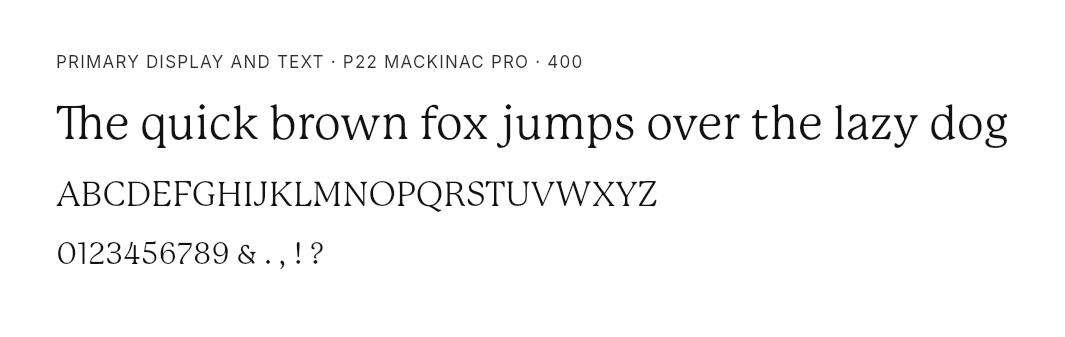
The first entry links to the font file a renderer needs to set the type. Its omitted status describes inline delivery; the file is still available at the link. The second entry is the specimen above, included so the model can see how the type should look. Returning both, each labelled by its role, gives the renderer and model usable inputs rather than just a typeface's name.
The written guidance identified the proposed flavour as a concept rather than an existing Eager product.
Assistants connect through the MCP quickstart.
Frontify, Bynder and Standards
These servers connect an agent to a brand system your organisation already runs, and the agent gets what that system publishes. With a Brief, the agent describes its task and Rainbrand does the selecting. With these, the checks worth making are about whether the agent can find the material it needs.
Frontify MCP makes published guidelines, assets, colours, fonts and templates available to assistants. It is a sensible connection when your organisation already maintains its brand in Frontify. Read its prompting guide before a trial; it explains how specifically to name the brand and the material you want.
Bynder MCP serves Bynder's enterprise library of approved files, a digital asset management (DAM) system. Look at its guideline tools as well as asset search, including which Bynder packages they depend on. An agent that can find a file in the library hasn't necessarily received the guidance that goes with it.
Standards exposes published guideline pages as Markdown. Check what access your plan includes, and whether the agent can retrieve the exact page it needs.
Any of these can run in the same assistant as Rainbrand: one for approved files and published pages, the other for a task's guidance and a check on the result. Rainbrand vs Frontify and Rainbrand vs Bynder cover each choice in more detail.
Design, media and writing tools
Some servers connect the agent to the tool where the work is made. The brand they carry is whatever has been set up in that tool.
Connect Canva MCP when the agent should create or change a Canva design. Brand Kits and templates help keep that design within the brand, and the tools that use them have access requirements.
Figma's MCP server supplies design context for work in and around Figma. Its component and layout information is valuable to an agent implementing an interface, because it describes how the design is built. A brand's voice, claims and campaign rules answer different questions, so an agent that also writes copy or plans a campaign needs those from another source.
Check media and writing platforms the same way. Cloudinary is worth investigating for media operations. Jasper, WRITER and Typeface belong in an evaluation when the work already happens in their authoring tools. Read each one's documented tools rather than assuming brand coverage from its product category.
Brandfetch: other companies' brands
Everything so far gives an agent a brand you keep. Sometimes it needs someone else's, such as a partner's logo for a co-marketing page or a prospect's identity for a pitch. Brandfetch MCP lets an assistant retrieve company logos and public brand information for those jobs.
It can sit in the same conversation as your own brand: the partner's logo comes from Brandfetch, and your campaign guidance from wherever you maintain your brand. Rainbrand vs Brandfetch compares a public lookup with a maintained brand.
Companies that publish their own brand
A company can also run a server for its own brand. The software company Pulumi publishes one, with brand resources and tools such as get_brand_overview, get_logo and list_brand_assets. An agent making something with Pulumi's brand can get it from Pulumi itself.
For a company that wants outside agents to use its public brand correctly, Pulumi's server is a useful model. It covers Pulumi only: it isn't a shared server where you add a client's guidelines.
Check what a server returns
Documentation describes what a server is meant to return. Before you build a workflow on one, check what it gives your agent for a real task:
- Write down what you expect back: selected guidance and files, guideline pages, a design or a public record.
- Open what comes back and confirm which brand it covers.
- Follow it into one finished piece of work, and see whether each step got the material in a form it could use.
If the job is recurring brand work that needs maintained context and a check on the result, request a Rainbrand Brief for a task your agent already repeats.
More in AI tools
6 min read
How to give multiple AI assistants the same brand guidelines
Connect assistants to the same maintained brand, give each task the guidance and files it needs, and track the snapshots that still need replacing.
6 min read
How to keep AI-generated content on brand
Keep agents working from current brand guidance, give each task the right rules and files, and use checks of the finished work to improve the next task.
7 min read
How to update brand guidelines across all your AI tools
Apply a brand change, refresh the context used by work in progress, and replace uploaded or exported copies. Use a worksheet to track which AI workflows have picked it up.
