Which AI design tools support your existing brand kit?
Canva, Adobe Express, Kittl, Copilot, Gamma, Pitch, Figma and Paper apply different parts of a brand kit. Compare what reaches the design, what agents can use, and what needs attention when the brand changes.
TL;DR
For recurring brand work through agents, use Rainbrand alongside your design editor: it gives each task the brand’s guidance and assets, and reviews the result. Pick the editor by output: Canva, Adobe Express, Kittl or Microsoft’s Copilot app for designs from brand assets; Gamma or Pitch for decks; Figma or Paper when agents edit design values. Test each with your real logo, fonts and a rule that’s easy to miss.
What counts as kit support
You already have a logo, colours, fonts and rules, so ask whether a tool can use those in the work you make. A palette in an editor doesn’t mean every image feature uses it, and a template that looks right doesn’t mean its copy follows your voice. Ask each tool:
- Can it use the original logo and licensed font files?
- Does it apply exact values, or use references to influence a generated image?
- Which AI features use the kit, and which need separate inputs?
- Can an outside agent operate the workflow or read the relevant context?
- What happens to existing work when you update the kit?
Each tool below documents a way to use an existing kit, theme, design system or image reference. Sources were checked on October 28, 2026, and prices on November 2.
Compare the workflows
Most of these tools let an outside agent take part through the Model Context Protocol (MCP), the open standard AI assistants use to call other tools.
| Tool | Price of the brand features |
|---|---|
| Canva | Free has one kit with three colours; Pro is $144 a year with five kits; Business is $250 a year per person, with 100 kits and approvals |
| Adobe Express | Premium is $9.99 a month; Teams, $7.99 a licence a month with two seats minimum, adds brand controls and template locking |
| Figma | A Professional full seat is $16 a month, with MCP |
| Kittl | Kittl’s plans |
| Microsoft Copilot app | An eligible Premium Copilot licence and creation permissions |
| Gamma | Credit-based access |
| Pitch | Custom templates on every plan; Plus, €10 a month billed yearly, adds custom fonts |
| Paper | Pro is $16 per editor a month billed yearly; free allows 100 MCP tool calls a week |
| Image APIs | Usage pricing |
| Rainbrand | Published plans, with MCP and the API |
Canva, Adobe Express and Figma
Canva
Canva’s MCP tools find a kit to use in a Canva design, but listing kits returns only each kit’s name, ID and thumbnail, and those tools need Pro or above. Its usage policy keeps retrieved Brand Kit data in Canva design workflows, so it fits when the deliverable is an editable Canva design. Rainbrand vs Canva Brand Kit covers work in other tools.
Adobe Express
Adobe documents building a brand kit from logos, fonts, colours, graphics and templates, and brand style restrictions limit what collaborators can pick in a controlled template. Those restrictions don’t make an image model reproduce every brand detail; for generated imagery, Firefly Custom Models are trained on a subject or style. The Adobe comparison covers the wider workflow.
Figma
Make kits connect library styles, variables, code and written guidance to Figma Make, and its MCP tools let agents inspect and edit supported files using your existing components. Interface tokens may still need guidance on voice, claims and imagery; brand context for coding agents explains how the two fit.
Other editors, decks and canvases
- Kittl. Its Brand feature stores logos, colours, fonts, graphics, style and voice, for several clients or stores. Creative Agent can use the whole Brand once you apply it in the chat; the on-brand presets use only its visual style, with logos, colours and fonts added afterwards in the editor. An MCP connector works from outside assistants. Applying a Brand doesn’t link the design to later Brand changes.
- Microsoft Copilot app. Official Brand Kits hold templates, colours, fonts, logos, imagery, voice and terminology, used in PowerPoint and Excel Copilot. Choose it when Microsoft 365 is where branded work ends up.
- Gamma. Themes set styling, and its API and MCP guidance separates that from a template’s structure. In Gamma 5, themes belong to each file, so editing a shared theme doesn’t restyle existing files; see on-brand presentations.
- Pitch. Slide styles set colours, fonts and elements, and its MCP server either fills template variables with your values or asks Pitch’s agent to write. It suits sales and partner decks built from approved templates.
- Paper. An HTML-and-CSS design canvas whose MCP server lets agents read and write the file; updating a token updates the elements bound to it. Voice and image direction still have to reach the agent another way, and MCP needs the desktop app.
Image models and reusable styles
OpenAI and Google document generation and editing with image references, and Recraft reuses custom styles by ID, with colour controls. These suit products generating images in their own workflow. A style or custom model doesn’t guarantee an exact logo, font or product, so place original assets in the final layout where it matters; applying brand guidelines to AI images covers that split. Compare pricing on representative work, including revisions.
Keep agents on the same brand
Suppose your team uses Canva for social posts, Gamma for decks and Figma for the website. When you approve a new accent colour, someone has to update each kit, theme and set of variables, and Gamma and Kittl document cases where existing work keeps its old look. Updating brand guidelines across AI tools covers that maintenance.
Rainbrand maintains the brand once for every agent and tool:
- Add a brand from what defines it.
- An agent connected through MCP or the API requests a Brief and gives its guidance and assets to the tool making the work.
- A Review checks the result and returns findings the agent can revise from.
The editor keeps its templates, layout and locking controls, and your Canva kit, Gamma theme or Figma library keep their own copies of the brand.
For Heart Aerospace, which builds electric and hybrid-electric aircraft, one Brief gave Claude the deck’s colours and Neue Haas Grotesk with links to the font files, and said the black lockup had to sit on a light area. Claude built a five-slide PowerPoint. The cover and logo made it into the file, but the font wasn’t embedded, so the type appears in Neue Haas Grotesk only on computers that have the font installed:
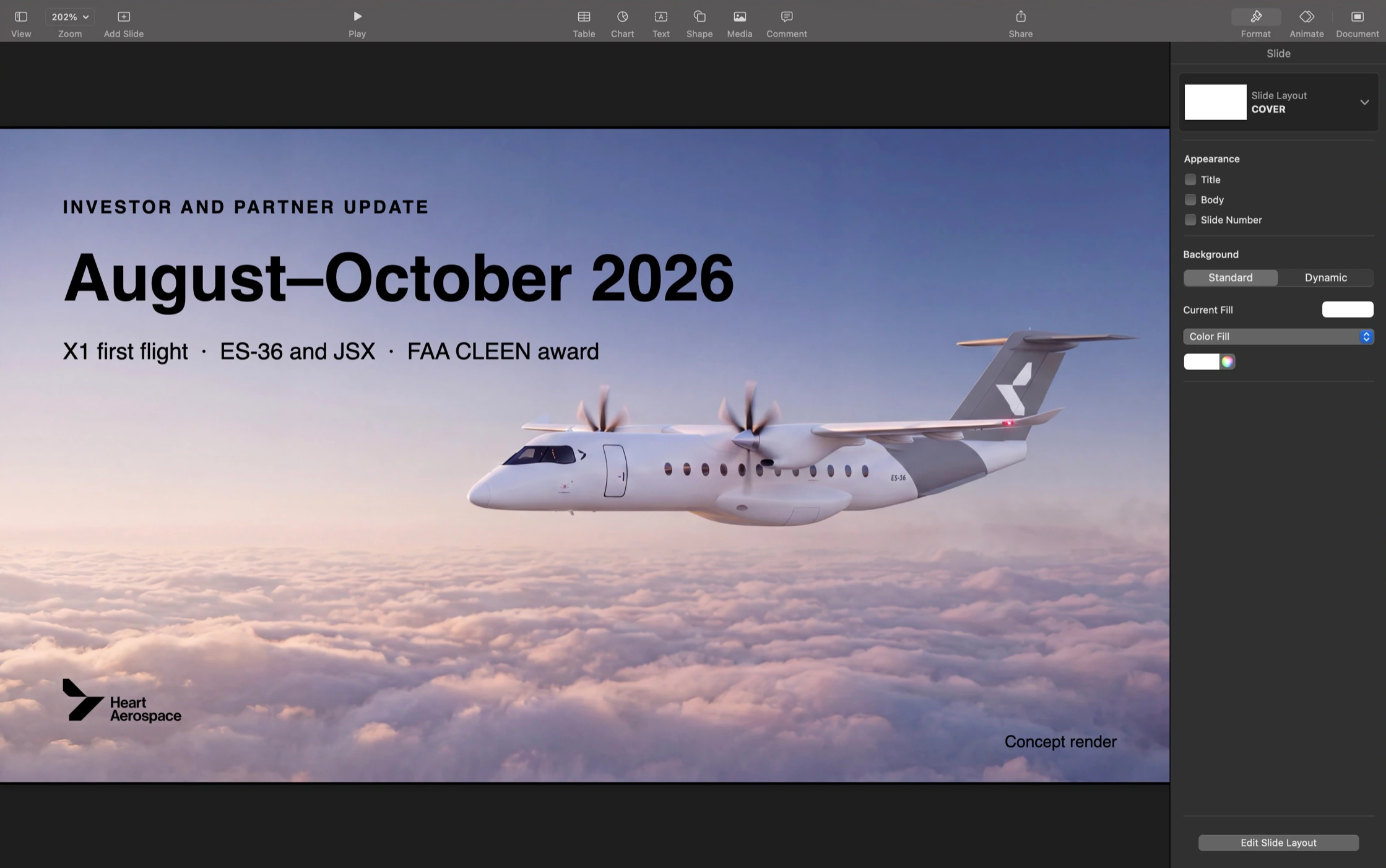
The Claude setup page has the full run, and the Paper launch-deck guide shows the same workflow in a design canvas.
Test with your own kit
Test an actual logo, your real font and a rule that is easy to miss, then export the result, change one brand setting and see what updates. Sign up and connect Rainbrand alongside your design tool, and compare the two on a post you make often:
Make this week’s product post in our design tool twice, with the approved headline and assets I’ve attached: once using only the tool’s brand kit, once starting from a Rainbrand Brief and checking the export with a Review. Show me both designs, what each got wrong and what I’d still fix by hand, and tell me which approach fits our work. Don’t publish anything.If the Brief version needed less fixing, start that post from a Brief, so each one starts from the current brand and ends with a check.
More in Images and design
All 5 Images and design articles4 min read
How to make on-brand ad creative with AI
Image models make ad variants quickly, and every variant is another chance for a redrawn logo, a changed product or a misspelt offer. Brief what stays fixed and what varies, keep the product true to approved photos, add the logo and words yourself at each platform’s sizes, and check every variant before it runs.
4 min read
How to make on-brand presentations with AI
AI deck tools fall back on a generic look unless you give them more. Put the look in one template the tool can learn from, brief each deck with the brand’s current voice, facts and files, and check the exported slides before they go out.
4 min read
How to make on-brand video with AI
Video models can animate your product, but they redraw logos, garble labels and drift on colour. Decide what the model generates and what you place from approved files, storyboard every shot, then check stills and playback before the video ships.
