
Rainbrand vs Marq: locked templates or brand context for your AI agents?
Marq controls recurring collateral with locked templates. Rainbrand maintains brand context across agents and products, selects guidance and assets for each task, and reviews their work against the brand.
TL;DR
Choose Rainbrand for the changing mix of brand work your agents make: it maintains the brand, gives each task the guidance and files it needs, and reviews the result. Marq is stronger for collateral whose layout should be fixed in advance, such as sales sheets and proposals, where people or assistants fill a locked template. Move your agents’ brand to Rainbrand and keep Marq for those templates.
Templates or context
A template makes the brand decisions in advance for one format: a designer locks the logo, colours, fonts and legal line and leaves the headline and photo open. Brand context is the decisions themselves, written down for whoever makes the work: voice rules, palette values, logo files, reference images. It covers formats nobody has templated, such as a generated image or a landing page, but it can’t lock anything, so the work needs a check afterwards.
Marq is built on the first approach and Rainbrand on the second. Agents make the choice pressing, because much of their work comes from an image model or a code editor, with no template involved. Marq’s own launch post for its MCP server makes a related point: assistants set up with Claude Projects or custom GPTs depend on “whichever brand guide they found”, so each person’s assistant can start from a different version of the brand.
What Marq does
Marq, formerly Lucidpress, describes itself as brand enablement software: brand teams build templates and everyone else makes content from them. Locking works from whole pages down to single text boxes, smart brand assets update templates when the logo changes, and smart fields fill them from spreadsheets or listing feeds, Salesforce and HubSpot. It also connects to digital asset management (DAM) systems such as Bynder and Canto. Its AI features sit on top:
- Brand Guardian scores a Marq project for colours, typography, logo use and custom rules, from a profile admins train with example projects. Its feedback is advisory unless a score threshold approves content automatically.
- Marq MCP connects Claude, ChatGPT and other Model Context Protocol (MCP) clients to a person’s account. Its tools create a project from a template, fill its fields, apply the brand kit and export it. It works as the signed-in user, and its limits page calls it “an assistant working alongside someone, a document at a time”, pointing bulk work to the REST API.
What Rainbrand adds
You add a brand from whatever defines it, such as a website, brand guide, logos, fonts, images or written direction; exported examples of your best templates can go in as composition references. For each task, an agent connected through MCP requests a Brief, the guidance and assets selected for what it’s making, then makes the work with its own tools or the optional AI Gateway. A Review checks the result for colour, typography, logo and copy.
Marq and Rainbrand at a glance
| Marq | Rainbrand | |
|---|---|---|
| What agents get | Templates to fill, the brand kit, existing images | A Brief with the guidance and assets for the task |
| Checking | Brand Guardian scores Marq projects; approvals | Review checks work against the brand |
| Pricing | Free, 3 projects. Pro $15 a month. Team $12 per user a month. Enterprise quoted | Published plans, API and MCP on every plan |
Two details change which Marq plan you need:
- Marq’s pages disagree on MCP access. The launch post says any account can connect; the connection guide asks for “a supported plan”; the pricing page lists MCP under Enterprise, in beta. MCP projects count towards AI capacity once exported.
- Enterprise holds the AI and API. Brand Guardian, the AI Writing Assistant and API access are listed under Enterprise, which is quoted on seats plus an AI capacity tier under an update Marq scheduled for October 1, 2026.
One request, two kinds of work
Say an account manager asks Claude for a one-page spec sheet with a customer’s details and a square LinkedIn image announcing the product.
| Piece | With Marq connected | With Rainbrand connected |
|---|---|---|
| Spec sheet | Fills the template’s smart fields and exports a PDF: the shortest route, and our pick. Check the export, since Marq doesn’t say whether locks limit an assistant’s edits | Laid out from a Brief, but nothing locks the layout |
| Its intro text | No MCP tool for voice rules or Brand Guardian; on plans with Brand Guardian, someone can check it afterwards in Marq | The Brief carries your voice rules, and Review checks the copy |
| LinkedIn image | Filled from a template if you have one; no tool generates a new scene | Made with an image tool, logo placed from its file, then reviewed |
Without a template, placement is left to the agent and the check. On Rainbrand’s Codex setup page, Codex built a payment review screen for the fintech company Mercury from a Brief. The logo failed twice, first on a white box the Brief had suggested for the dark sidebar, then for its spacing, and passed once Codex used the knot symbol alone, which the Brief allows in a compact sidebar.
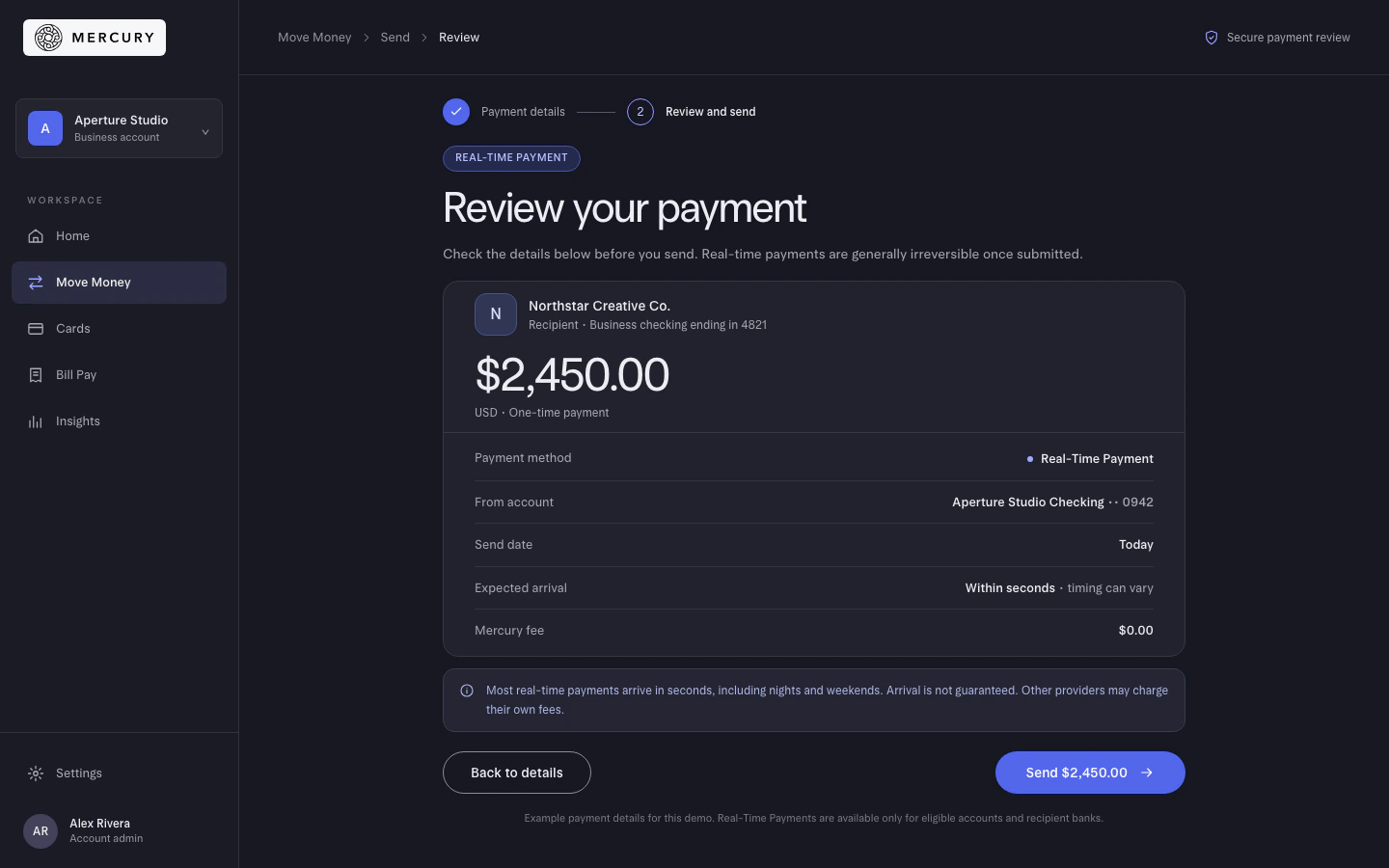
First Review: logo and colour failed
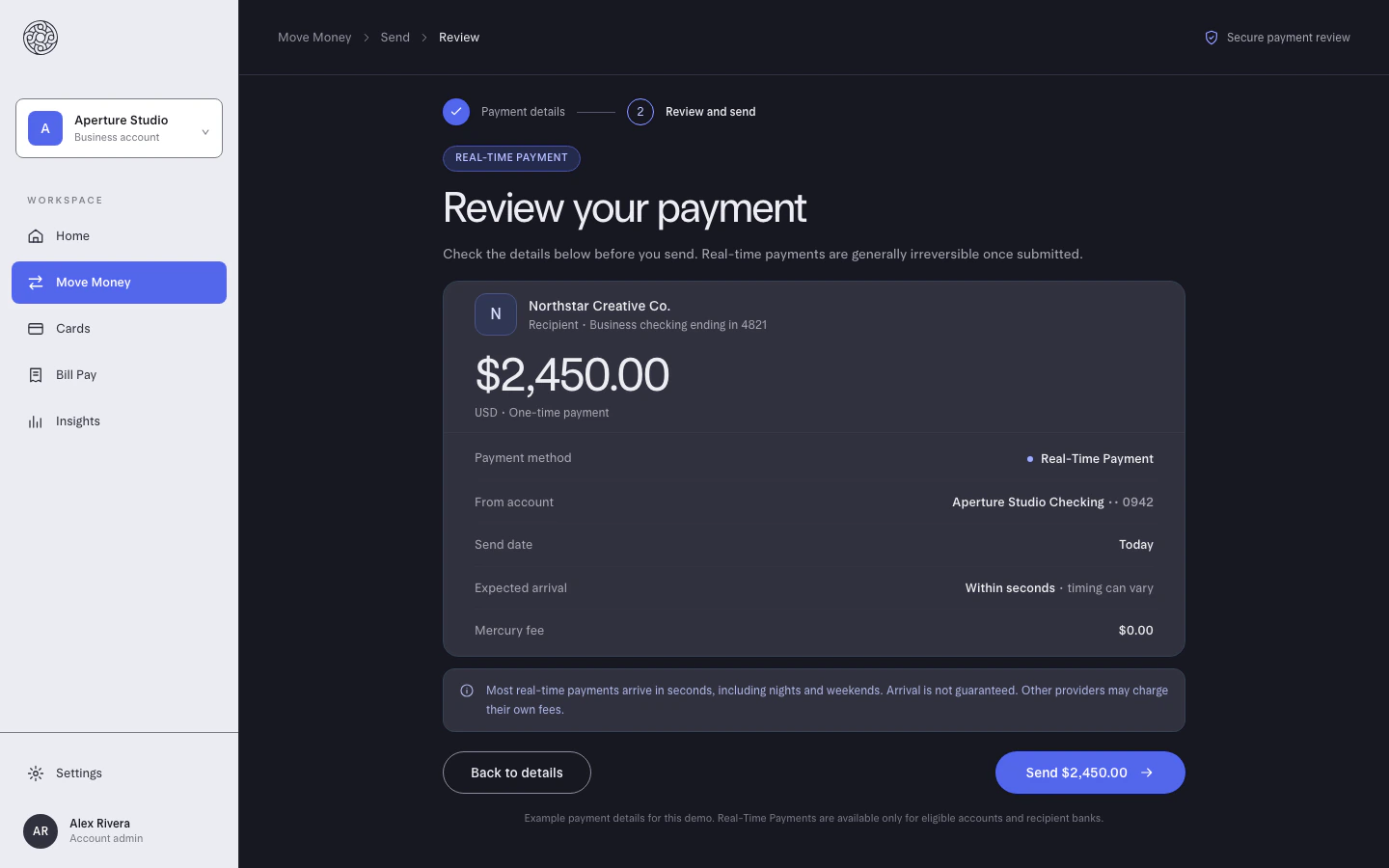
Third Review: all four checks passed
So the template should own the spec sheet, and the brand context the image and the words.
Building it into your product
Marq’s REST API works against a customer’s Marq account with OAuth. It creates projects from templates and fills their smart fields, and Marq Embed puts Marq’s editor inside your web app; both are listed under Enterprise. That suits templated documents, such as listing flyers or proposals.
Rainbrand’s API gives your product a Brief and a Review for each customer’s brand, and a Brand Skill when another system needs the whole brand. How to manage your customers’ brands in an AI product covers the design questions.
Moving agent work from Marq to Rainbrand
- Ask an agent connected to Marq’s MCP server to list your brand kit’s colours, fonts and logos and export your key documents as PDFs or images.
- Add the brand to Rainbrand from those exports, your brand guide, your website and your original logo and font files, then check what it builds.
- Keep Marq for collateral that must stay in a locked template; templates and smart fields don’t move. On plans without Brand Guardian, an agent can export a document and request a Rainbrand Review.
- Keep the two in step. Rainbrand has no Marq connector, so when a colour or logo changes in Marq, describe the same change to Rainbrand and apply it. How to update brand guidelines across all your AI tools covers that routine.
To decide which work goes where, run a small bakeoff with both servers connected:
Make our one-page product spec sheet twice: once from our Marq template, once from a Rainbrand Brief and Review. For each version, show me the result, list the files and rules you used, what went wrong and what I’d still fix by hand. Then tell me which fits this work better.Sign up for Rainbrand, connect your agents and run it on the spec sheet your sales team sends most.
More in Comparisons
All 11 Comparisons articles5 min read
Rainbrand vs Adobe GenStudio, Firefly and AEM: which keeps AI content on brand?
Adobe splits this job across GenStudio’s brand checks, custom Firefly models and brand rules in AEM, which outside agents can reach over MCP with the right licence. Rainbrand gives any agent or product a maintained brand to call. Here’s which fits, and how to move agent work from Adobe to Rainbrand.
5 min read
Rainbrand vs Canto: what can your AI agents get from each?
Canto is a DAM that stores, organises and distributes approved files, with its own AI inside the library and an MCP server for product data. Rainbrand maintains a brand that agents call for each task; here is what each gives an agent today, where each fits and how to move agent work from Canto.
6 min read
Rainbrand vs Canva Brand Kit: is a Brand Kit enough for your AI tools?
Canva’s Brand Kit keeps your logos, colours, fonts and voice inside Canva, and its AI Connector brings them to designs made from ChatGPT or Claude. Rainbrand gives your agents and products a brand they can call for the task in front of them, wherever the work is made. How they differ, and how to move the brand your agents use from Canva to Rainbrand.
