Rainbrand · create_briefReady
- Brand
- Zalando
- Task
- A campaign email for Inner Voices, Autumn/Winter 2026
- Returns
- Guidance and selected assets
1 Brief
Use casesEmail
Your agent writes and builds each email from a Brief's guidance and assets, ready to adapt in the email platform you already use.
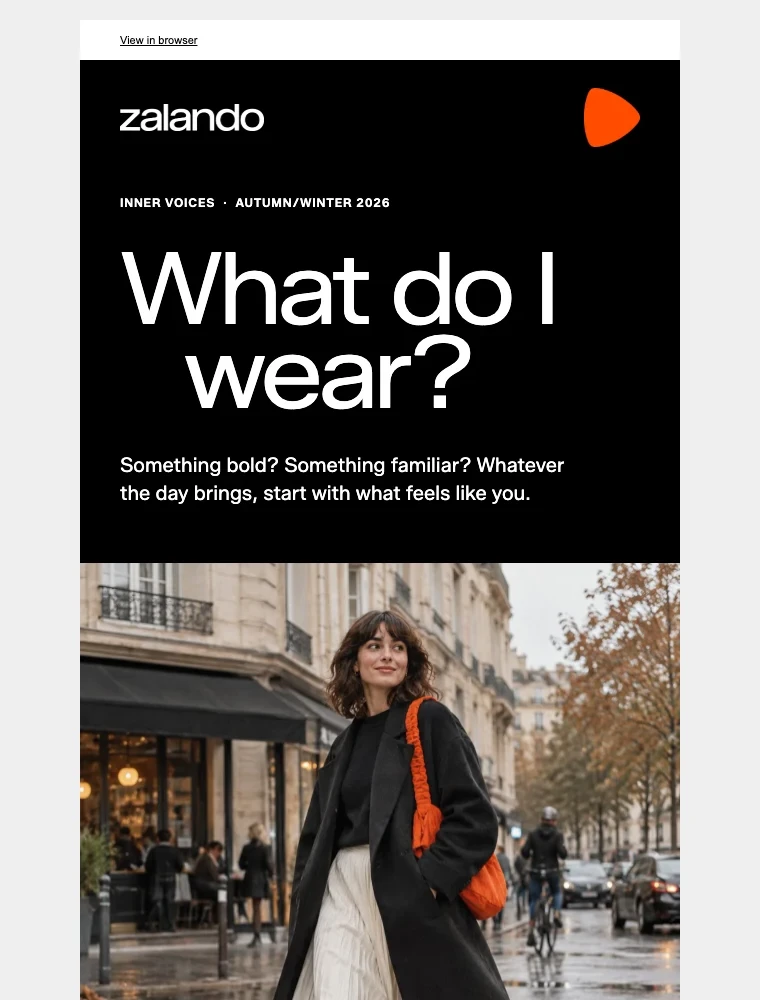
Agents can write and code an email, but without the brand they guess at its voice, type and imagery. Rainbrand gives your agent a Brief for each email, with the guidance and assets for its copy, layout and images.
How it's made
With your agent
Describe the campaign, who it's for and where the main button goes. Your agent requests a Brief, builds and previews the HTML and checks it against the Brief.
Read the guide (opens in a new tab) Codex
Build a campaign email for zalando.com on the Inner Voices campaign for Autumn/Winter 2026, with Explore Zalando as the main action. Leave placeholders for sender details and subscription links, and don't send anything.
Codexcreate_briefInner Voices email
Codexget_briefWaiting until it's ready
Rainbrand BriefInner Voices email
ReadyThe Brief is ready. I'll turn Inner Voices into one everyday question, What do I wear?, with bold black-and-white type, orange accents and an original street-style image.
The HTML uses a 600px table layout, inline styles and Zalando Sans with Arial and Helvetica fallbacks. I checked the desktop and mobile previews against the Brief. Sender details and subscription links are placeholders, and it still needs testing in your email clients.
Illustrated with the Zalando email from the email guide, built as responsive HTML from a Brief.
How companies integrate Rainbrand into their agents and products.
All customer stories“We use Rainbrand to fetch each customer’s brand and generate accurate, on-brand creative for their ads. It means we don’t have to reinvent that part of the stack ourselves.”
“We pushed Rainbrand to production as our default image solution.”
“I have the ideas, but turning them into great design was always a struggle. Rainbrand makes me feel like the best designer in the world, and I don’t think I’ll need to hire one for the small stuff again.”
Connect Rainbrand to your agent, add a brand and describe the campaign.
Open the Rainbrand plugin and add it.
Open Rainbrand plugin (opens in a new tab)Connect your Rainbrand account when asked. It works in ChatGPT and in Codex.
A development environment connected to Rainbrand through MCP, a ready brand or sources such as a website to create one, and a campaign goal, audience and destination for the main call to action. Connect Rainbrand to your agent.
The Brief covers voice, campaign, typography, layout and imagery guidance and selects the brand's assets. For new images, use its guidance and references with your own image tool, or pass its ID to a supported image model through the AI Gateway. How Briefs work.
Yes. Your agent creates and previews the HTML, and you import it into your email platform, which handles contacts, sender identity, subscription links, sending and analytics. Replace the email's placeholders with your platform's own values.
The HTML uses a 600px table layout, inline styles and font fallbacks. The Zalando email loads Zalando Sans and falls back to Arial and Helvetica in clients that don't load it. A browser preview can't show how every inbox renders an email, so send tests to the clients your audience uses. Open the Zalando email.
Compare the preview with the Brief, replace the browser-view, preferences, unsubscribe and company-address placeholders, and check the campaign claims and links. Then send test emails through your platform and check the mobile layout, blocked images and fallback fonts. To check a screenshot against the brand, request a Review.

Rainbrand builds and maintains shared brand context for your agents and products.





