(Brand guidelines) // Music and audio
Apple Music brand
guidelines
Apple Music’s logo, colors, fonts, voice, and dos and don’ts, from the Brand Skill Rainbrand built from apple.com.
Download the Brand Skill
- Music red#FA243C
- Near black#1D1D1F
- White#FFFFFF
About Apple Music
Apple Music is Apple’s music streaming service, bringing together a listening catalog, artist and album discovery, playlists, radio and listening features across supported devices. Its identity combines the Apple Music name-and-symbol lockup with clear typography and music-centered storytelling.
Apple Music logo
Use the supplied Apple Music lockup to identify the service. Keep the Apple symbol and Music name together, with strong background contrast. The standalone Apple corporate symbol and other Apple product marks have separate roles.
Apple Music colors
Music red
Service accent
HEXRGBNear black
Dark backgrounds and text
HEXRGBWhite
Reverse logo and light backgrounds
HEXRGB
Apple Music fonts
SF Pro Display
Headlines
SF Pro Text
Body and interface
Font names only. The Brand Skill download doesn’t include font files.
Apple Music’s voice
Write with clarity, confidence and a love of music. Lead with the listening experience, then explain features and availability in simple language. Keep artist, album, playlist and audio-feature details accurate.
- “All access. No ads. Sounds incredible.”
Dos and don’ts
Do
- Use the Apple Music service lockup as the brand signature.
- Keep the music, artist or listening experience central.
- Use concise, rhythmic headlines with practical supporting detail.
- Keep subscription and audio-feature claims tied to supported plans and devices.
Don’t
- Do not substitute the Apple corporate symbol for Apple Music’s full signature.
- Do not turn a temporary album campaign into a universal identity rule.
- Do not imply that every audio feature is available on every device.
Apple Music imagery
5 images from apple.com, in one file of the Brand Skill. Each file starts with its guidance, then shows the images it refers to.
Listening interface imagery
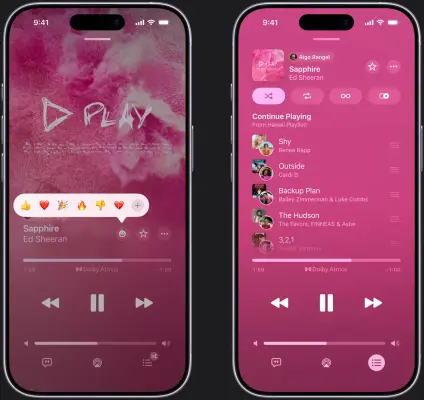
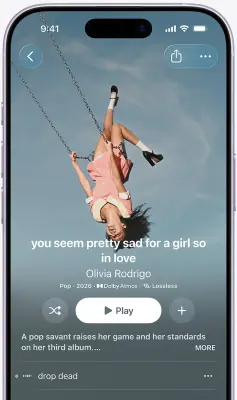
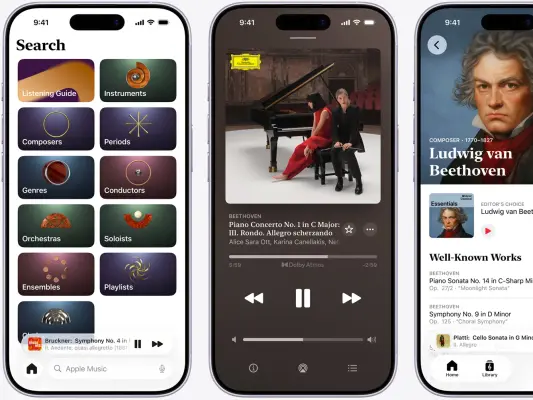
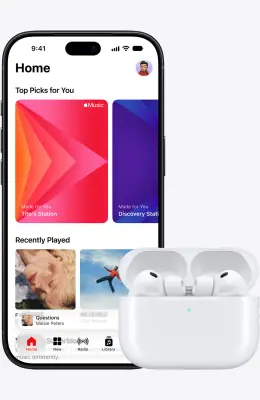
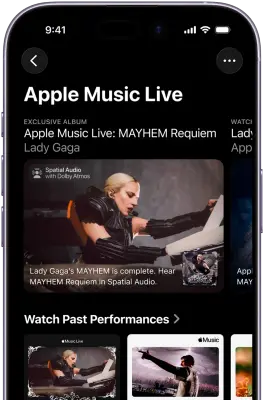
5 imagesShow recognizable Apple Music listening, discovery, playlist and playback screens. Preserve the relevant controls, track context and device framing; feature and catalog availability can vary. Album art and performances identify the music shown, rather than the service’s own logo.
More from the Brand Skill
Apple Music identity imagery
Use the Apple Music name-and-symbol lockup as the service identifier. Keep artist, album and campaign imagery in its music context; it does not replace the service mark.
Listening moments
Show music discovery and listening in natural settings. Keep the focus on the listening experience and its connection to people rather than unrelated Apple hardware or business campaigns.
Apple Music product imagery
Present the music service through its listening interface, playlists, radio, catalog and supported devices. Keep screens relevant to music and avoid turning a particular hardware model into the service identity.
Download Apple Music’s Brand Skill
A Brand Skill is a folder of brand guidance written for agents. Give it to Claude, ChatGPT, Cursor or another agent and ask it to follow Apple Music’s guidelines. It starts at SKILL.md, which points to the right file for each task.
It has the guidance, 5 images and the logos. The font files belong to Apple Inc, so they’re left out.
apple-music-brand-skill/
├ SKILL.md
├ README.md
├ references/
│ ├ dos-and-donts.md
│ ├ colors.md
│ ├ logo.md
│ ├ typography.md
│ ├ voice.md
│ ├ imagery-identity.md
│ ├ imagery-interfaces.md
│ ├ imagery-people-and-places.md
│ └ imagery-products.md
└ assets/
├ images/
└ logos/
Rainbrand’s Brand Agent built this Brand Skill from apple.com on 3 Nov 2026. It isn’t Apple Music’s official guide. Reviewed by Siddharth Borderwala, Founding Engineer at Rainbrand.
Apple Music and its logos are trademarks of Apple Inc. Rainbrand isn’t affiliated with or endorsed by Apple Inc.

Make one for
your brand.
Add Rainbrand to your agent and give it your website, brand guide or files. Rainbrand builds a Brand Skill like this one and keeps it up to date.

Open the Rainbrand plugin and add it.
Open Rainbrand plugin (opens in a new tab)Connect your Rainbrand account when asked. It works in ChatGPT and in Codex.
More brand guidelines
See all brands Sonos brand guidelinesMusic and audio
 Spotify brand guidelinesMusic and audio
 Teenage Engineering brand guidelinesMusic and audio

Rainbrand builds and maintains shared brand context for your agents and products.


