
What’s the best brand compliance software for AI-made work?
Eleven tools that check work against your brand, from proofing tools with AI reviewers to checks your agents can call themselves. What each one checks, where the work has to be for it to check it, how it’s priced as of October 2026, and how to test them on your own work.
TL;DR
For teams and agencies making work through agents, choose Rainbrand: the agent starts from the brand guidance for its task, has the result reviewed against the brand and fixes it before passing it on. Choose Filestage or Ziflow to route work to people for sign-off; Bynder, Marq, IntelligenceBank, Lytho or Cloudinary when checks belong in their workflows or media library; Markup AI for writing; and Adobe for AEM content.
When the check happens
Brand compliance software checks work against your brand’s rules or routes it to the people who approve it (what is brand compliance covers the rules). The deciding question is when the check happens:
- Before the work is made
Locked templates fix the logo, colours, type and legal lines for templated formats.
- While an agent works
The agent checks its own draft and revises it before a person sees it.
- In review
A proofing tool puts the file in front of brand and legal reviewers, often with an AI first pass.
- In the library or after launch
A digital asset management (DAM) system checks files as they arrive; monitoring tools scan live pages and ads.
AI-made work can start outside the review platform, in Claude or ChatGPT, an image model, a code editor or your own product. A review-platform check needs the piece submitted there first; others check text or screenshots in place through an extension, an API or the Model Context Protocol (MCP), the open standard for connecting AI assistants to other systems.
How we chose
We included tools that check finished work against a brand, automatically or by routing it to reviewers, and left out template-only tools such as Templafy and monitors of published content such as Brand24; What’s the best brand management software for AI agents? covers tools that give agents your brand in the first place.
Star ratings don’t separate these tools: Marq’s list gives G2 ratings without dates, Filestage’s cites “independent user reviews” without naming them, and AI features such as Filestage’s Review Agents are still in beta, so test the check itself on your own work.
Side by side
| Tool | Where the work has to be | Prices |
|---|---|---|
| Filestage | Files in a Filestage review | Published; Review Agents on Business and Enterprise |
| Ziflow | Proofs in Ziflow | From $199 a month, billed annually; ReviewAI only on Enterprise, quoted |
| Bynder | Assets in the Bynder DAM | Quote |
| Marq | Projects in Marq | Quote; Brand Guardian on Enterprise |
| IntelligenceBank | Its reviews and editor add-ins | DAM from $567 a month, billed annually; compliance quoted |
| Lytho | Lytho workflows and its extension | Quote; AI Reviewers an add-on on Standard, included on Professional and Enterprise |
| Cloudinary | Assets uploaded to Cloudinary | 500 free moderation actions; every-upload checks and AI-image detection on advanced plans, through sales |
| Frontify | Text given to its Brand Assistant | Quote, by monthly active users |
| Markup AI | Editors, or any agent through MCP | From $249 a month billed annually, by words checked |
| Adobe AEM | AEM, or agents through its MCP | Agents trial or paid licence; no price listed |
| Rainbrand | Any agent or product, MCP or API | Published monthly plans |
Proofing tools with an AI first pass
These route work to people for sign-off. Their AI checks run on files uploaded for review, so agent-made work has to be added to a review first.
Filestage
Review Agents comment on PDF, DOCX, JPG and PNG files like another reviewer, checking spelling, forbidden terms, required logos and codes, and people make the decisions. Don’t assume detecting a logo verifies its colour or treatment; test those on your own files.
Ziflow
Ziflow proofs over 1,200 file types. Its ReviewAI for Checklists checks a proof against your review criteria and suggests comments for reviewers. A check against your logo, font and colour standards is marked coming soon.
Brand platforms that check work
Bynder
Its Brand Compliance Agent checks images and documents in the DAM against your rules and proposes a status for permitted people to approve; it may skip small or low-confidence text, so test fine print. Outside agents can run it on assets already in the DAM through Bynder’s AI Agents API, but Bynder MCP only searches. See Rainbrand vs Bynder.
Marq
Brand Guardian scores Marq projects for colours, fonts, logo placement and custom rules after admins train it on example projects. It’s advisory unless admins set a score that approves content automatically, and Marq’s MCP tools don’t include it. See Rainbrand vs Marq.
IntelligenceBank
AI risk reviews scan PDFs and images for high-risk words, missing disclaimers, tone and logos, though logo and image checks may need extra training. Checks also run inside Word, Figma, Canva and Google Docs, and every flag goes to a person. It suits regulated marketing such as financial services and healthcare.
Lytho
AI Reviewers flag failures, warnings and passes against standards you define, and the browser extension runs them in other tools. Check extension access and review volume in your quote.
Cloudinary
Cloudinary stores, transforms and delivers images and video for websites and apps. Cloudinary Moderation checks them against built-in rules, such as unauthorised logos or AI-generated content, and your own, on upload or across the library. Its free allowance counts each asset times each rule, and “humans always make the final call.”
Frontify
Brand Assistant reviews text against your tone of voice: “Images, PDFs, and videos are not currently used.” Frontify MCP and its tool packs reach guidelines and assets, with no documented tool for checking work as of October 2026. See Rainbrand vs Frontify.
Checks your agents can call
These run where the agent works, so it can fix a draft before a person sees it. All three connect through MCP.
Markup AI
A writing checker: it flags off-voice copy, unapproved terms, unclear sentences and risky claims, with a suggested fix. It works through its MCP server and through apps for Google Docs, Word and Figma. An image check isn’t documented as of October 2026.
Adobe Experience Manager Governance Agent
For sites and assets on Adobe Experience Manager (AEM) as a Cloud Service, the Governance Agent checks tone, claims, logo, typography and imagery. Agents reach it through the AEM MCP server, and Adobe advises double-checking its findings.
Rainbrand
Rainbrand checks work where agents make it:
- Add a brand from your website, a brand guide, logo files and approved images.
- For each task, the agent requests a Brief with the guidance and assets it needs.
- It requests a Review: colour, typography and logo against the brand, and copy against the wording you supply. Each check returns pass, fail, uncertain or not applicable, with a reason and evidence where available.
The agent revises and asks again; set a limit on rounds, and request a new Brief if you edit the brand mid-task.
For Eager, a juice brand sold in solid-colour cartons, Claude invented a blackcurrant flavour with a purple carton, then set the landing page’s headline in the same purple. The colour check failed it, measured at #4A1B5E, noting that text should be black or charcoal:
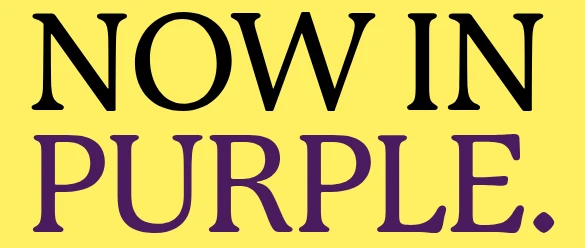
Claude set the headline in black, and the next Review’s colour check passed, measuring #000000:
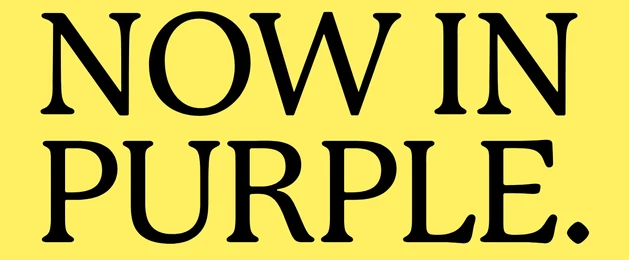
The example page has every Review from that campaign. Your workflow still decides who signs off.
Other tools you may see
Adobe GenStudio for Performance Marketing scores the ad variants it generates against your brand and channel guidelines, and Writer checks its own output against your rules for punctuation, grammar and readability; see Rainbrand vs Writer.
If you’re building on an API
A product that makes content for customers needs a check it can call without a person. Bynder’s AI Agents API suits customers already in Bynder, Markup AI’s REST API checks text, and Rainbrand’s API lets a product create an image, request a Review and revise against each customer’s brand.
How the checks fit together
Say your marketers make most launch work in Claude and ChatGPT, legal must approve every product claim, and finished files go into Bynder. You could check at three points:
- While agents work: each agent requests a Rainbrand Review of every image and runs its copy through Markup AI, revises up to two rounds, and sends anything uncertain to a person.
- In review: the final files go to Filestage, where Review Agents check forbidden terms and required logos, and brand and legal sign off.
- In the library: Bynder’s compliance agent checks the files against regional rules as they arrive.
Each tool keeps its own copy of the rules, so the check closest to where work is made saves the most rework; add later checks only for sign-off or an approval record. How to review AI content before it’s published covers sign-off.
Test them on your own work
Make a small test set where you know the answers, plant one error per piece, and keep a few clean pieces to see what gets flagged wrongly:
Visual errors to plant
- A colour a few shades off the palette.
- A stretched, recoloured or cropped logo.
- A typeface close to the brand’s, but wrong.
- A required logo or legal mark left out.
Copy errors to plant
- A misspelt product name, such as two words run together.
- A banned word or an unsupported claim.
- A headline that differs from the approved one.
- A missing disclaimer, or one set too small to read.
An agent can make the test set:
Make 10 versions of a 1080 × 1350 Instagram post for our next product launch. Make 4 fully on brand. In each of the other 6, plant exactly one error: a colour slightly off the palette, a stretched logo, a near-miss typeface, a misspelt product name, a headline that differs from the approved one I give you, and a missing legal line. Name the files 01 to 10, and save a separate answer key listing which file has which error.Keep the answer key away from the tools, and note what each caught, what it flagged wrongly and whether it said what to change.
To test Rainbrand, sign up, connect your agents, add a brand, and run the set through Review and through the checker you use now.
More in Comparisons
All 5 Comparisons articles5 min read
Which AI branding tools are worth paying for on a small team?
What a team of 1 to 20 already gets in ChatGPT, Claude, Gemini, Cursor and Canva, when paying starts to make sense, what to pay for first, and what the tools cost, with every price checked on the vendor’s own pricing page.
6 min read
Which digital asset management tools work with AI agents?
Bynder, Frontify, Cloudinary and Adobe AEM now let agents search and fetch approved files, and Canto and Brandfolder offer narrower routes. What that access covers, what agents need on top of it, and how a DAM and a brand layer split the work.
6 min read
11 brand management tools for AI agents (2027)
Eleven brand management tools compared for recurring brand work through AI agents: maintained brand context, asset libraries, design templates, AI authoring platforms and public brand lookups, with what each gives an agent and when to choose it.
