(Brand guidelines) // Social media
Twitch brand
guidelines
Twitch’s logo, colors, fonts, voice, and dos and don’ts, from the Brand Skill Rainbrand built from twitch.tv.
Download the Brand Skill
- Twitch Purple#9146FF
- Near-black#0E0E10
- White#FFFFFF
About Twitch
Twitch is a live-streaming platform where people gather to watch, create, and connect across gaming, music, art, and more. Its identity pairs a vivid purple accent with a dark foundation and an energetic, community-minded voice.
Twitch logo
- WordmarkDownloadSVG of Twitch purple wordmarkPNG of Twitch purple wordmark

Use the Twitch wordmark as the primary name signature and Glitch as the compact platform identifier. Preserve the angular lettering and speech-bubble silhouette.
Use the purple artwork on a light background. Keep creator, channel and event identities separate from Twitch's own brand marks.
Twitch colors
Twitch Purple
Primary identity color
HEXRGBNear-black
Dark interface ground
HEXRGBWhite
Contrast
HEXRGB
Twitch fonts
Inter
Primary heading · 700, Body · 400
Roobert
Secondary heading · 500
Font names only. The Brand Skill download doesn’t include font files.
Twitch’s voice
Write with an inviting, community-first energy. Keep copy direct, lively, and easy to scan. Speak about live content and creators with enthusiasm, while making Twitch feel open to many interests and communities.
- “Together for gaming, together for you”
- “Discover the best live streams anywhere”
- “These creative streams have something for everyone”
- “Check out some of the top musical talent from around the world, live”
- “Watch these talented creators spin, mix, and scratch your favorite music”
Dos and don’ts
Do
- Use Twitch’s symbol and purple palette to make brand communications immediately recognizable.
- Keep copy welcoming, energetic, and community-focused.
- Use concise, direct language that helps people discover live content and creators.
- Keep interface typography clear and structured with Inter and Roobert.
Don’t
- Don’t substitute a streamer’s or channel’s identity for Twitch’s own mark.
- Don’t let promotional language lose the open, community-minded tone.
- Don’t use a scattered type hierarchy that undermines clear browsing and reading.
Twitch imagery
10 images from twitch.tv, in one file of the Brand Skill. Each file starts with its guidance, then shows the images it refers to.
Imagery
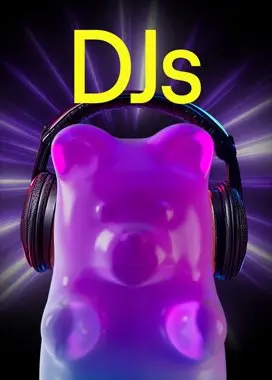
10 imagesTwitch imagery spans its own identity marks, branded backdrops, community invitations, and product experiences. Use the symbol and purple palette to keep Twitch brand moments recognizable. Product examples show category discovery and live-channel browsing; keep those visual contexts legible and grounded in the platform experience.








Download Twitch’s Brand Skill
A Brand Skill is a folder of brand guidance written for agents. Give it to Claude, ChatGPT, Cursor or another agent and ask it to follow Twitch’s guidelines. It starts at SKILL.md, which points to the right file for each task.
It has the guidance, 10 images and the logos. The font files belong to Twitch Interactive, Inc, so they’re left out.
twitch-brand-skill/
├ SKILL.md
├ README.md
├ references/
│ ├ colors.md
│ ├ imagery.md
│ ├ logo.md
│ ├ typography.md
│ ├ voice.md
│ └ dos-and-donts.md
└ assets/
├ images/
└ logos/
Rainbrand’s Brand Agent built this Brand Skill from twitch.tv on 3 Nov 2026. It isn’t Twitch’s official guide. Reviewed by Siddharth Borderwala, Founding Engineer at Rainbrand.
Twitch and its logos are trademarks of Twitch Interactive, Inc. Rainbrand isn’t affiliated with or endorsed by Twitch Interactive, Inc.

Make one for
your brand.
Add Rainbrand to your agent and give it your website, brand guide or files. Rainbrand builds a Brand Skill like this one and keeps it up to date.

Open the Rainbrand plugin and add it.
Open Rainbrand plugin (opens in a new tab)Connect your Rainbrand account when asked. It works in ChatGPT and in Codex.
More brand guidelines
See all brands Discord brand guidelinesSocial media
 Instagram brand guidelinesSocial media
 LinkedIn brand guidelinesSocial media

Rainbrand builds and maintains shared brand context for your agents and products.