(Brand guidelines) // Social media
Snapchat brand
guidelines
Snapchat’s logo, colors, fonts, voice, and dos and don’ts, from the Brand Skill Rainbrand built from snapchat.com.
Download the Brand Skill
- Snap Yellow#FFFC00
- Black#000000
- White#FFFFFF
- Gray#D9D9D9
About Snapchat
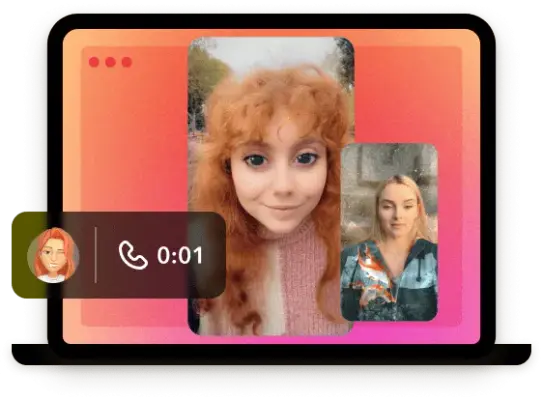
Snapchat is a camera-centered social platform for communicating, expressing yourself, exploring, and having fun together. Its experience brings together chat, Snaps, video calls, Stories, Spotlight, Lenses, and local discovery.
Snapchat logo
Use the official Snapchat Ghost to identify the Snapchat platform. Keep the black outline and white fill intact on light backgrounds. Keep Snapchat+ artwork specific to the subscription offering and separate from the main platform mark.
Snapchat colors
Snap Yellow
Primary brand color
HEXRGBBlack
Text and logo outline
HEXRGBWhite
Ghost fill and backgrounds
HEXRGBGray
Supporting neutral
HEXRGB
Snapchat fonts
Program
Headlines
Ghost Sans
Body
Avenir Next
Website interface
Font names only. The Brand Skill download doesn’t include font files.
Snapchat’s voice
Write in a friendly, direct, energetic voice that makes the next experience feel inviting. Speak to people as participants: invite them to chat, explore, watch, create, and share. Favor clear everyday language, short statements, and lively verbs.
- “Chat, Snap, and video call your friends. Watch Stories and Spotlight, all from your computer”
- “Find the best restaurants, bars, live music, and things to do in 50 cities across the United States — see the places real Snapchatters are visiting right now”
- “Discover the latest stories from top Snap creators”
- “Browse popular topics on Snapchat Spotlight, from pets and sports to food, beauty, and travel. Pick a topic to watch the best videos”
Dos and don’ts
Do
- Do use Snapchat’s own ghost mark for the Snapchat identity and reserve the Snapchat+ wordmark for Snapchat+ contexts.
- Use Snap Yellow, black and white as the core palette, with gray as a supporting neutral.
- Use Program and Ghost Sans for the current brand system; Avenir Next appears in the website interface.
- Do write in clear, friendly language with active invitations to connect, explore, and create.
Don’t
- Don’t treat Lens creator previews as Snapchat logos or as universal identity artwork.
- Don’t replace the signature yellow palette with the website’s blue interface accent.
- Don’t make brand copy sound formal or distant when a direct, personable invitation fits.
Snapchat imagery
34 images from snapchat.com, in 2 files of the Brand Skill. Each file starts with its guidance, then shows the images it refers to.
Imagery
31 imagesSnapchat’s own web imagery supports a camera-led, social experience: show people connecting, expressive Lens experiences, creator content, and discovery. Product and discovery pages mix visual previews with concise context, so the image helps people understand what they can explore or do. Treat creator-made Lens previews as examples of the Snapchat experience, not as Snapchat identity artwork.
Brand and web backdrops:
Social sharing and feature previews:
Lens discovery previews:
Use these previews to understand the range of Lens experiences shown in Snapchat’s discovery pages. Their individual effects and creator-specific content are not general rules for Snapchat’s visual identity.






























Digital experience
3 imagesSnapchat’s website uses a light interface with open white space, dark text, and clear blue links or accents. Organize content into distinct, easy-to-scan sections. Feature pages pair concise headings with action-oriented links; discovery pages use cards and previews to make Stories, Lenses, topics, and local places easy to browse.
The web system uses rounded pill-shaped dark primary buttons and simple, lightly bordered cards. Preserve the straightforward hierarchy: prominent headings, readable body copy, and compact navigation and utility links.
The website’s download experience uses a scan-to-download visual and recognizable app-store badges to guide people between desktop and mobile.


Download Snapchat’s Brand Skill
A Brand Skill is a folder of brand guidance written for agents. Give it to Claude, ChatGPT, Cursor or another agent and ask it to follow Snapchat’s guidelines. It starts at SKILL.md, which points to the right file for each task.
It has the guidance, 34 images and the logos. The font files belong to Snap Inc, so they’re left out.
snapchat-brand-skill/
├ SKILL.md
├ README.md
├ references/
│ ├ dos-and-donts.md
│ ├ colors.md
│ ├ logo.md
│ ├ typography.md
│ ├ voice.md
│ ├ imagery.md
│ └ digital-experience.md
└ assets/
├ images/
└ logos/
Rainbrand’s Brand Agent built this Brand Skill from snapchat.com on 3 Nov 2026. It isn’t Snapchat’s official guide. Reviewed by Siddharth Borderwala, Founding Engineer at Rainbrand.
Snapchat and its logos are trademarks of Snap Inc. Rainbrand isn’t affiliated with or endorsed by Snap Inc.

Make one for
your brand.
Add Rainbrand to your agent and give it your website, brand guide or files. Rainbrand builds a Brand Skill like this one and keeps it up to date.

Open the Rainbrand plugin and add it.
Open Rainbrand plugin (opens in a new tab)Connect your Rainbrand account when asked. It works in ChatGPT and in Codex.
More brand guidelines
See all brands Discord brand guidelinesSocial media
 Instagram brand guidelinesSocial media
 LinkedIn brand guidelinesSocial media

Rainbrand builds and maintains shared brand context for your agents and products.